
How to get YOY Variance in DAX power BI
Loading
How to get YOY Variance in DAX power BI
Know the answer? Post it — somebody with the same question will find it here.
Sign in to answer this question
It is the same account you read, post and publish with — and you will come straight back to this page.
Eliana BlakePosted Feb 28, 2025, 5:19 AM
Absolutely, I'd be happy to explain YOY Variance in DAX Power BI! Year-over-year (YOY) variance is a common analysis used to compare the performance of a metric in the current year with the same metric in the previous year. In Power BI, you can calculate YOY variance using DAX formulas.
To calculate YOY Variance in DAX Power BI, you can follow these general steps:
1. Calculate the total for the current year: Use DAX functions like SUMX or CALCULATE to sum up the values for the current year.
2. Calculate the total for the previous year: You can use functions like SAMEPERIODLASTYEAR to get the total for the same period in the previous year.
3. Calculate the YOY Variance: The YOY Variance can be calculated by subtracting the total for the previous year from the total for the current year and then dividing it by the total for the previous year. The formula typically looks like (Current Year Total - Previous Year Total) / Previous Year Total * 100 to get the percentage difference.
Here's an example of how you can write a DAX formula to calculate YOY Variance in Power BI:
You can adjust this formula based on your specific data structure and requirements.
This calculation can provide valuable insights into how a certain metric is performing compared to the previous year. It's a powerful tool for trend analysis and business decision-making in Power BI reports. Let me know if you need further clarification or have any other questions related to YOY Variance in DAX Power BI!
Tuhin PaulPosted Feb 28, 2025, 7:21 AM
overview of the task:
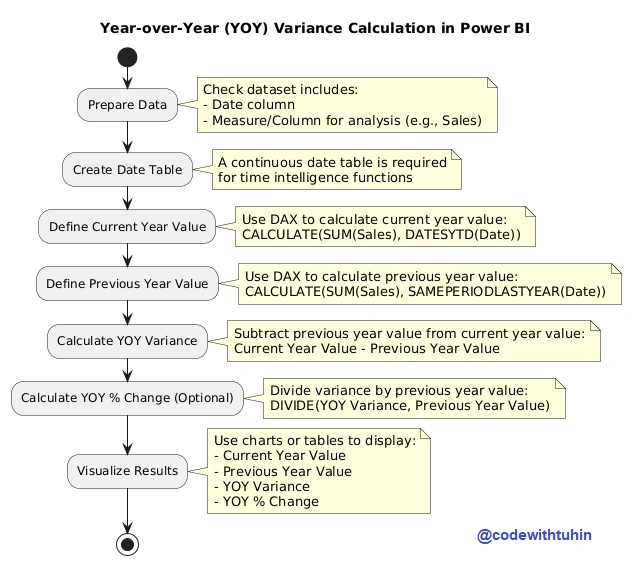
Tuhin PaulPosted Feb 28, 2025, 7:12 AM
Date
Current Year Value
Previous Year Value
YOY Variance
YOY % Change
Jan 2023
$10,000
$8,000
$2,000
25%
Feb 2023
$12,000
$10,000
$2,000
20%
Date Table :
SAMEPERIODLASTYEAR.Handling Missing Data :
Previous Year Valuewill return blank. You can handle this usingIForISBLANKfunctions.Custom Time Periods :
DATESYTDor useDATESBETWEEN.Tuhin PaulPosted Feb 28, 2025, 7:11 AM
Year-over-Year (YOY) variance is a common metric used to compare data from the current year to the same period in the previous year. In Power BI, you can calculate YOY variance using DAX (Data Analysis Expressions) . Below is a step-by-step guide to achieve this.
CALCULATE:SUM:DATESYTD:SAMEPERIODLASTYEAR:DIVIDE:To visualize the YOY variance in Power BI:
Datefield to the Axis.Current Year Value,Previous Year Value,YOY Variance, andYOY % Changemeasures to the Values area.