


Claude just got a serious upgrade with a new Research feature. Now, instead of giving you simple answers, Claude can dig into your documents and the web at the same time to bring you thoughtful, well-rounded insights. It doesn’t just search once—it figures out what’s most important, explores different sides of your question, and builds a detailed response. And yes, it includes sources, so you know exactly where the info is coming from. Perfect for anyone juggling research tasks throughout the day.
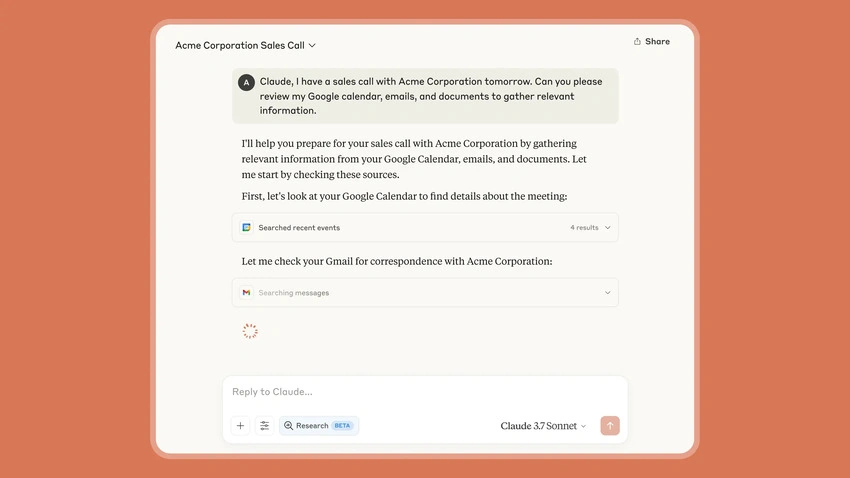
Now Works with Gmail, Calendar, and Docs
Claude now connects with your Google Workspace, which means it can see your Gmail, Google Calendar, and Google Docs (with your permission, of course). This makes a big difference—you don’t have to upload anything manually or explain your work setup each time. Need to find action items from an email chain? Or pull together notes from last week’s meeting? Claude can do that, and more. It delivers the right info, when you need it, and always shows where it came from.
Real Use Cases Across Different Roles
These updates aren’t just fancy tech—they’re actually useful. Here’s how different people can take advantage:
- Marketing teams can gather market research, internal product docs, and create solid launch plans.
- Sales teams can prep for meetings using client emails, calendars, and company updates.
- Engineers can work on technical solutions with help from internal specs and online resources.
- Students can organize their notes, explore academic research, and build smarter study plans.
- Parents can keep up with emails, school calendars, and local events—all in one place.
Claude helps cut through the noise, no matter what your day looks like.
Smarter Document Search for Companies
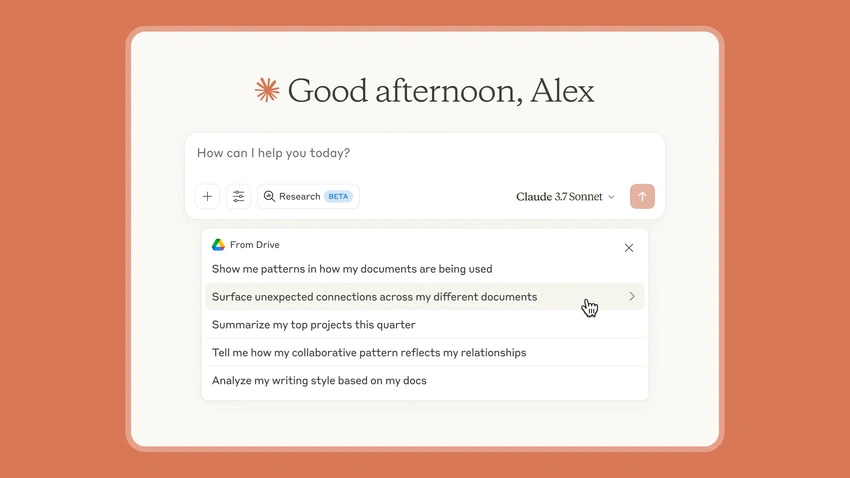
For businesses using Claude Enterprise, there’s a new feature called cataloging. Basically, Claude creates a smart index of your documents so it can pull answers even from long or hard-to-find files. You don’t need to tell it exactly which file to look in—it just finds what you need. Everything stays secure and private, but now your company knowledge is way easier to access.
Who Can Use It and How to Get Started
These updates are rolling out now,
- Research is available in early beta for users on Max, Team, or Enterprise plans in the US, Japan, and Brazil. Just turn it on in settings.
- Web search, which launched earlier in the US, is now live in Brazil and Japan too.
- Google Workspace integration is in beta for all paid users. If you're on a team or enterprise plan, your admin needs to enable it first.
- Cataloging is also available for Enterprise users to boost document search.
More helpful tools are on the way, but these changes already make Claude a much smarter teammate.
Join the conversation! Your thoughts help the community grow.