

This is an article for sending Mail from Gmail
and Save the file in PDF Format and shown PDF File in Solution Explore. "Message
seen after SAVE" will work after the message is saved in PDF.
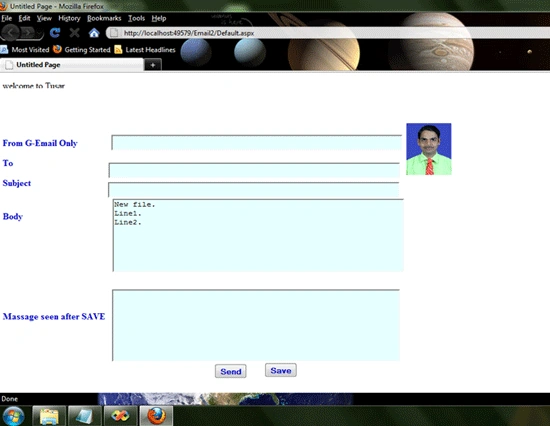
Code for Click Events for SEND Button And SAVE Button:
using
System;
using
System.Configuration;
using
System.Data;
using
System.Web;
using
System.Web.Security;
using
System.Web.UI;
using
System.Web.UI.HtmlControls;
using
System.Web.UI.WebControls;
using
System.Web.UI.WebControls.WebParts;
using
System.IO;
using
System.Collections.Generic;
public
partial class
_Default : System.Web.UI.Page
{
protected void
Page_Load(object sender,
EventArgs e)
{
TextBox5.Text = "";
if (!IsPostBack)
{
TextBox4_Load();
}
}
private void
TextBox4_Load()
{
//throw new NotImplementedException();
if (File.Exists(Server.MapPath("Tusar.pdf")))
{
//StreamReader StreamReader1 = new
StreamReader(Server.MapPath("test.txt"));
StreamReader StreamReader1
= new StreamReader(Server.MapPath("Tusar.pdf"));
TextBox4.Text = StreamReader1.ReadToEnd();
StreamReader1.Close();
}
else
{
TextBox4.Text = "New file.";
}
}
void TextBox5_Load()
{
if (File.Exists(Server.MapPath("Tusar.pdf")))
{
StreamReader StreamReader1 =
new StreamReader(Server.MapPath("Tusar.pdf"));
TextBox5.Text = StreamReader1.ReadToEnd();
StreamReader1.Close();
}
}
protected void
Button1_Click(object sender,
EventArgs e)
{
System.Net.Mail.MailMessage MyMailMessage = new
System.Net.Mail.MailMessage(TextBox1.Text,
TextBox2.Text, TextBox3.Text, "");
MyMailMessage.IsBodyHtml = false;
MyMailMessage.Body = TextBox4.Text;
provide Authentication Details need to be ed when sending
email from gmail
System.Net.NetworkCredential
mailAuthentication = new System.Net.NetworkCredential(TextBox1.Text,
"word");//Sender
word
Smtp
Mail server of Gmail is
"smpt.gmail.com" and it uses port no. 587
System.Net.Mail.SmtpClient mailClient = new
System.Net.Mail.SmtpClient("smtp.gmail.com",
587);
Enable SSL
mailClient.EnableSsl = true;
mailClient.UseDefaultCredentials = false;
mailClient.Credentials = mailAuthentication;
mailClient.Send(MyMailMessage); }
protected void
Button2_Click(object sender,
EventArgs e)
{
StreamWriter StreamWriter1 =
new StreamWriter(Server.MapPath("Tusar.pdf"));
StreamWriter1.WriteLine(TextBox4.Text);
StreamWriter1.WriteLine("Line1.\r\nLine2.");
StreamWriter1.Close();
TextBox5_Load();
}
protected void
TextBox5_TextChanged(object sender,
EventArgs e)
{
}
protected void
TextBox1_TextChanged(object sender,
EventArgs e)
{
}
}
Gowtham manjuPosted May 11, 2011, 8:47 AM
can u please help me in solving the problem such as when a word document is being uploaded in gmail or some other mail automatically it must be converted in to pdf on the receiver side that too in my aspx page ....
vishal pateleditedPosted Apr 12, 2011, 1:00 AMEdited Apr 12, 2011, 1:01 AM
Its still not a pdf file though its extention is .pdf. Its treated as a file what ever formate in the explorer... You cant say it creates a pdf file properly.
vishal patelPosted Apr 11, 2011, 4:19 AM
protected void Button2_Click(object sender, EventArgs e) { StreamWriter StreamWriter1 = new StreamWriter(Server.MapPath("Tusar.pdf")); StreamWriter1.WriteLine(TextBox4.Text); StreamWriter1.WriteLine("Line1.\r\nLine2."); StreamWriter1.Close(); TextBox5_Load(); } is not working properly....
Vijay GillPosted Mar 16, 2011, 8:23 AM
Are you sure it saves the file in PDF format? What library are you using for that? Vijay