

Before moving on let's understand some assemblies and classes associated with Active Directory which are used to perform some operations related to Active Directory.
Assemblies
using System.DirectoryServices;
- This namespace provides easy access to Active directory.
- This namespace basically used to manipulate users,computers and security groups across the multiple directory services say Active Directory Domain Services(AD DS) and Active Directory Lightweight Directory Services(AD LDS) and also provide the access to users, computers and security groups.
Classes
PrincipalContext
- This class basically wrap server or domain, container and credentials against all operations.
DiectoryEntry
- This class is used to access the entries from schema entries, also let us fetch entries (attribute values) and update the same .
We have to use above assemblies for accessing and performing operation against Active Directory.
Add the following assemblies
- using System.DirectoryServices;
- using System.DirectoryServices.AccountManagement;
Let's add the following class ClsUser with properties
- public class ClsUsers
- {
- public string AccountName { get; set; }
- public string DisplayName { get; set; }
- }
- private void GetADUsers()
- {
- dt.Columns.AddRange(new DataColumn[2]
- {
- new DataColumn("AccountName", typeof (string)),
- new DataColumn("GivenName", typeof (string))
- });
- using(var context = new PrincipalContext(ContextType.Domain, "enter your domain here"))
- {
- using(var searcher = new PrincipalSearcher(new UserPrincipal(context)))
- {
- foreach(var result in searcher.FindAll())
- {
- DirectoryEntry de = result.GetUnderlyingObject() as DirectoryEntry;
- var clsuser = new ClsUsers();
- dt.Rows.Add(Convert.ToString(de.Properties["samAccountName"].Value), Convert.ToString(de.Properties["givenName"].Value));
- }
- GridView1.DataSource = dt;
- GridView1.DataBind();
- }
- }
- }
Output
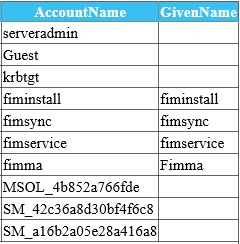
Closure
That's how we can fetch the Active Directory entries of user. Hope you find this helpful.
Happy coding!
Jorge MatarritaPosted Apr 24, 2020, 5:34 PM
Excelente aporte!!!!
Dinesh GabhanePosted Nov 11, 2019, 1:18 AM
Thank you for sharing
Hadshana KamalanathanPosted Jul 22, 2018, 6:39 AM
Thanks for sharing
Viknaraj ManogararajahPosted Jul 22, 2018, 1:44 AM
Nice article, thank you for sharing
Shridhar SharmaPosted Aug 9, 2016, 1:22 PM
Thanks friends :)
Asfend YarPosted Feb 29, 2016, 1:38 PM
good
Sonu ChaudharyPosted Feb 25, 2016, 6:37 AM
good one!
RubolPosted Feb 10, 2016, 12:03 AM
Nice
Shridhar SharmaPosted Jan 4, 2016, 6:17 AM
Thank you Santhakumar Munuswamy, Humayun Kabir Mamun and P K Yadav :)
Praveen KumarPosted Jan 3, 2016, 1:57 AM
Very Nice.. Sridhar
Humayun Kabir MamunPosted Jan 3, 2016, 12:15 AM
Nice...
Santhakumar MunuswamyPosted Jan 2, 2016, 10:19 PM
Thanks for nice share