

Background
Posting data to the server without whole postback or we can say without page refresh is very important to save the server resources and make the application faster. In ASP.NET MVC there are lot of options to achieve this without writing lots of custom code.
In many forum posts I read, one common question was the difference between HTML.BeginForm and Ajax.BeginForm when both are doing the whole page refresh while posting data to the server and also seeing lots of misleading answers, so by considering the above requirement I decided to write this article. So let us see step by step.
Step 1. Create an MVC application.
- "Start", then "All Programs" and select "Microsoft Visual Studio 2015".
- "File", then "New" and click "Project" then select "ASP.NET Web Application Template", then provide the Project a name as you wish and click on OK.
- Choose the MVC empty application option and click on OK
Step 2. Add model class.
Right-click on the Model folder in the created MVC application add a class named EmpModel and right the following lines of code.
EmpModel.cs
using System.ComponentModel.DataAnnotations;

namespace AjaxBeginFormwithMVC.Models
{
    public class EmpModel
    {
        [Required]
        public string Name { get; set; }
        [Required]
        public string City { get; set; }
        [Required]
        public string Address { get; set; }
    }
}
Step 3. Add Home controller controller.
Right-click on the Controller folder in the created MVC application and add the controller class as.
 Now after selecting the controller template, click on the add button then the following window appears.

Specify the controller name and click on the add button, Now open the HomeController.cs file and write the following code into the Home Controller class as.
HomeController.cs
using AjaxBeginFormwithMVC.Models;
using System.Web.Mvc;

namespace AjaxBeginFormwithMVC.Controllers
{
    public class HomeController : Controller
    {
        // GET: Home
        [HttpGet]
        public ActionResult EmployeeMaster()
        {
            return View();
        }

        [HttpPost]
        public ActionResult EmployeeMaster(EmpModel obj)
        {
            ViewBag.Records = "Name : " + obj.Name + " City: " + obj.City + " Addreess: " + obj.Address;
            return PartialView("EmployeeMaster");
        }
    }
}
In the above code, we have added the EmployeeMaster Action result method and it returns the partial view named EmployeeMaster with input parameters value.
Step 4. Add View
Add a strongly typed view named EmployeeMaster from the EmpModel class.
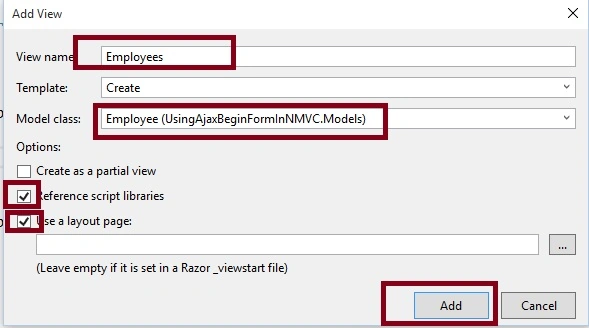
After clicking on the add button the view is generated.
Step 5. Add Reference to jquery. unobtrusive-ajax.
To work Ajax.To beginForm functionality properly we need to add the reference of jQuery. unobtrusive-ajax library, there are many ways to add the reference of jQuery library into our project. The following are some methods.
Using the NuGet package manager, you can install a library and reference into the project.
Right-click on the created MVC project and find the NuGet Package Manager option.
 Now the following window will appear and search for the jQuery unobtrusive Ajax as.
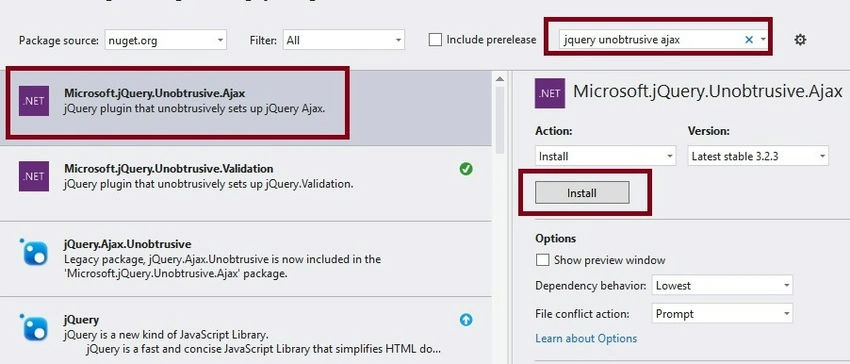
Choose the appropriate version and click on the Install button. It will install the jQuery UI library to your project and the library script file get added to the script folder of the created project which you can add references to the project.
- Use the CDN library provided by Microsoft, jQuery, Google, or any other that requires an active internet connection.
- Download the library using NuGet and reference it in the project.
The library will be look like as follows after adding it in the script folder.
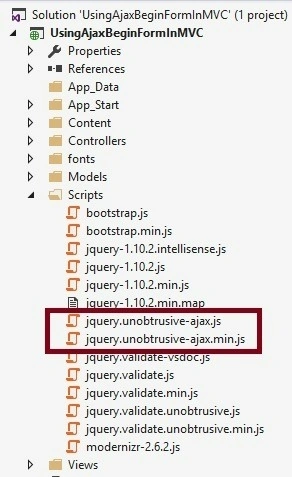
To work Ajax.BeginForm functionality properly don't forget to add the reference of the following jQuery library.
<script src="~/Scripts/jquery-1.10.2.js"></script>
<script src="~/Scripts/jquery.unobtrusive-ajax.js"></script>
After adding the necessary code, files, and logic the EmployeeMaster.cshtml code will look like the following.
@model AjaxBeginFormwithMVC.Models.EmpModel

@{
    ViewBag.Title = "www.compilemode.com";
}

<script src="~/Scripts/jquery-1.10.2.js"></script>
<script src="~/Scripts/jquery.unobtrusive-ajax.js"></script>

<div id="divEmp">

    @using (Ajax.BeginForm("EmployeeMaster", "Home", new AjaxOptions { HttpMethod = "POST", UpdateTargetId = "divEmp" }))
    {
        @Html.AntiForgeryToken()

        <div class="form-horizontal">

            <hr />
            @Html.ValidationSummary(true, "", new { @class = "text-danger" })
            <div class="form-group">
                @Html.LabelFor(model => model.Name, htmlAttributes: new { @class = "control-label col-md-2" })
                <div class="col-md-10">
                    @Html.EditorFor(model => model.Name, new { htmlAttributes = new { @class = "form-control" } })
                    @Html.ValidationMessageFor(model => model.Name, "", new { @class = "text-danger" })
                </div>
            </div>

            <div class="form-group">
                @Html.LabelFor(model => model.City, htmlAttributes: new { @class = "control-label col-md-2" })
                <div class="col-md-10">
                    @Html.EditorFor(model => model.City, new { htmlAttributes = new { @class = "form-control" } })
                    @Html.ValidationMessageFor(model => model.City, "", new { @class = "text-danger" })
                </div>
            </div>

            <div class="form-group">
                @Html.LabelFor(model => model.Address, htmlAttributes: new { @class = "control-label col-md-2" })
                <div class="col-md-10">
                    @Html.EditorFor(model => model.Address, new { htmlAttributes = new { @class = "form-control" } })
                    @Html.ValidationMessageFor(model => model.Address, "", new { @class = "text-danger" })
                </div>
            </div>

            <div class="form-group">
                <div class="col-md-offset-2 col-md-10">
                    <input type="submit" value="Save" class="btn btn-primary" />
                </div>
            </div>
            <hr />
            <div class="form-group">
                <div class="col-md-offset-2 col-md-12 text-success">
                    @ViewBag.Records
                </div>
            </div>

        </div>
    }
</div>

<script src="~/Scripts/jquery.validate.min.js"></script>
<script src="~/Scripts/jquery.validate.unobtrusive.min.js"></script>
Now run the application and click on the save button without entering text in the textbox, it will fire the validation as in the following.
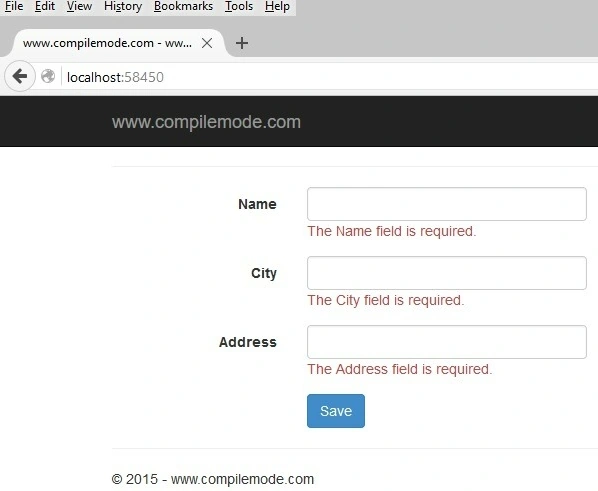
From the preceding example, it is clear that validation also gets fired. Now enter the proper details and click on the save button, it will pass data to the controller asynchronously without the whole page refresh.
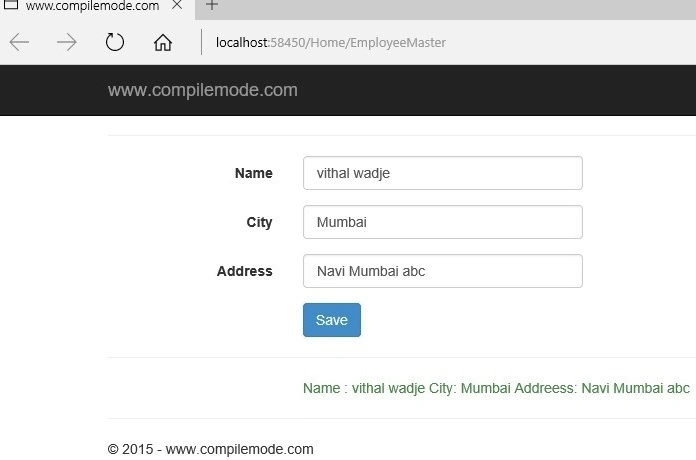
From all the above examples, how to post data to the controller without Page refresh in ASP.NET MVC using Ajax.BeginForm.
Note
- For the complete code, please download the sample zip file.
- You need to use the jQuery library.
Summary
I hope this article is useful for all readers. If you have a suggestion then please contact me.
Carlos KassabPosted Apr 25, 2022, 4:59 PM
Excellent article. Thank you so much.
noel consolacionPosted Feb 22, 2021, 1:32 PM
Perfect code saving all the research and time in mvc
Rizvan ShaikhPosted Dec 18, 2019, 6:21 AM
It still doesn't work properly
Pitambar ThapaPosted May 19, 2017, 2:14 AM
Great article sir, Thank you!
Nabil NawazPosted Jan 11, 2017, 4:24 AM
Great.. really awesome article. but i'm facing one problem ? when i add input file control to form. when i submit the form there in controller i'm not able to get FILE. i've used enctype in my form and HttpPostedFileBase in actionmethod. any solution to this please ?
BlumondePosted Oct 19, 2016, 6:04 PM
In Step 4, you created a regular view form. Not a partial view form because you didn't checkmark the box. This statement "return PartialView("EmployeeMaster")" will popup a standard viewpage instead of a partial view page.
Vithal WadjePosted Mar 22, 2016, 10:46 AM
Yes Mike Xhasa View is partial because whenever you use Ajax,BeginFrom then related view must be a partial
Mike XhasaPosted Mar 22, 2016, 8:18 AM
A great tutorial, but there are several errors I think. I tried to follow it step by step but was unsuccessful. Should the view you create be partial?
Vithal WadjePosted Feb 28, 2016, 11:38 PM
Thanks
Rajeev PunhaniPosted Feb 26, 2016, 6:19 AM
Nice article.
Vithal WadjePosted Dec 28, 2015, 9:49 AM
Thanks
Humayun Kabir MamunPosted Dec 28, 2015, 1:45 AM
Nice...
Vithal WadjePosted Dec 25, 2015, 10:12 PM
Thanks Santhakumar Munuswamy sir
Vithal WadjePosted Dec 25, 2015, 10:12 PM
Thanks Ajay Gandhi sir
Santhakumar MunuswamyPosted Dec 25, 2015, 3:22 PM
Thanks for nice article
Ajay GandhiPosted Dec 25, 2015, 2:02 PM
Good