

Package in Java
Introduction
- Every class is part of some package.
- All classes in a file are part of the same package.
- You can specify the package using a package declaration: package name; as the first (non-comment) line in the file.
- Multiple files can specify the same package name.
- You can access public classes in another (named) package using:
package-name.class-name - You can access the public fields and methods of such classes using:
package-name.class-name.field-or-method-name - You can avoid having to include the package-name using:
import package-name.*;orimport package-name.class-name; at the beginning of the file (after the package declaration). The former imports all of the classes in the package, and the second imports just the named class. - You must still use: Class-name to access the classes in the packages, and
class-name.field-or-method-name to access the fields and methods of the class; the only thing you can leave off is the package name.
Some core packages of java are
| java.lang | Basic language functionality and fundamental types |
| java.util | Collection data structure classes |
| java.io | File operations |
| java.math | Multiprecision arithmetics |
| java.nio | The New I/O framework for Java |
| java.net | Networking operations, sockets, DNS lookups |
| java.security | key generation, encryption and decryption |
| java.sql | Java Database Connectivity to access databases |
| java.awt | The basic hierarchy of packages for native GUI components |
| javax.swing | Hierarchy of packages for platform-independent rich GUI |
| java.applet | Classes for creating an applet |
Create Its Own package
For creating the package we follow the following steps:
Defining a Package
To define a package, include a package command as the first statement in a Java source file.
Any classes declared within that file will belong to the specified package.If
you omit the package statement, the class names are put into the default
package, which has no name. This is the general form of the package statement:
package packageName;
Create a hierarchy of packages
To create a hierarchy of packages,
separate each package name from the one above it by use of a period. The general
form of a multileveled package statement:
package pkg1[.pkg2[.pkg3]];
Example
In this example, we create a folder of name
MyPack and save this java file with name My1.java
.The package name and folder name should be same:
My1.java
Compile and Run it
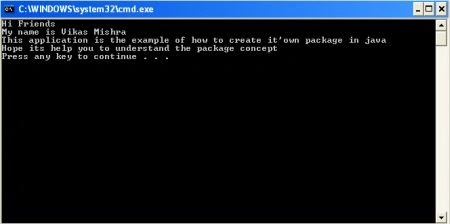
After running this code will give the output as
follow:
 Using The packages
For using the java core packages we Importing the
packages and for importing we use the import statement
.In a Java source file, import statements occur immediately following the
package statement and before class definitions.
This is the general form of the import statement:
import pkg1[.pkg2].(classname|*);
(*) means including all classes under that package.
For example:
import java.lang.*;
Another Application
In this
example we are going to import util package to use the class:
A. java:
Using The packages
For using the java core packages we Importing the
packages and for importing we use the import statement
.In a Java source file, import statements occur immediately following the
package statement and before class definitions.
This is the general form of the import statement:
import pkg1[.pkg2].(classname|*);
(*) means including all classes under that package.
For example:
import java.lang.*;
Another Application
In this
example we are going to import util package to use the class:
A. java:
- package MyPack;
- public class My1
- {
- public static void main(String args[])
- {
- System.out.println("Hi Friends");
- System.out.println("My name is Vikas Mishra");
- System.out.println("This application is the example of How to create it's own package in java");
- System.out.println("Hope its help you to understand the package concept");
- }
- }
- import java.util.Date;
- public class A
- {
- public static void main(String args[])
- {
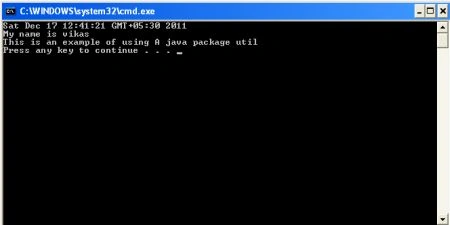
- System.out.println(new Date());
- System.out.println("My name is vikas");
- System.out.println("This is an example of using A java package util");
- }
- }
Output
After running the above application we'll find the
following output:
Thus this article may help you to understand
the package and it's creation:
Alten ChingumbraPosted Dec 22, 2011, 5:46 AM
Thank's for sharing goodies!