

Introduction
This article is based on the article written by me for Digit Magazine under "Digit Tech Star Contest". So let's take a quick look at this.
Intel Galileo is a Microcontroller board based on the Intel Quark SoC X1000 Application Processor, a 32-bit Intel Pentium class system on a chip. It's the first board based on an Intel architecture designed to be hardware and software pin-compatible with Arduino Shields designed for the UNO R3.
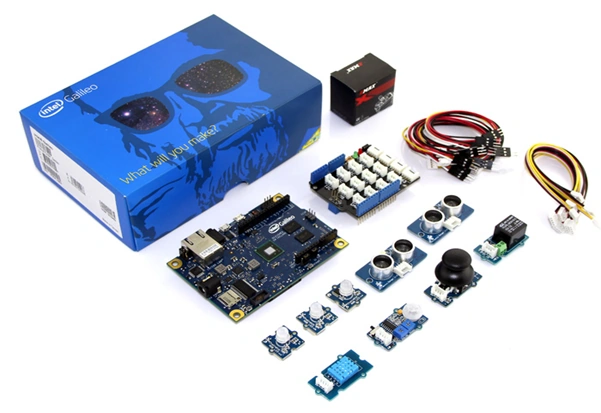
Intel Galileo and Grove starter kit
 A Quick Review
Galileo is designed to support Arduino shields that operate at either 3.3V or 5V. The core operating voltage of Galileo is 3.3V. In spite of this, a jumper on the board can convert the voltage up to 5V at the I/O pins.
In addition to supporting the Arduino shield ecosystem, the Intel development board comes with many computing industry standard I/O interfaces, including ACPI Express, PCI Express, 10/100 Mbit Ethernet, Micro SD or SDHD, USB 2.0 device and EHCI/OHCI USB host ports, high-speed UART, RS-232 serial port, programmable 8 MB NOR flash and a JTAG port for easy debugging.
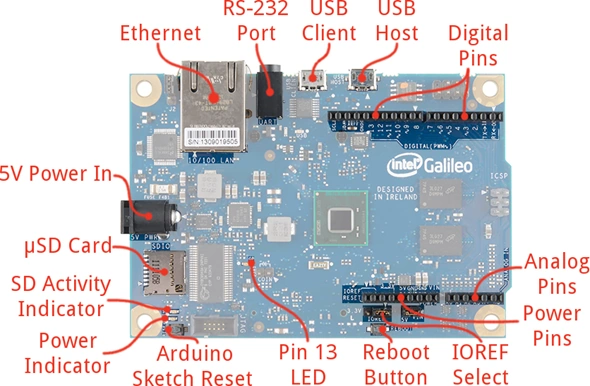
Let's have a look at its parts.
A Quick Review
Galileo is designed to support Arduino shields that operate at either 3.3V or 5V. The core operating voltage of Galileo is 3.3V. In spite of this, a jumper on the board can convert the voltage up to 5V at the I/O pins.
In addition to supporting the Arduino shield ecosystem, the Intel development board comes with many computing industry standard I/O interfaces, including ACPI Express, PCI Express, 10/100 Mbit Ethernet, Micro SD or SDHD, USB 2.0 device and EHCI/OHCI USB host ports, high-speed UART, RS-232 serial port, programmable 8 MB NOR flash and a JTAG port for easy debugging.
Let's have a look at its parts.
 Tips & Tricks
If you are into programming and technologies, then you guys trust me, this is for you. From a programmer's perspective, one can easily say "If you can imagine, you can create it!".
So let's have a look at what you can do with Intel Galileo.
Tips & Tricks
If you are into programming and technologies, then you guys trust me, this is for you. From a programmer's perspective, one can easily say "If you can imagine, you can create it!".
So let's have a look at what you can do with Intel Galileo.
Intel Galileo
Figure 1: Galileo Kit
Figure 2: Galileo Quick Review
Image Courtesy - Sparkfun
- You can create things for
your home/office automation.(Explore more here: http://blog.arduino.cc/2014/05/28/real-time-tinkering-on-galileo/) - You can use it in Robotics.
(Explore more here: https://www.youtube.com/watch?v=AudqfOlWE4o)
- You can take a step towards Artificial Intelligence.
(There is a complete world of IoT and Intel Galileo waiting for you guys, so tighten your laces and get ready.)
Benefits
- The Galileo board is also software compatible with the Arduino Software Development Environment (IDE), that makes usability and introduction a snap.
- The Galileo board has several PC industry standard I/O ports and features to expand native usage and capabilities beyond the Arduino shield ecosystem.
- A full-sized mini-PCI Express slot, 100Mb Ethernet port, Micro-SD slot, RS-232 serial port, USB Host port, USB Client port, and 8MByte NOR flash come standard on the board.
- Using an Intel Galileo Board you can create your own world of Internet of Things (IoT) by writing just a few sketches.
Summary

Figure 3: What will you make with Galileo
Abhishek JaiswalPosted May 23, 2015, 9:01 AM
Thanks!! :)
NitinPosted May 23, 2015, 8:51 AM
good one :)
Abhishek JaiswalPosted May 22, 2015, 3:47 PM
Thank you guys for such response to IoT!! :)
Santhakumar MunuswamyPosted May 22, 2015, 2:52 PM
Thanks for nice article
Yashwant VishwakarmaPosted May 22, 2015, 8:26 AM
Superb Dude !!!
Akshay PhadkePosted May 22, 2015, 5:18 AM
Very Nice Sirji :)
Pooja BaraskarPosted May 22, 2015, 4:40 AM
Nice. I was also thinking to write a detailed description on Intel Galileo boards but u did that :) .
Gopi ChandPosted May 22, 2015, 2:42 AM
Trying your good hand in IOT :)
Mahesh ChandPosted May 22, 2015, 1:18 AM
Very nice!
Upendra Pratap ShahiPosted May 22, 2015, 12:53 AM
nice sir...