

Introduction
In this article, I will show you a simple implementation of Dependency Injection in the Web API. Here we create an application that implements Dependency Injection.
Step 1
Create a Web API application.
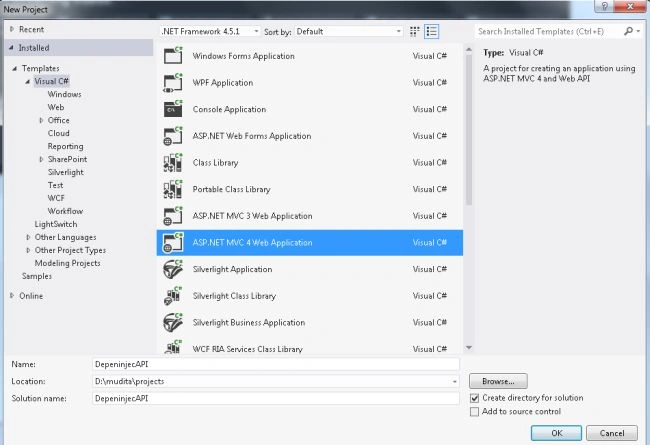
- Start Visual Studio 2012.
- From the start window Select "Installed" -> "Visual C#" -> "Web".
- Select "ASP.NET MVC4 Web Application" and click on the "Ok" button.
- From the "MVC4 Project" window select "Web API".
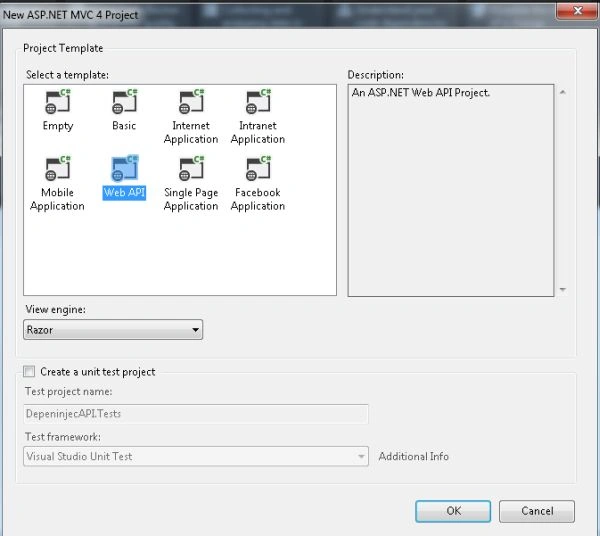
- Click on the "OK" button.
Step 2
Create Two Model classes first is "ResponseModel" and another as "ResultModel".
- In the "Solution Explorer".
- Right-click on the Model Folder.
- Select "Add" -> "Class".
- Select "Installed" -> "Visual C#" and select "Class".
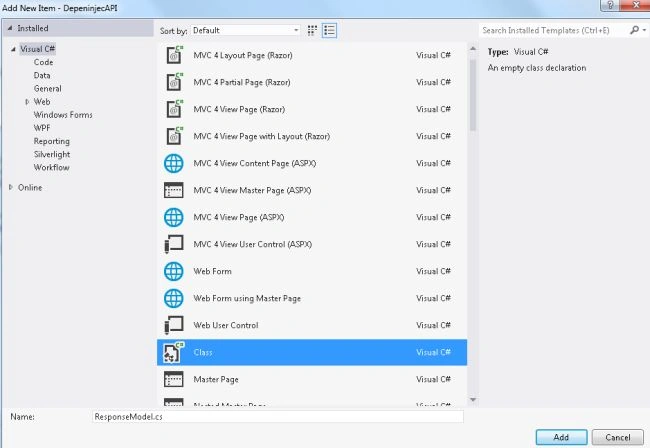
Add the following code in the "ResponseModel.cs".
- using System;
- using System.Collections.Generic;
- using System.Linq;
- using System.Web;
- namespace DepeninjecAPI.Models
- {
- public class ResponseModel
- {
- public int ID { get; set; }
- public DateTime Date { get; set; }
- }
- }
Add the following code in "ResultModel.cs" class.
- using System;
- using System.Collections.Generic;
- using System.Linq;
- using System.Web;
- namespace DepeninjecAPI.Models
- {
- public class ResultModel<T>
- {
- public int Full_count { get; set; }
- public int Pagecount { get; set; }
- public IEnumerable<T> Rslt { get; set; }
- }
- }
Step 3
Add a new Folder to the project.
- In the "Solution Explorer".
- Right-click on the Project.
- Select "Add" -> "New Folder"and change the name of it to "Collect".

Add a new interface in this folder.
- Right-click on the "Collect" folder.
- Select "Add" -> "New Items".
- Select "installed" -> "Visual C#" and select "Interface".
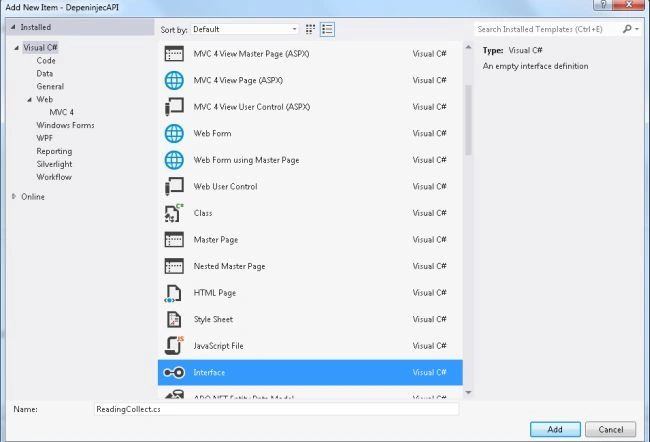
Add the following code in this interface:
- using DepeninjecAPI.Models;
- using System;
- using System.Collections.Generic;
- using System.Linq;
- using System.Web;
- namespace DepeninjecAPI.Collect
- {
- public interface IRedingCollect
- {
- void Save(ResponseModel read);
- ResultModel<ResponseModel> Get();
- ResultModel<ResponseModel> Get(int No_page);
- }
- public class ReadingCollect :IRedingCollect
- {
- private readonly IList<ResponseModel> intercollect = new List<ResponseModel>();
- public const int PageSize = 5;
- public void Save(ResponseModel read)
- {
- intercollect.Add(new ResponseModel { ID = read.ID, Date = read.Date });
- }
- public ResultModel<ResponseModel> Get()
- {
- return this.Get(1);
- }
- public ResultModel<ResponseModel> Get(int No_page)
- {
- var Gap_No = (No_page - 1) * PageSize;
- return new ResultModel<ResponseModel>
- {
- Full_count = intercollect.Count(),
- Pagecount = No_page,
- Rslt = intercollect.Skip(Gap_No).Take(PageSize)
- };
- }
- }
- }
Step 4
Create a Controller "ResponseController".
- In the "Solution Explorer".
- Right-click on the Controller folder.
- Select "Add" -> "Controller".
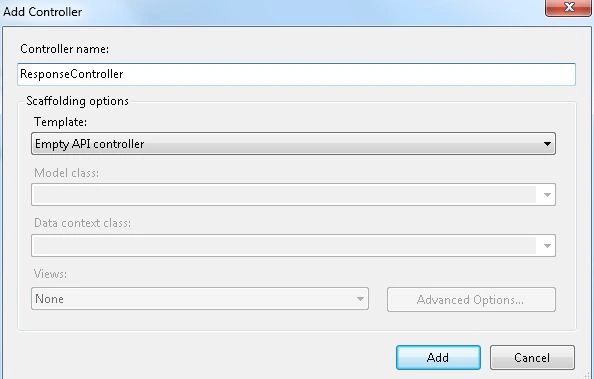
- Click on the "Add" button.
Add the following code:
- using System;
- using System.Collections.Generic;
- using System.Linq;
- using System.Net;
- using System.Net.Http;
- using System.Web.Http;
- using DepeninjecAPI.Models;
- using DepeninjecAPI.Collect;
- namespace DepeninjecAPI.Controllers
- {
- public class ResponseController : ApiController;'
- {
- private readonly IRedingCollect collect;
- public ResponseController(IRedingCollect col)
- {
- collect = col;
- }
- public void Post(ResponseModel read)
- {
- if(read==null) throw new HttpResponseException(HttpStatusCode.BadRequest);
- collect.Save(read);
- }
- public ResultModel<ResponseModel> Get()
- {
- return Get(1);
- }
- public ResultModel<ResponseModel> Get(int No_page)
- {
- return collect.Get(No_page);
- }
- }
- }
Step 5
Now we add a class in the "App_start" folder:
-
In the "Solution Explorer"
-
Right-click on the "App_Start" folder.
-
Select "Add" -> "Class".
Add the following code:
- using DepeninjecAPI.Collect;
- using DepeninjecAPI.Controllers;
- using System;
- using System.Collections.Generic;
- using System.Linq;
- using System.Web;
- using System.Web.Http.Dependencies;
- namespace DepeninjecAPI.App_Start
- {
- public class SolveController:IDependencyResolver
- {
- private static readonly IRedingCollect readcollect = new ReadingCollect();
- public object GetService(Type type)
- {
- return type == typeof(ResponseController) ? new ResponseController(readcollect) : null;
- }
- public IEnumerable<object> GetServices(Type type)
- {
- return new List<object>();
- }
- public IDependencyScope BeginScope()
- {
- return this;
- }
- public void Dispose()
- {
- }
- }
- }
In the "WebApi.config" file add the following line of code:
config.DependencyResolver = new SolveController();
Step 6
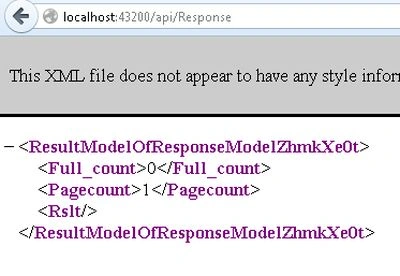
Execute the application and change the URL to "http://localhost:43200/api/Response".Then the output will be as in the following:
Join the conversation! Your thoughts help the community grow.