
Introduction : AJAX(Asynchronous JavaScript and XML) is a new web development technique used for creating an interactive website. AJAX helps us develope web applications and retrieve a small amount of data from a web server. AJAX consists of different types of technology.
- JavaScript
- XML
- Asynchronous Call to the server
WCF Service : A WCF Service is a service that can be consumed using an AJAX client-side script. The easiest method to create an AJAX-enabled WCF Service is to use the 'AJAX-enabled WCF Service' Template in Visual Studio. WCF service is primarily based on the System.ServiceModel namespace. This is the Programming interface to the developers. The System.ServiceModel namespace is very rich in its design so that it allows much easier programming interface.
Programming Model:
The Programming model mainly constitutes of the End points. The endpoint is the basic unit of communication in (WCF). Each endpoint is made up of three elements.
- Address
- Binding
- Contracts
Step 1 : Open Visual Studio 2010.
- Go to File->New->WebSite
- Select ASP.NET Empty WebSite

Step 2 : Go to Solution Explorer and right-click.
- Select Add->New Item
- Select WebForm
- Default.aspx page open

Define WCF Service :
Step 3 : Go to Solution Explorer and right-click.
- Select Add->New Item
- Select AJAX Enabled WCF Service
- Define the Namespace

Namespace :
[ServiceContract(Namespace
= "MCNSOLUTION")]
[AspNetCompatibilityRequirements(RequirementsMode
= AspNetCompatibilityRequirementsMode.Allowed)]
public
class Service
{
// To use HTTP GET, add [WebGet] attribute.
(Default ResponseFormat is WebMessageFormat.Json)
// To create an operation that returns
XML,
// add [WebGet(ResponseFormat=WebMessageFormat.Xml)],
// and include the following line in
the operation body:
//
WebOperationContext.Current.OutgoingResponse.ContentType = "text/xml";
[OperationContract]
public void
DoWork()
{
// Add your operation implementation
here
return;
}
Step 4 : Open Default.aspx
page and click in [Design option].
- Drag and drop Scriptmanager Control
Define Service Path :
Step 5 : In [Design] page
right-click in Scriptmanager Control
- Select Properties option
- Define Services
- Click the Add option and select Service Path

Step 6 : Now add a Html Button, an HTML
Input box and <Div> to the Deafult.aspx page.After renaming the controls and
adding the onClick event of the button, the markup will appear similar to the
following:
<div
id ="dispService">
<input
id="btnCallWCF"
type="button"
value="MCN User"
onclick="return btnCallWCF_onclick()" />
<input
id="txtUNm"
type="text"
/>
Java Script code :
Step 7 : Now go to
Default.aspx page and select Design option.
- Click in the input Button
- Define Java Script code for the on click event
Code :
<script
language="javascript"
type="text/javascript">
function btnCallWCF_onclick() {
}
</script>
</head>
Step 8 :
Now call the WebService then add the namespace to the service called "MCN
Solution".
Code :
script
language="javascript"
type="text/javascript">
function btnCallWCF_onclick()
{
var MCN = new
MCNSOLUTION.Service();
MCN.MCNUSER($get("txtUNm").Value,
OnServiceComplete, onerror);
}
function
OnServiceComplete(result) {
$get("dispService").innerHTML = result;
}
function
onerror(result) {
alert(result.get_message());
}
</script>
Add Method :
Step 9 : Now we add a method called mcnuser which take a user name and
return string value.
Method :
//
Add more operations here and mark them with [OperationContract]
[OperationContract]
public string
MCNUSER(string UNAME)
{
return "HELLOMCN"
+ UNAME;
}
}
Step 10 : Now the complete
code for calling the WCF Service in an AJAX Enabled WebService.
Code :
using
System;
using
System.Collections.Generic;
using
System.Linq;
using
System.Runtime.Serialization;
using
System.ServiceModel;
using
System.ServiceModel.Activation;
using
System.ServiceModel.Web;
using
System.Text;
[ServiceContract(Namespace =
"MCNSOLUTION")]
[AspNetCompatibilityRequirements(RequirementsMode
= AspNetCompatibilityRequirementsMode.Allowed)]
public
class Service
{
// To use HTTP GET, add [WebGet] attribute.
(Default ResponseFormat is WebMessageFormat.Json)
// To create an operation that returns
XML,
// add [WebGet(ResponseFormat=WebMessageFormat.Xml)],
// and include the following line in
the operation body:
//
WebOperationContext.Current.OutgoingResponse.ContentType = "text/xml";
[OperationContract]}|
public void
DoWork()
{
// Add your operation implementation
here
return;
}
// Add more operations here and mark them with
[OperationContract]
[OperationContract]
public string
MCNUSER(string UNAME)
{
return "HELLOMCN"
+ UNAME;
}
}
Step 11: Now run the
application by Pressing F5.

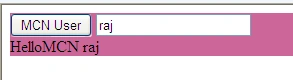
Now click on the MCN USER Button and see the following output.
TAN WhoAMIPosted Jan 24, 2014, 8:56 PM
Unhandled exception at line 11, column 13 in http://localhost:49240/ 0x800a1391 - JavaScript runtime error: 'MCNSOLUTION' is undefined
TAN WhoAMIPosted Jan 24, 2014, 8:56 PM
I follow your example using Visual Studio 2012, but getting this error: