

Introduction
A relationship, in the context of databases, is a situation that exists between two relational database tables when one table has a foreign key that references the primary key of the other table. Relationships allow relational databases to split and store data in various tables while linking disparate data items. For example, if we want to store information about a Customer and his Order then we need to create two tables, one for the Customer and another for the Order. Both tables, Customer, and Order, will have a relationship one-to-many so whenever we retrieve all orders of a customer then we can easily retrieve them.
There are several types of database relationships. In this article, I will cover the following.
- One-to-One Relationships
- One-to-many or Many to One Relationships
- Many-to-Many Relationships
Entity Framework Code First allows us to use our own domain classes to represent the model that Entity Framework relies on to perform querying, change tracking, and updating functions. The Code First approach follows conventions over the configuration but it also gives us two ways to add a configuration over classes. One uses simple attributes called DataAnnotations and another uses Code First's Fluent API, which provides you with a way to describe configuration imperatively, in code. This article will focus on tuning up the relationship in the Fluent API.
To understand the relationship in the Entity Framework Code First approach, we create an entity and define its configuration using the Fluent API. We will create two class library projects, one library project (EF.Core) has entities, and another project (EF.Data) has these entities configured with DbContext. We also create a unit test project (EF.UnitTest) that will be used to test our code. We will use the following classes that are in a class diagram to explain the preceding three relationships.
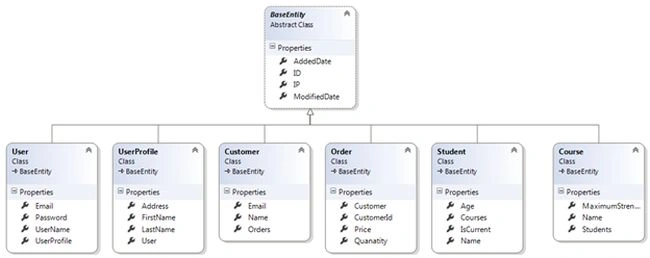
Figure 1.1. Class Diagram for Entities.
As in the preceding class diagram, the BaseEntity class is a base class that is inherited by each other class. Each derived entity represents each database table. We will use two derived entity combinations from the left side to explain each relationship type and that's why we create six entities.
So, first of all, we create the BaseEntity class that is inherited by each derived entity under the EF. Core class library project.
using System;

namespace EF.Core
{
    public abstract class BaseEntity
    {
        public Int64 ID { get; set; }
        public DateTime AddedDate { get; set; }
        public DateTime ModifiedDate { get; set; }
        public string IP { get; set; }
    }
}
We use navigation properties to access a related entity object from one to another. The navigation properties provide a way to navigate an association between two entity types. Every object can have a navigation property for every relationship in which it participates. Navigation properties allow you to navigate and manage relationships in both directions, returning either a reference object (if the multiplicity is either one or zero-or-one) or a collection (if the multiplicity is many).
Now let's see each relationship one by one.
Our Roadmap towards Learning MVC with Entity Framework
- Code First Migrations with Entity Framework
- CRUD Operations Using Entity Framework 5.0 Code First Approach in MVC
- CRUD Operations Using the Repository Pattern in MVC
- CRUD Operations Using the Generic Repository Pattern and Unit of Work in MVC
- CRUD Operations Using the Generic Repository Pattern and Dependency Injection in MVC
One-to-One Relationship
Both tables can have only one record on either side of the relationship. Each primary key value relates to only one record (or no records) in the related table. Keep in mind that this kind of relationship is not very common and most one-to-one relationships are forced by business rules and don't flow naturally from the data. In the absence of such a rule, you can usually combine both tables into one table without breaking any normalization rules.
To understand one-to-one relationships, we create two entities, one is User, and another is UserProfile. One user can have a single profile, a User table that will have a primary key and that same key will be both primary and foreign keys for the UserProfile table. Let’s see Figure 1.2 for a one-to-one relationship.
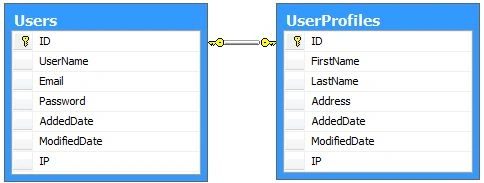
Figure 1.2. One-to-One Relationship
Now we create both entities User and UserProfile in the EF. Core project under the Data folder. Our User class code snippet is as in the following.
namespace EF.Core.Data
{
    public class User : BaseEntity
    {
        public string UserName { get; set; }
        public string Email { get; set; }
        public string Password { get; set; }
        public UserProfile UserProfile { get; set; }
    }
}
The UserProfile class code snippet is as in the following.
namespace EF.Core.Data
{
    public class UserProfile : BaseEntity
    {
        public string FirstName { get; set; }
        public string LastName { get; set; }
        public string Address { get; set; }
        public virtual User User { get; set; }
    }
}
As you can see in the preceding, in both code snippets each entity is using another entity as a navigation property so that you can access the related object from each other.
Now we define the configuration for both entities that will be used when the database table is created by the entity. The configuration defines another class library project EF. Data under the Mapping folder. Now create two configuration classes for each entity. For the User entity, we create the UserMap entity.
using System.ComponentModel.DataAnnotations.Schema;
using System.Data.Entity.ModelConfiguration;
using EF.Core.Data;

namespace EF.Data.Mapping
{
    public class UserMap : EntityTypeConfiguration<User>
    {
        public UserMap()
        {
            // Key
            HasKey(t => t.ID);

            // Fields
            Property(t => t.ID).HasDatabaseGeneratedOption(DatabaseGeneratedOption.Identity);
            Property(t => t.UserName).IsRequired().HasMaxLength(25);
            Property(t => t.Email).IsRequired();
            Property(t => t.AddedDate).IsRequired();
            Property(t => t.ModifiedDate).IsRequired();
            Property(t => t.IP);

            // Table
            ToTable("Users");
        }
    }
}
We will use the same way to create the configuration for other entities as for the User. EntityTYpeConfiguration<T> is an important class that allows configuration to be performed for an entity type in a model. This is done using the modelbuilder in an override of the OnModelCreate method. The Constructor of the UserMap class uses the Fluent API to map and configure properties in the table. So let's see each method used in the constructor one by one.
- HasKey(): The Haskey() method configures a primary key on the table.
- Property(): The Property method configures attributes for each property belonging to an entity or complex type. It is used to obtain a configuration object for a given property. The options on the configuration object are specific to the type being configured.
- HasDatabaseGeneratedOption: It configures how values for the property are generated by the database.
- DatabaseGeneratedOption.Identity: DatabaseGeneratedOption is the database annotation. It enumerates a database-generated option. DatabaseGeneratedOption.Identity is used to create an auto-increment column in the table by a unique value.
- ToTable(): Configures the table name that this entity type is mapped to.
Now create the UserProfile configuration class, the UserProfileMap class.
using System.Data.Entity.ModelConfiguration;
using EF.Core.Data;

namespace EF.Data.Mapping
{
    public class UserProfileMap : EntityTypeConfiguration<UserProfile>
    {
        public UserProfileMap()
        {
            // Key
            HasKey(t => t.ID);

            // Fields
            Property(t => t.FirstName);
            Property(t => t.LastName);
            Property(t => t.Address).HasMaxLength(100).HasColumnType("nvarchar");
            Property(t => t.AddedDate);
            Property(t => t.ModifiedDate);
            Property(t => t.IP);

            // Table
            ToTable("UserProfiles");

            // Relationship
            HasRequired(t => t.User)
                .WithRequiredDependent(u => u.UserProfile);
        }
    }
}
In the code snippet above we defined a one-to-one relationship between both User and UserProfiles entities. This relationship is defined by the Fluent API using the HasRequired() and WithRequiredDependent() methods so these methods are as in the following.
- HasRequired(): Configures a required relationship from this entity type. Instances of the entity type will not be able to be saved to the database unless this relationship is specified. The foreign key in the database will be non-nullable. In other words, UserProfile can’t be saved independently without a User entity.
- WithRequiredDependent(): (from the MSDN) Configures the relationship to be required: required without a navigation property on the other side of the relationship. The entity type being configured will be the dependent and contain a foreign key to the principal. The entity type that the relationship targets will be the principal in the relationship.
Now define the connection string in the App. config file under EF. Data Project so that we can create a Database with an appropriate name. The connection string is.
<connectionStrings>
    <add name="DbConnectionString" connectionString="Data Source=sandeepss-PC;Initial Catalog=EFCodeFirst;User ID=sa; Password=*******" providerName="System.Data.SqlClient" />
</connectionStrings>
Now we create a context class EFDbContext (EFDbContext.cs) that inherits the DbContext class. In this class, we override the OnModelCreating() method. This method is called when the model for a context class (EFDbContext) has been initialized, but before the model has been locked down and used to initialize the context such that the model can be further configured before it is locked down. The following is the code snippet for the context class.
using System;
using System.Data.Entity;
using System.Data.Entity.ModelConfiguration;
using System.Linq;
using System.Reflection;

namespace EF.Data
{
    public class EFDbContext : DbContext
    {
        public EFDbContext()
            : base("name=DbConnectionString")
        {
        }

        protected override void OnModelCreating(DbModelBuilder modelBuilder)
        {
            var typesToRegister = Assembly.GetExecutingAssembly().GetTypes()
                .Where(type => !String.IsNullOrEmpty(type.Namespace))
                .Where(type => type.BaseType != null && type.BaseType.IsGenericType
                    && type.BaseType.GetGenericTypeDefinition() == typeof(EntityTypeConfiguration<>));

            foreach (var type in typesToRegister)
            {
                dynamic configurationInstance = Activator.CreateInstance(type);
                modelBuilder.Configurations.Add(configurationInstance);
            }

            base.OnModelCreating(modelBuilder);
        }
    }
}
As you know the EF Code First approach follows convention over configuration so in the constructor we just pass the connection string name, the same as an App. Config file and it connects to that server. In the OnModelCreating() method, we used a reflection to map an entity to its configuration class in this specific project.
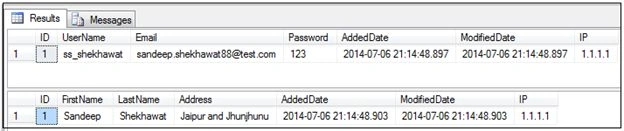
We create a Unit Test Project EF.UnitTest to test the code above. We create a test class UserTest that has a test method UserUserProfileTest(). This method creates a database and populates User and UserProfile tables as per their relationship. The following is the code snippet for the UserTest class.

jack machinePosted May 4, 2019, 3:33 AM
Sir please guide this situation from generic method . where table name is passed and through reflection its properties will set . how to set navigation property from that .
Hamid KhanPosted Dec 2, 2018, 11:28 PM
Thanks...…..It is really very helpful article for me, which I want to implement in my project...…..
Amit Kumar SinghPosted Oct 8, 2018, 12:45 AM
Thanks for Sharing Sandeep !!!
vishal pawarPosted Mar 8, 2018, 11:50 PM
Hi Sandeep, sir,Thanks for this article. but i am facing issue while updating the courses for same student.How can we do this?ex. I want to delete course id 1 for studentid 1 and add new course id 3 for student id 1.Can you provide sample code?
Abhishek KumarPosted Sep 27, 2017, 4:47 AM
Thanks for detailed example... Good One..
Rajat ChananPosted May 16, 2017, 1:46 AM
Nice article with understandable examples.
ShwetaPosted May 6, 2015, 1:48 AM
Thanks for a detailed article. Good one.
Santhakumar MunuswamyPosted Apr 13, 2015, 2:44 PM
Thanks for nice article
Sandeep Singh ShekhawatPosted Apr 11, 2015, 2:40 AM
Thanks everyone !!
Gowtham RajamanickamPosted Mar 13, 2015, 5:23 AM
Good article !
karpit patelPosted Feb 14, 2015, 7:57 AM
Can you tell how to give reference of Asp.net Identity (AspNetUsers) Table to our custom table?
Yogesh TyagiPosted Jul 9, 2014, 2:19 AM
Nice Article Sir.....