

In this article, I will explain how to insert data into multiple tables using a MySQL Transaction in ASP.NET.
So, let's proceed with the following procedure:
- ASP.NET web page
- Grid View Data Control , MySQL Database and MySQL Transaction
Now, open the MySQLAdmin Page then select "Create a New Table” > "View" >”Table Structure for Table 'student ' ”.
- CREATE TABLE IF NOT EXISTS `student` (
- `SID` int(100) NOT NULL AUTO_INCREMENT,
- `Name` varchar(100) NOT NULL,
- `Address` varchar(500) NOT NULL,
- `Email` varchar(100) NOT NULL,
- `Mobile` varchar(25) NOT NULL,
- PRIMARY KEY (`SID`)
- ) ENGINE=InnoDB DEFAULT CHARSET=latin1 AUTO_INCREMENT=1;
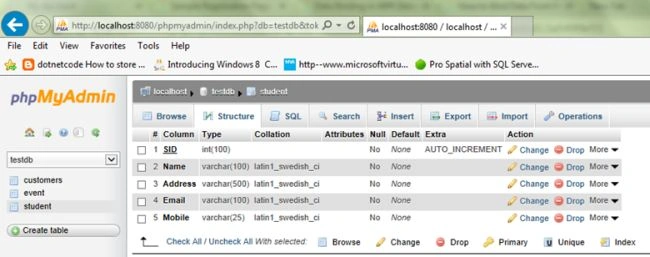
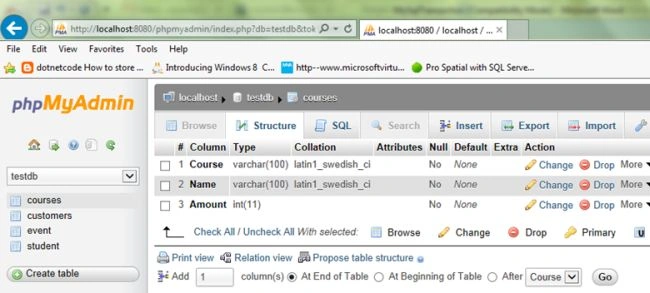
Table structure for table 'courses'
- CREATE TABLE IF NOT EXISTS `courses` (
- `Course` varchar(100) NOT NULL,
- `Name` varchar(100) NOT NULL,
- `Amount` int(11) NOT NULL
- ) ENGINE=InnoDB DEFAULT CHARSET=latin1;
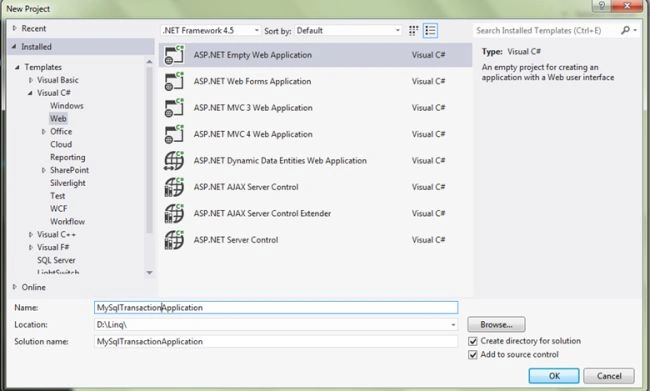
Open your instance of Visual Studio 2012 and create a new ASP.NET Web application. Name the project “MySqlTransactionApplication", as shown in the following figure:
Now design your Student.aspx View design part; use the following code:
Student.aspx
- <%@ Page Title="" Language="C#" MasterPageFile="~/Site.Master" AutoEventWireup="true" CodeBehind="Student.aspx.cs" Inherits="MySqlTransactionApplication.Student" %>
- <asp:Content ID="Content1" ContentPlaceHolderID="titleContent" runat="server">
- </asp:Content>
- <asp:Content ID="Content2" ContentPlaceHolderID="head" runat="server">
- <script type="text/javascript">
- function validationCheck() {
- var summary = "";
- summary += isvalidName();
- summary += isvalidAmount();
- summary += isvalidAddress();
- summary += isvalidEmail();
- summary += isvalidMobileno();
- if (summary != "") {
- alert(summary);
- return false;
- }
- else {
- return true;
- }
- }
- function isvalidName() {
- var id;
- var temp = document.getElementById("<%=txtName.ClientID %>");
- id = temp.value;
- if (id == "") {
- return ("Please Enter Name" + "\n");
- }
- else {
- return "";
- }
- }
- function isvalidAddress() {
- var id;
- var temp = document.getElementById("<%=txtAddress.ClientID %>");
- id = temp.value;
- if (id == "") {
- return ("Please Enter Address" + "\n");
- }
- else {
- return "";
- }
- }
- function isvalidAmount() {
- var id;
- var temp = document.getElementById("<%=txtAmount.ClientID %>");
- id = temp.value;
- if (id == "") {
- return ("Please Enter Amount" + "\n");
- }
- else {
- return "";
- }
- }
- function isvalidEmail() {
- var id;
- var temp = document.getElementById("<%=txtEmail.ClientID %>");
- id = temp.value;
- var re = /\w+([-+.']\w+)*@\w+([-.]\w+)*\.\w+([-.]\w+)*/;
- if (id == "") {
- return ("Please Enter Email" + "\n");
- }
- else if (re.test(id)) {
- return "";
- }
- else {
- return ("Email should be in the form [email protected]" + "\n");
- }
- }
- function isvalidMobileno() {
- var id;
- var temp = document.getElementById("<%=txtMobile.ClientID %>");
- id = temp.value;
- var re;
- re = /^[0-9]+$/;
- var digits = /\d(10)/;
- if (id == "") {
- return ("Please Enter Mobile no" + "\n");
- }
- else if (re.test(id)) {
- return "";
- }
- else {
- return ("Phone no should be digits only" + "\n");
- }
- }
- </script>
- </asp:Content>
- <asp:Content ID="Content3" ContentPlaceHolderID="MainContent" runat="server">
- <table>
- <tr>
- <td class="td">Name:<span style="color:red;">*</span></td>
- <td>
- <asp:TextBox ID="txtName" runat="server" CssClass="txt"></asp:TextBox></td>
- </tr>
- <tr>
- <td class="td">Course:<span style="color:red;">*</span></td>
- <td>
- <asp:DropDownList ID="ddlCourse" runat="server" CssClass="txt" Width="216px">
- <asp:ListItem Value="0">--------Select--------</asp:ListItem>
- <asp:ListItem>.NET</asp:ListItem>
- <asp:ListItem>Java</asp:ListItem>
- <asp:ListItem>SQL Server</asp:ListItem>
- <asp:ListItem>MySQL</asp:ListItem>
- <asp:ListItem>Oracle</asp:ListItem>
- <asp:ListItem>PHP</asp:ListItem>
- <asp:ListItem>A+/Network+</asp:ListItem>
- <asp:ListItem>CISCO</asp:ListItem>
- </asp:DropDownList>
- </td>
- </tr>
- <tr>
- <td class="td">Amount: <span style="color:red;">*</span></td>
- <td>
- <asp:TextBox ID="txtAmount" runat="server" CssClass="txt"></asp:TextBox></td>
- </tr>
- <tr>
- <td class="td">Address: <span style="color:red;">*</span></td>
- <td>
- <asp:TextBox ID="txtAddress" runat="server" CssClass="txt"></asp:TextBox>
- </td>
- </tr>
- <tr>
- <td class="td">Mobile: <span style="color:red;">*</span></td>
- <td>
- <asp:TextBox ID="txtMobile" runat="server" CssClass="txt"></asp:TextBox></td>
- </tr>
- <tr>
- <td class="td">Email ID: <span style="color:red;">*</span></td>
- <td>
- <asp:TextBox ID="txtEmail" runat="server" CssClass="txt"></asp:TextBox>
- </td>
- </tr>
- <tr>
- <td></td>
- <td>
- <asp:Button ID="btnSubmit" runat="server" Text="Submit" OnClick="btnSubmit_Click" CssClass="button" />
- <asp:Button ID="btnCancel" runat="server" Text="Cancel" OnClick="btnCancel_Click" CssClass="button" /></td>
- <td></td>
- </tr>
- </table>
- <asp:Panel ID="Panel1" runat="server" >
- <table style="width: 50%;">
- <tr>
- <td>
- <asp:GridView ID="GridViewStudent" CssClass="handsontable" runat="server"></asp:GridView>
- </td>
- <td><asp:GridView ID="GridViewCourses" CssClass="handsontable" runat="server"></asp:GridView></td>
- </tr>
- </table>
- </asp:Panel>
- </asp:Content>
Now, in the code behind file "Student.aspx.cs" use the following code.
Student.aspx.cs
- using System;
- using System.Collections.Generic;
- using System.Configuration;
- using System.Data;
- using System.Linq;
- using System.Web;
- using System.Web.UI;
- using System.Web.UI.WebControls;
- using MySql.Data.MySqlClient;
- namespace MySqlTransactionApplication
- {
- public partial class Student : System.Web.UI.Page
- {
- #region MySqlConnection Connection and Page Lode
- MySqlConnection conn = new MySqlConnection(ConfigurationManager.ConnectionStrings["ConnectionString"].ConnectionString);
- protected void Page_Load(object sender, EventArgs e)
- {
- try
- {
- if (!Page.IsPostBack)
- {
- btnSubmit.Attributes.Add("onclick", "javascript:return validationCheck()");
- BindStudentGridView(); BindCoursesGridView();
- }
- }
- catch (Exception ex)
- {
- ShowMessage(ex.Message);
- }
- }
- #endregion
- #region show message
- /// <summary>
- /// This function is used for show message.
- /// </summary>
- /// <param name="msg"></param>
- void ShowMessage(string msg)
- {
- ClientScript.RegisterStartupScript(Page.GetType(), "validation", "<script language='javascript'>alert('" + msg + "');</script>");
- }
- /// <summary>
- /// This Function is used TextBox Empty.
- /// </summary>
- void clear()
- {
- txtName.Text = string.Empty; txtAddress.Text = string.Empty; txtMobile.Text = string.Empty; txtEmail.Text = string.Empty;
- ddlCourse.SelectedIndex = 0; txtAmount.Text = string.Empty; txtName.Focus();
- }
- #endregion
- #region bind data to GridViewStudent and GridViewCourses
- private void BindStudentGridView()
- {
- try
- {
- if (conn.State == ConnectionState.Closed)
- {
- conn.Open();
- }
- MySqlCommand cmd = new MySqlCommand("Select * from Student ORDER BY SID DESC", conn);
- MySqlDataAdapter adp = new MySqlDataAdapter(cmd);
- DataSet ds = new DataSet();
- adp.Fill(ds);
- GridViewStudent.DataSource = ds;
- GridViewStudent.DataBind();
- }
- catch (MySqlException ex)
- {
- ShowMessage(ex.Message);
- }
- finally
- {
- if (conn.State == ConnectionState.Open)
- {
- conn.Close();
- }
- }
- }
- private void BindCoursesGridView()
- {
- try
- {
- if (conn.State == ConnectionState.Closed)
- {
- conn.Open();
- }
- MySqlCommand cmd = new MySqlCommand("Select * from courses", conn);
- MySqlDataAdapter adp = new MySqlDataAdapter(cmd);
- DataSet ds = new DataSet();
- adp.Fill(ds);
- GridViewCourses.DataSource = ds;
- GridViewCourses.DataBind();
- }
- catch (MySqlException ex)
- {
- ShowMessage(ex.Message);
- }
- finally
- {
- if (conn.State == ConnectionState.Open)
- {
- conn.Close();
- }
- }
- }
- #endregion
- #region Transaction
- //this code used to Transaction are implememted
- protected void btnSubmit_Click(object sender, EventArgs e)
- {
- MySqlTransaction tr = null;
- try
- {
- conn.Open();
- tr = conn.BeginTransaction();
- MySqlCommand cmd = new MySqlCommand();
- cmd = new MySqlCommand("Insert into student (Name,Address,Mobile,Email ) values (@Name,@Address,@Mobile,@Email)", conn,tr);
- cmd.Parameters.AddWithValue("@Name", txtName.Text);
- cmd.Parameters.AddWithValue("@Address", txtAddress.Text);
- cmd.Parameters.AddWithValue("@Mobile", txtMobile.Text);
- cmd.Parameters.AddWithValue("@Email", txtEmail.Text);
- cmd.ExecuteNonQuery();
- cmd = new MySqlCommand("Insert into courses (Course,Name,Amount ) values (@Course,@Name1,@Amount )", conn,tr);
- cmd.Parameters.AddWithValue("@Name1", txtName.Text);
- cmd.Parameters.AddWithValue("@Course",ddlCourse.SelectedValue.ToString());
- cmd.Parameters.AddWithValue("@Amount",txtAmount.Text);
- cmd.ExecuteNonQuery();
- tr.Commit();
- cmd.Dispose();
- ShowMessage("Student Course Enrollment Successfully......!");
- clear();
- BindStudentGridView(); BindCoursesGridView();
- }
- catch (MySqlException ex)
- {
- tr.Rollback();
- ShowMessage(ex.Message);
- }
- finally
- {
- conn.Close();
- }
- }
- #endregion
- // used TextBox Empty.
- protected void btnCancel_Click(object sender, EventArgs e)
- {
- clear();
- }
- }
- }
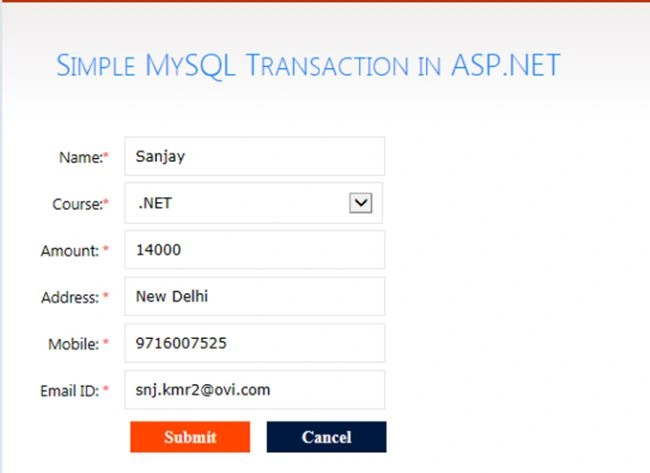
Now run the page, it will look like the following.
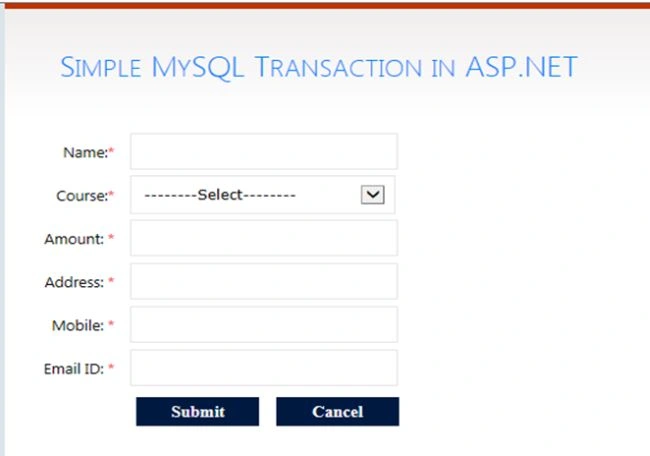
Now, Student information Enter and Submit, it will look like the following:
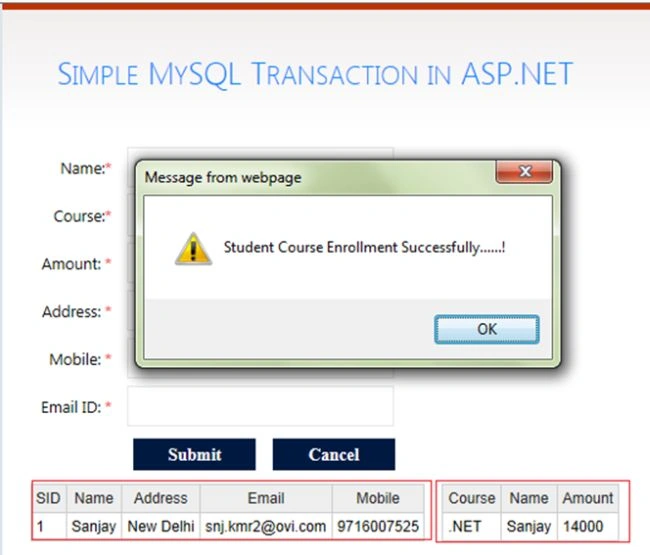
Now, show in the Message box “Student Course Enrollment Successfully”. And show the data to GridViewStudent and GridViewCourses.
Now, open the MySQLAdmin Page then show the Student and Courses table data

I hope this article is useful. If you have any other questions then please provide your comments below.
Join the conversation! Your thoughts help the community grow.