


In this article we will learn about the HTML Data Source of Windows Phone App Studio. We will create a static app of two pages as a demo for learning how to use this tool.
HTML Data Source
In Windows Phone App Studio we have various types of Data Sources. Some of the Data Sources are for dynamic purposes and some are for static use. A HTML Data Source is in that category. It is a Data Source that holds the HTML content. It supports only basic HTML tags like div, image, table, anchor and so on. The Style is tag is not supported. This HTML Data Source comes with one detail page that is used for displaying the HTML data. This Data Source suffers from one shortcoming, the finite length of HTML. You can enter the HTML content up to the length of 2048 characters. Since this tool is in beta stage, we can expect to have a remedy to this problem in the future releases from Microsoft. This issue is also raised in the user voice forum of Microsoft.
When to use
There is no specific rule for it that says when one should use it or not. It's totally a user choice. But it is good for:
- simple static text display.
- About page of the App.
- Help or App instructions.
Overcoming 2048 size
As I said, it supports a maximum of 2048 characters. To overcome this limit we can use more then one HTML Data Source. All those HTML Data Sources can be linked using menu items. To understand it better consider this example, In a book the index page is like your first app page that contains a link to other pages. Here other pages are nothing but HTML Data Sources. In this way you can create various page based apps. From this technique you can create various tutorials, tips, tricks, shortcuts and so on like apps. The HTML Data Source will be very useful in that case.

To add the HTML Data Source:
- First open the "Configure App content" page of App Studio.
- Click on "+" and select "Add Section" from the pop-up.
- On add section page, add your section name
- Choose the HTML as the Data Source type
- Enter the Data Source name.
- Click "Save changes".
You are done with adding the Data Source. Now the next step is to configure it.
Setting HTML Data Source
To add the data or content or more precisely HTML to your Data Source:
- Click on the newly added Data Source.
- Enter your HTML.
- The editor can take HTML tags as well as simple text.
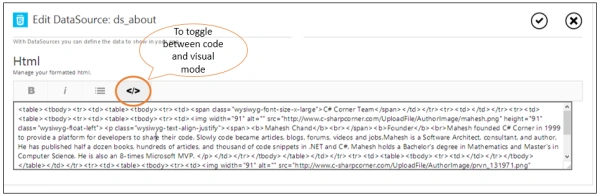
- If you want to use the HTML tags then click on "Show code".
- Now you can insert your HTML code.
- To hide to code and to see the visuals click on "Show code" again.
- The editor also supports the direct HTML copy and paste operation.
- You can copy the web page section and paste it into an editor. The editor will automatically drop the unsupported tags. This technique is used in my demo.
Demo App
Now let's do a simple demonstration of the preceding text.
-
Open App Studio from this link http://apps.windowsstore.com/default.htm.
-
Click on "Start Building" (assuming you are already logged into your account).
-
Click on "Create".
-
Click on "Create an Empty Application".
-
Set the App logo. I'm using the C# Corner logo. The logo should be in PNG format only.
-
Set the App title and Description and click "Next"

-
Click on "Add section" and select "Add Section".
-
Now enter "About" for the section name.
-
Choose the HTML Data Source and provide it a name in the Data Source name field.
-
Click on "Save changes".

-
Now add one more section by repeating the preceding four steps. Name this section "Delhi Chapter Lead"

-
Now click "Save changes".
-
Our App sections are ready. Next we need to configure the Data Sources and then we are done.

-
Click on the first Data Source in the left side. This is bound to an About page.

-
To view the HTML code click on "Show code".
-
Enter whatever HTML you want in an editor. In this demo I'm using copy & paste.
-
To add HTML as in the Demo, select the first two team members with images by selecting from the mouse and copy it.
-
Now paste it into your editor and you are done.
-
Click on "Save changes".

-
Repeat the same steps for the Delhi chapter lead page.

For the remaining steps to complete this app the following article may help you:
Summary
We have completed the HTML Data Source. Now you can use it in your application freely. This is a very popular way of creating a static app. Using App Studio you can create an Information based app or static app in just 10 minutes. That's all for this article. Don't forget to comment and like. In the next article we will learn about the collections. 
Join the conversation! Your thoughts help the community grow.