

Introduction
This article shows the development of an ASP.NET Web application in an MVC 5 project template that connects with an existing database. I have a database with which we can create a model that supports interaction with the application and the performance of Create, Read, Update, and Delete (CRUD) operations.
Web Application in MVC
Let's create an ASP.NET Web Application with the MVC 5 project template with the following procedure.
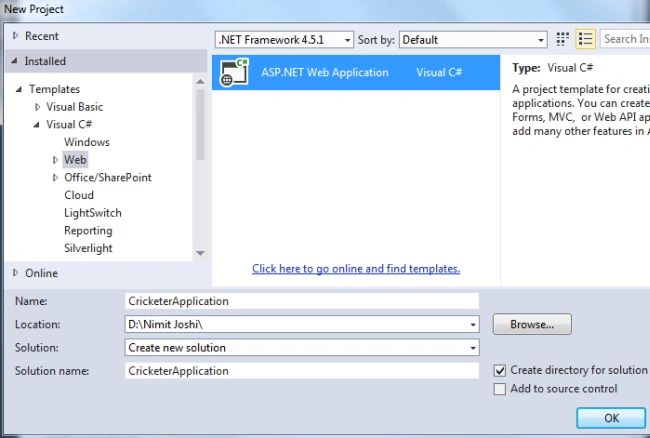
Step 1. Open Visual Studio 2013 and create a new project.
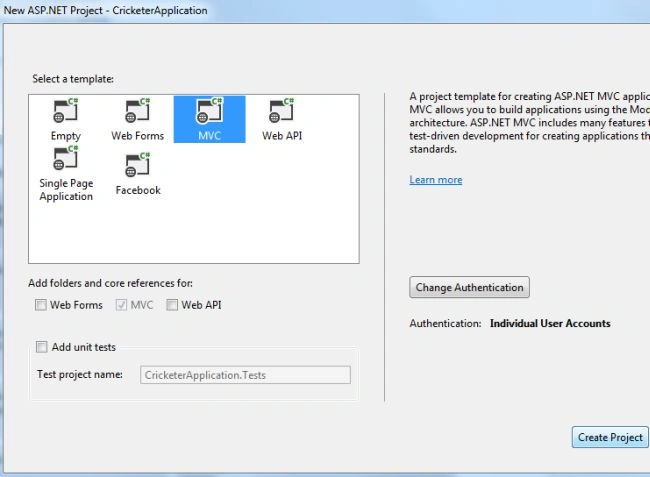
Step 2. Select the MVC project template to create an application.
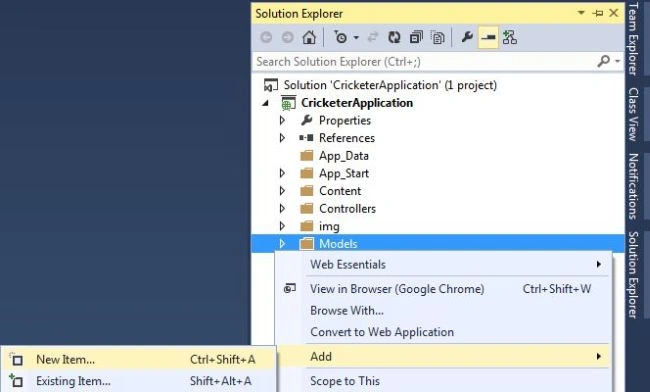
Step 3. In your Solution Explorer, right-click on your Models to add a New Item.
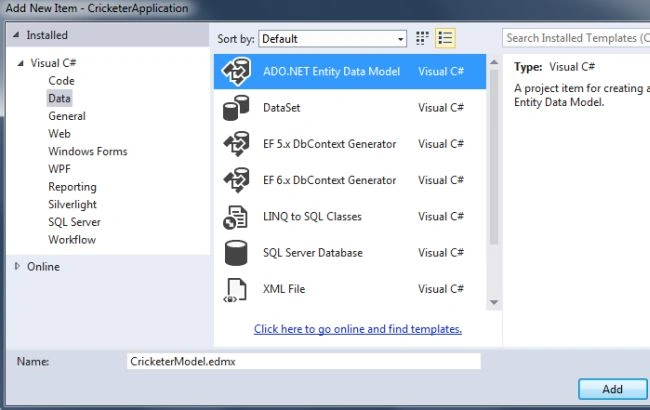
Step 4. Select ADO.NET Entity Data Model.
Step 5. In the next wizard, select the data connection that was created earlier. Provide also the Connection String name.
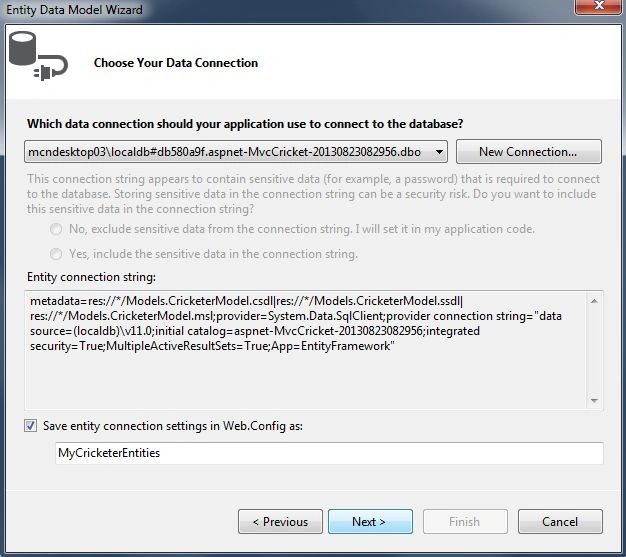
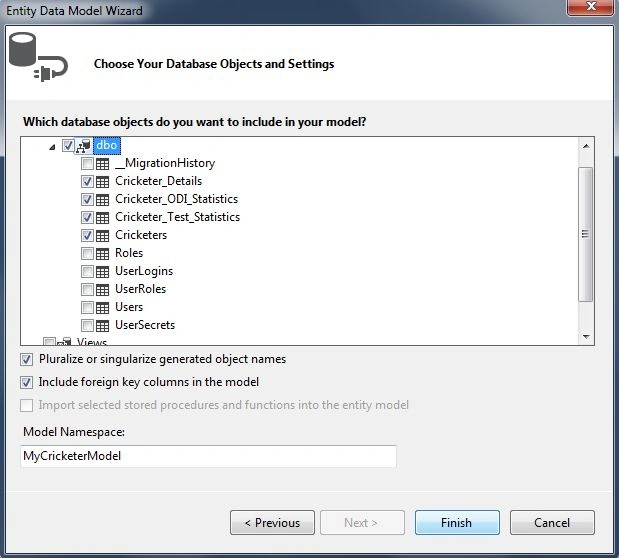
Step 6. The next wizard will help you to choose the tables.
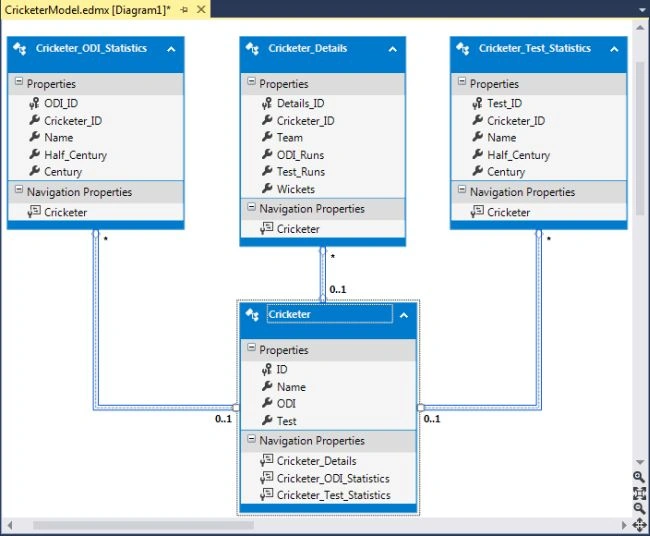
Step 7. Visual Studio automatically creates the Model and generates a view for the model.
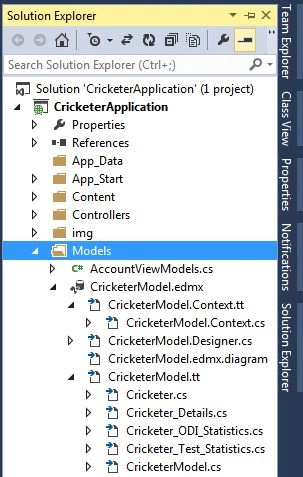
You can also see in your Solution Explorer that the CricketerModel has many new files related to the database.
So far we have created a model, and now we move to add the Controllers and Views for our Model. So Let's proceed with the following section.
- Adding Controller & View
- Working with View
Adding Controller & View
MVC 5 can create a Controller with the corresponding views using Entity Framework 6. We need to just use Scaffolding. So let's start with the following procedure.
Step 1. In your Solution Explorer, Right-click on your Controller to Scaffold.
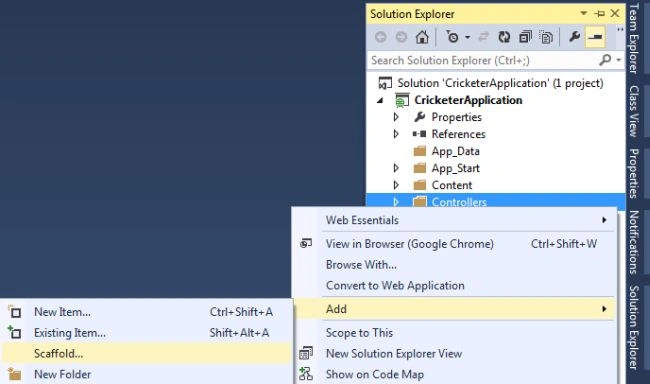
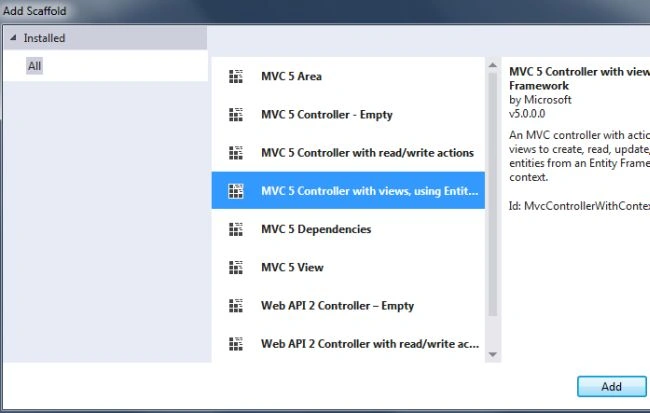
Step 2. In the next wizard, select the controller with the views option as shown below.
Step 3. In the next wizard enter the controller name and choose the corresponding model and the DbContext class as shown below.
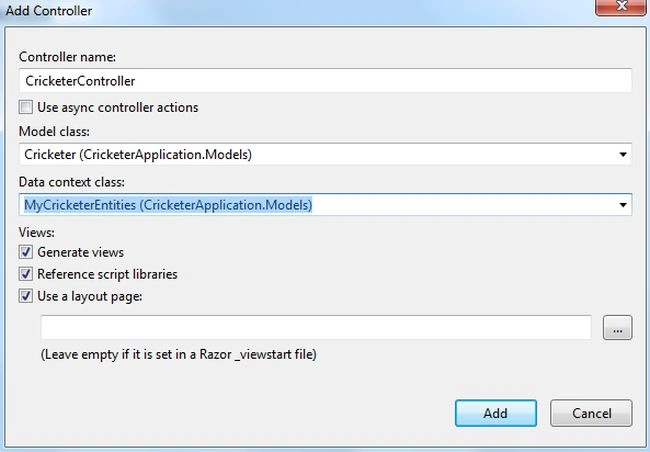
Click on Add. You might get an error, if you didn't build your project. So build your solution and again follow the steps.
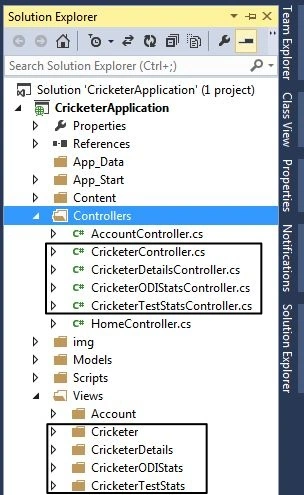
After adding the controller, Visual Studio automatically creates a Cricketer Controller and the corresponding Cricketer View. You can see that in the following image.
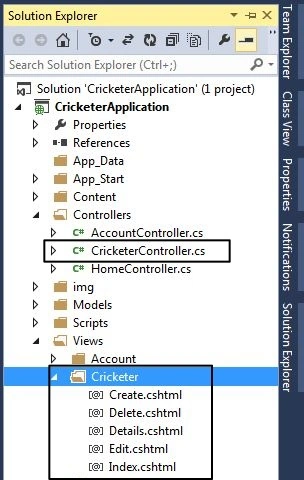
Step 4. Now, add a controller for your remaining classes, like Cricker_Details, Cricketer_ODI_Statistics, and Cricketer_Test_Statistics by performing the same steps as above. You can see all controllers and corresponding views in the following image.
Working with View
Now your controller and view are ready. You can create and view all your data (added to the database) in the browser. To work with them use the following procedure.
Create and Read Operations
Step 1. To work with the Cricketer, select the Index. cshtml in the Cricketer view and open it in the browser.
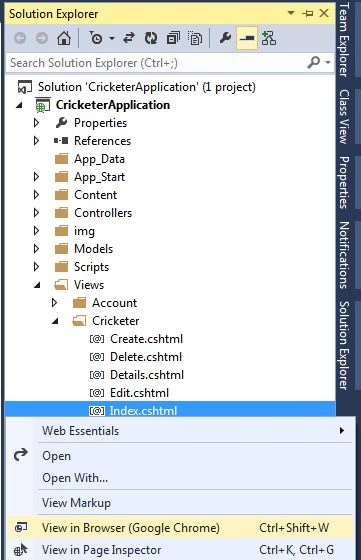
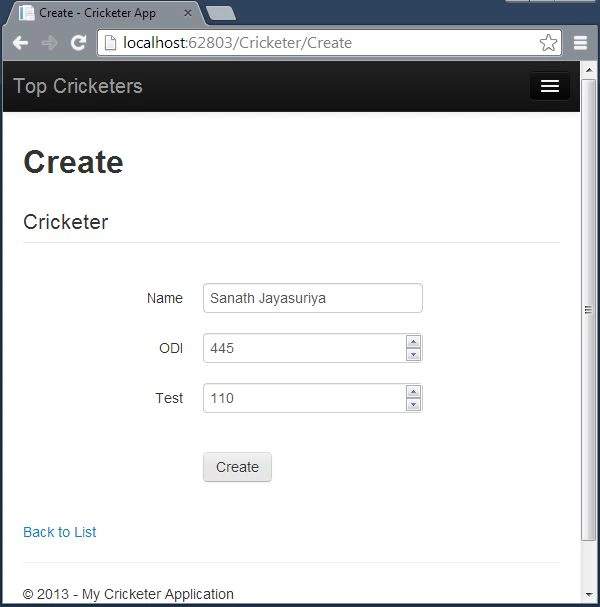
Step 2. Click on Create New. Enter some new cricketers.
Step 3. You can see your Cricketer as shown below.
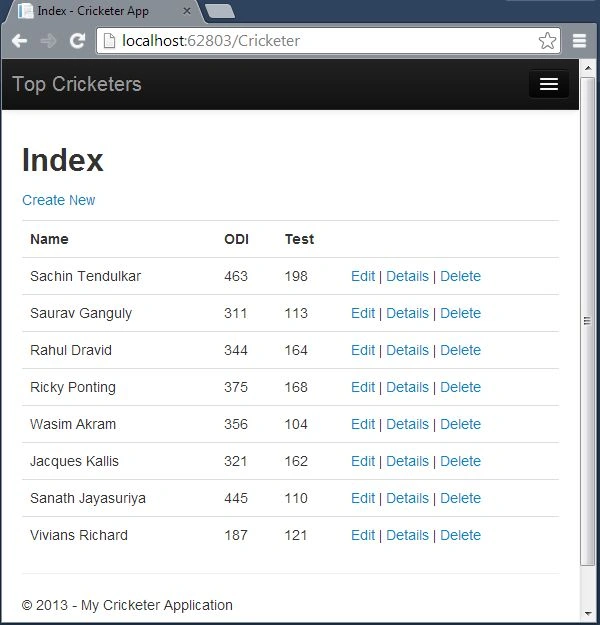
Cricketer
Let's add some Cricketer with the following procedure:
Cricketer Details
Add some Cricketer Details with the following procedure.
Step 1. Open Index. cshtml of the CricketerDetails view.
Step 2. Add the details for the new cricketers.
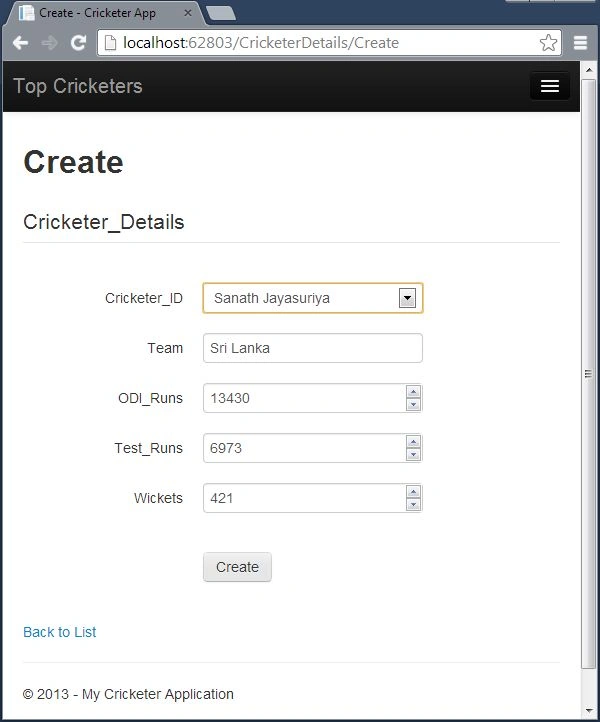
Step 3. You can see the added details as shown below.
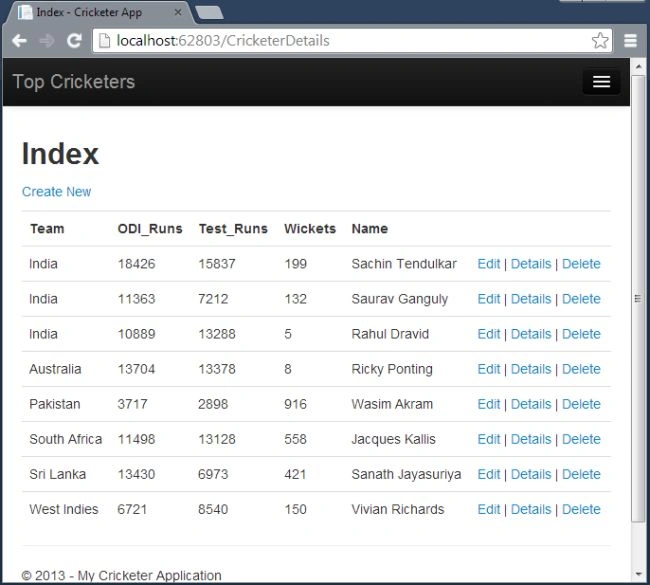
Note. Perform the same steps for the remaining views to create the cricketer details and information.
In the preceding steps, you have performed Create and Read operations. Now let's do Edit and Delete operations.
Edit & Delete Operations
Edit
To edit or update the information use the following procedure.
Step 1. Click on Edit on which you need to edit the information.
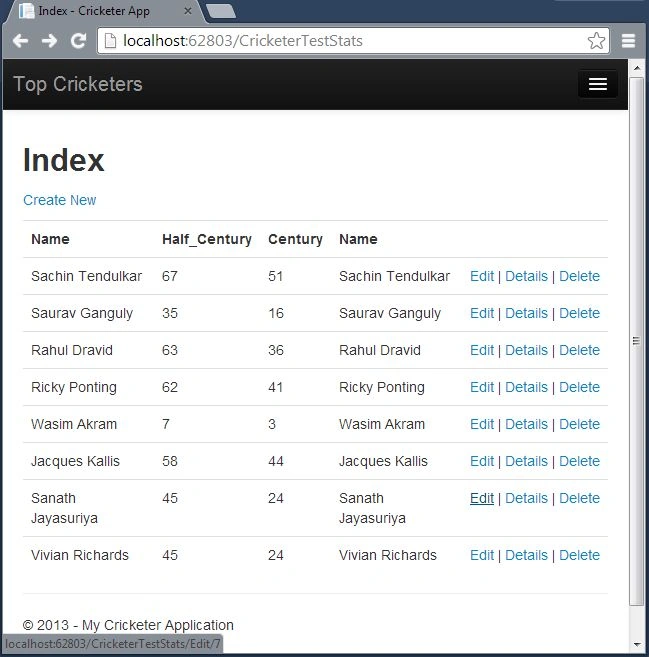
Step 2. Edit the information.
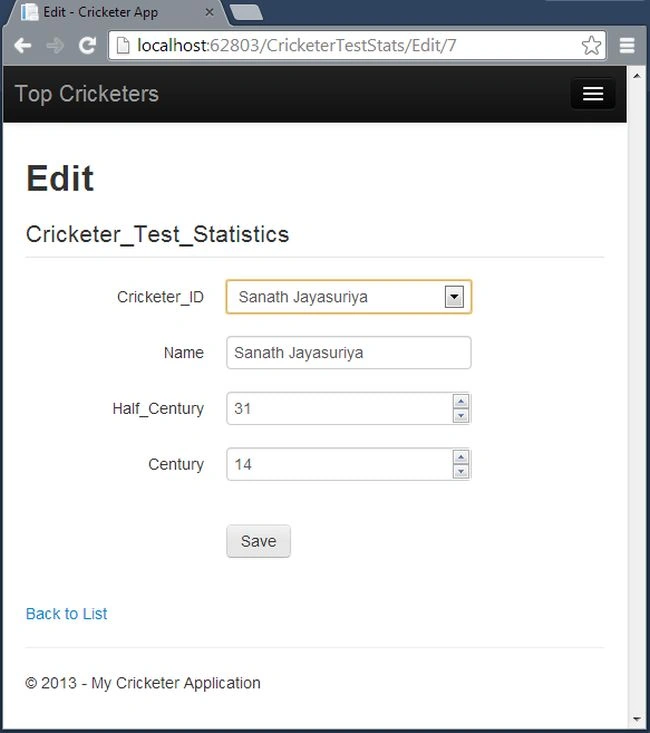
Delete
To delete the information use the following procedure.
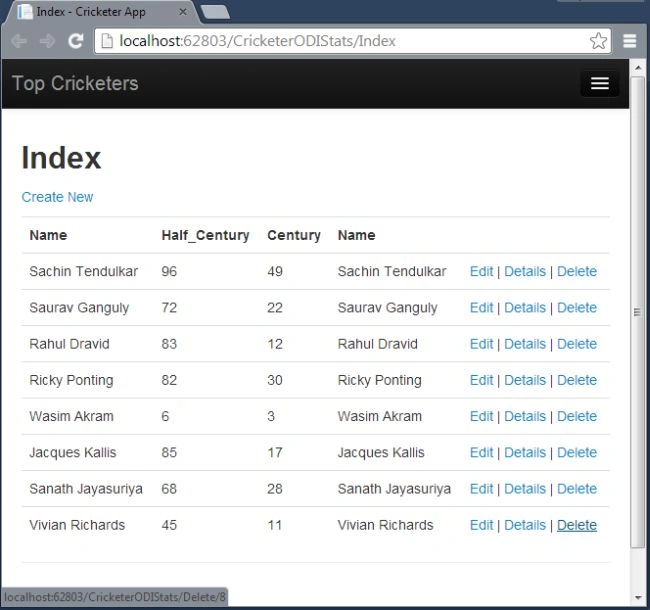
Step 1. Click on Delete on which you need to delete the cricketer.
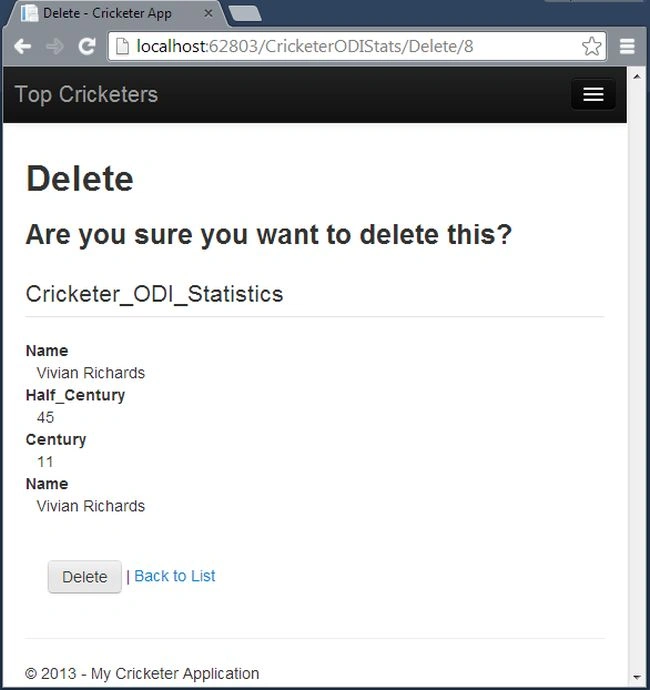
Step 2. Choose Yes if you want to delete it permanently.
Summary
This article will help you learn to create a new ASP.NET Web Application add the database model with the application and perform the CRUD operations in the Database First Approach in MVC 5. In the next part, we will make some changes in the database and create the corresponding details in the application.
- Next article: DB First Approach: Part 3 >>
- Previous article: << DB First Approach: Part 1
Sr KarthigaPosted Feb 21, 2016, 11:16 PM
nice one
Sr KarthigaPosted Feb 21, 2016, 11:16 PM
Nice explanation
saurabh gaurPosted Sep 30, 2015, 8:06 AM
I am also getting this error while trying to delete only in CricketerController------------- this is the error ---Server Error in '/' Application. The DELETE statement conflicted with the REFERENCE constraint "FK__Cricketer__Crick__1273C1CD". The conflict occurred in database "asp-MvcCricket-20130823082956", table "dbo.Cricketer_ODI_Statistics", column 'Cricketer_ID'. The statement has been terminated. Description: An unhandled exception occurred during the execution of the current web request. Please review the stack trace for more information about the error and where it originated in the code. Exception Details: System.Data.SqlClient.SqlException: The DELETE statement conflicted with the REFERENCE constraint "FK__Cricketer__Crick__1273C1CD". The conflict occurred in database "asp-MvcCricket-20130823082956", table "dbo.Cricketer_ODI_Statistics", column 'Cricketer_ID'. The statement has been terminated. Source Error: Line 112: Cricketer cricketer = db.Cricketers.Find(id); Line 113: db.Cricketers.Remove(cricketer); Line 114: db.SaveChanges(); Line 115: return RedirectToAction("Index"); Line 116: } Source File: c:\Users\SAURABH\Documents\Visual Studio 2013\Projects\emptyMVC5\emptyMVC5\Controllers\CricketerController.cs Line: 114 Stack Trace: [SqlException (0x80131904): The DELETE statement conflicted with the REFERENCE constraint "FK__Cricketer__Crick__1273C1CD". The conflict occurred in database "asp-MvcCricket-20130823082956", table "dbo.Cricketer_ODI_Statistics", column 'Cricketer_ID'. The statement has been terminated.] System.Data.SqlClient.SqlConnection.OnError(SqlException exception, Boolean breakConnection, Action`1 wrapCloseInAction) +1791910 System.Data.SqlClient.SqlInternalConnection.OnError(SqlException exception, Boolean breakConnection, Action`1 wrapCloseInAction) +5347106 System.Data.SqlClient.TdsParser.ThrowExceptionAndWarning(TdsParserStateObject stateObj, Boolean callerHasConnectionLock, Boolean asyncClose) +546 System.Data.SqlClient.TdsParser.TryRun(RunBehavior runBehavior, SqlCommand cmdHandler, SqlDataReader dataStream, BulkCopySimpleResultSet bulkCopyHandler, TdsParserStateObject stateObj, Boolean& dataReady) +1693 System.Data.SqlClient.SqlCommand.FinishExecuteReader(SqlDataReader ds, RunBehavior runBehavior, String resetOptionsString) +275 System.Data.SqlClient.SqlCommand.RunExecuteReaderTds(CommandBehavior cmdBehavior, RunBehavior runBehavior, Boolean returnStream, Boolean async, Int32 timeout, Task& task, Boolean asyncWrite, SqlDataReader ds) +1421 System.Data.SqlClient.SqlCommand.RunExecuteReader(CommandBehavior cmdBehavior, RunBehavior runBehavior, Boolean returnStream, String method, TaskCompletionSource`1 completion, Int32 timeout, Task& task, Boolean asyncWrite) +177 System.Data.SqlClient.SqlCommand.InternalExecuteNonQuery(TaskCompletionSource`1 completion, String methodName, Boolean sendToPipe, Int32 timeout, Boolean asyncWrite) +208 System.Data.SqlClient.SqlCommand.ExecuteNonQuery() +163 System.Data.Mapping.Update.Internal.DynamicUpdateCommand.Execute(UpdateTranslator translator, EntityConnection connection, Dictionary`2 identifierValues, List`1 generatedValues) +530 System.Data.Mapping.Update.Internal.UpdateTranslator.Update(IEntityStateManager stateManager, IEntityAdapter adapter) +261 [UpdateException: An error occurred while updating the entries. See the inner exception for details.] System.Data.Mapping.Update.Internal.UpdateTranslator.Update(IEntityStateManager stateManager, IEntityAdapter adapter) +441 System.Data.EntityClient.EntityAdapter.Update(IEntityStateManager entityCache) +146 System.Data.Objects.ObjectContext.SaveChanges(SaveOptions options) +570 System.Data.Entity.Internal.InternalContext.SaveChanges() +114 [DbUpdateException: An error occurred while updating the entries. See the inner exception for details.] System.Data.Entity.Internal.InternalContext.SaveChanges() +200 System.Data.Entity.Internal.LazyInternalContext.SaveChanges() +33 System.Data.Entity.DbContext.SaveChanges() +20 emptyMVC5.Controllers.CricketerController.DeleteConfirmed(Int32 id) in c:\Users\SAURABH\Documents\Visual Studio 2013\Projects\emptyMVC5\emptyMVC5\Controllers\CricketerController.cs:114 lambda_method(Closure , ControllerBase , Object[] ) +97 System.Web.Mvc.ActionMethodDispatcher.Execute(ControllerBase controller, Object[] parameters) +14 System.Web.Mvc.ReflectedActionDescriptor.Execute(ControllerContext controllerContext, IDictionary`2 parameters) +156 System.Web.Mvc.ControllerActionInvoker.InvokeActionMethod(ControllerContext controllerContext, ActionDescriptor actionDescriptor, IDictionary`2 parameters) +27 System.Web.Mvc.Async.AsyncControllerActionInvoker.<BeginInvokeSynchronousActionMethod>b__39(IAsyncResult asyncResult, ActionInvocation innerInvokeState) +22 System.Web.Mvc.Async.WrappedAsyncResult`2.CallEndDelegate(IAsyncResult asyncResult) +29 System.Web.Mvc.Async.WrappedAsyncResultBase`1.End() +49 System.Web.Mvc.Async.AsyncControllerActionInvoker.EndInvokeActionMethod(IAsyncResult asyncResult) +32 System.Web.Mvc.Async.AsyncInvocationWithFilters.<InvokeActionMethodFilterAsynchronouslyRecursive>b__3d() +50 System.Web.Mvc.Async.<>c__DisplayClass46.<InvokeActionMethodFilterAsynchronouslyRecursive>b__3f() +225 System.Web.Mvc.Async.<>c__DisplayClass33.<BeginInvokeActionMethodWithFilters>b__32(IAsyncResult asyncResult) +10 System.Web.Mvc.Async.WrappedAsyncResult`1.CallEndDelegate(IAsyncResult asyncResult) +10 System.Web.Mvc.Async.WrappedAsyncResultBase`1.End() +49 System.Web.Mvc.Async.AsyncControllerActionInvoker.EndInvokeActionMethodWithFilters(IAsyncResult asyncResult) +34 System.Web.Mvc.Async.<>c__DisplayClass2b.<BeginInvokeAction>b__1c() +26 System.Web.Mvc.Async.<>c__DisplayClass21.<BeginInvokeAction>b__1e(IAsyncResult asyncResult) +100 System.Web.Mvc.Async.WrappedAsyncResult`1.CallEndDelegate(IAsyncResult asyncResult) +10 System.Web.Mvc.Async.WrappedAsyncResultBase`1.End() +49 System.Web.Mvc.Async.AsyncControllerActionInvoker.EndInvokeAction(IAsyncResult asyncResult) +27 System.Web.Mvc.Controller.<BeginExecuteCore>b__1d(IAsyncResult asyncResult, ExecuteCoreState innerState) +13 System.Web.Mvc.Async.WrappedAsyncVoid`1.CallEndDelegate(IAsyncResult asyncResult) +36 System.Web.Mvc.Async.WrappedAsyncResultBase`1.End() +54 System.Web.Mvc.Controller.EndExecuteCore(IAsyncResult asyncResult) +39 System.Web.Mvc.Controller.<BeginExecute>b__15(IAsyncResult asyncResult, Controller controller) +12 System.Web.Mvc.Async.WrappedAsyncVoid`1.CallEndDelegate(IAsyncResult asyncResult) +28 System.Web.Mvc.Async.WrappedAsyncResultBase`1.End() +54 System.Web.Mvc.Controller.EndExecute(IAsyncResult asyncResult) +29 System.Web.Mvc.Controller.System.Web.Mvc.Async.IAsyncController.EndExecute(IAsyncResult asyncResult) +10 System.Web.Mvc.MvcHandler.<BeginProcessRequest>b__5(IAsyncResult asyncResult, ProcessRequestState innerState) +21 System.Web.Mvc.Async.WrappedAsyncVoid`1.CallEndDelegate(IAsyncResult asyncResult) +36 System.Web.Mvc.Async.WrappedAsyncResultBase`1.End() +54 System.Web.Mvc.MvcHandler.EndProcessRequest(IAsyncResult asyncResult) +31 System.Web.Mvc.MvcHandler.System.Web.IHttpAsyncHandler.EndProcessRequest(IAsyncResult result) +9 System.Web.CallHandlerExecutionStep.System.Web.HttpApplication.IExecutionStep.Execute() +9651796 System.Web.HttpApplication.ExecuteStep(IExecutionStep step, Boolean& completedSynchronously) +155 Version Information: Microsoft .NET Framework Version:4.0.30319; ASP.NET Version:4.0.30319.34249
Sandeep Singh ShekhawatPosted Feb 15, 2014, 4:54 AM
@raha please post your error on forum and please elaborate the error what are you getting.?
raha amirchermahiniPosted Feb 15, 2014, 4:33 AM
When I want to create new give me the following error : db.Savechanges(); in CricketerController.cs line 54 . help me why ?