
Introduction
The DropShadowExtender control is used to add shadow to panel controls. It allows a user to set the width of a shadow, opaque as well as rounded corner. Here I will use the DropShadow Extender in my web application. It has some properties to which I will use here. They are given below.
- TargetControlID : The ID of control to operate.
- Width : The width of the shadow in pixels. The default width is 5.
- Opacity : The opacity of dropshadow. It ranges from 0 ( 0 for full transparent ) to 1.0 (1 for full opaque ).
- Rounded : To set rounded corners for a control as well as shadows. It has two values, "true" or "false". True for setting rounded otherwise default value is false.
Now we take an ASP.NET web application. At first we create an application without using a DropShadowExtender control, then we will use this DropShadowExtender control so that we can understand what changes it makes. Take a panel and two labels and two TextBoxes and change their name and text properties as below.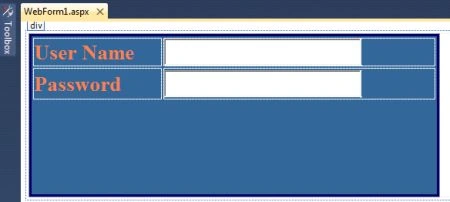
Code for the .aspx page:
<div>
<asp:Panel ID="Panel1" runat="server" BackColor="#336699" BorderColor="#000066"
BorderStyle="Solid" Height="205px" Width="526px">
<table>
<tr>
<td class="style1"><asp:Label ID="lblusername" Font-Bold="true" Font-Size="20" ForeColor="Coral" Text="User Name" runat="server"></asp:Label> </td>
<td class="style5"> <asp:TextBox ID="txtusername" Height="35px" Width="248px" Font-Size="20" runat="server"></asp:TextBox></td>
</tr>
<tr>
<td class="style1"><asp:Label ID="lblpwd" Font-Bold="true" Font-Size="20" ForeColor="Coral" Text="Password" runat="server"></asp:Label></td>
<td class="style2"><asp:TextBox ID="txtpwd" Height="35px" Width="248px" Font-Size="20"
runat="server" TextMode="Password"></asp:TextBox></td>
</tr>
</table>
</asp:Panel>
</div>
Run this application.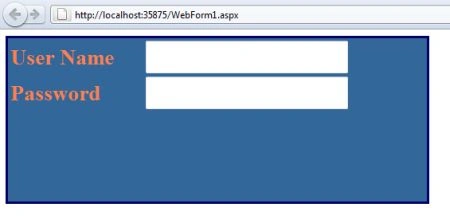
It is simple example. I have taken some control in panel and displaying it. Now we add DropShadowExtender control. Follows the given steps.
Step 1: Take a ASP.NET Web Application. And at first take ScripManager from your Toolbox.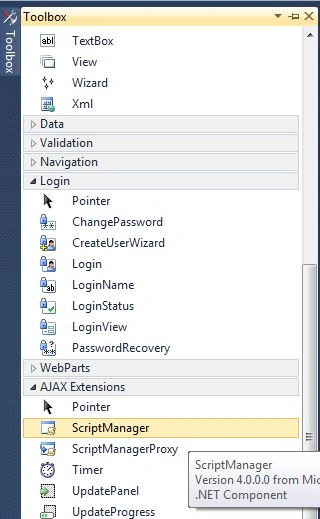
Code for the .aspx page
<form id="form1" runat="server">
<asp:ScriptManager ID="ScriptManager1" runat="server">
</asp:ScriptManager>
<div>
Step 2: Take a panel and some controls for the panel, change their name and text property and arrange them like the following figure.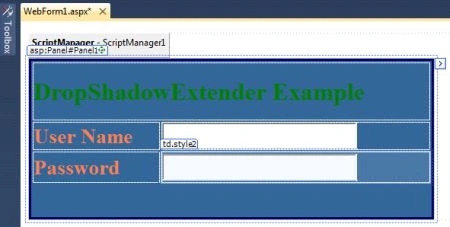
Code for the .aspx page:
</asp:ScriptManager>
<div>
<asp:Panel ID="Panel1" runat="server" BackColor="#336699" BorderColor="#000066"
BorderStyle="Solid" Height="205px" Width="526px">
<table>
<tr>
<td colspan="2" style="color:Green" class="style3"><h1>DropShadowExtender Example</h1></td>
</tr>
<tr>
<td class="style1"><asp:Label ID="lblusername" Font-Bold="true" Font-Size="20" ForeColor="Coral" Text="User Name" runat="server"></asp:Label> </td>
<td class="style5"> <asp:TextBox ID="txtusername" Height="35px" Width="248px" Font-Size="20" runat="server"></asp:TextBox></td>
</tr>
<tr>
<td class="style1"><asp:Label ID="lblpwd" Font-Bold="true" Font-Size="20" ForeColor="Coral" Text="Password" runat="server"></asp:Label></td>
<td class="style2"><asp:TextBox ID="txtpwd" Height="35px" Width="248px" Font-Size="20"
runat="server" TextMode="Password"></asp:TextBox></td>
</tr>
</table>
</asp:Panel>
Step 3 : Go to the toolbox and drag a DropShadowExtender control to the form.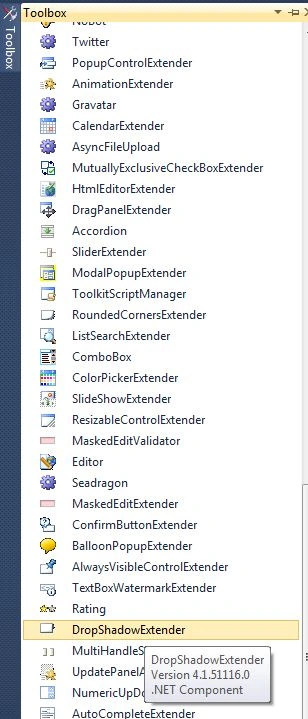
Code for the .aspx page
<asp:DropShadowExtender ID="DropShadowExtender1" runat="server">
</asp:DropShadowExtender>
Step 4: Set the properties of the DropShadowExtender control.
<asp:DropShadowExtender ID="DropShadowExtender1" TargetControlID="Panel1" Width="10" Opacity=".5" Rounded="true" runat="server">
</asp:DropShadowExtender>
Code on .aspx page
<form id="form1" runat="server">
<asp:ScriptManager ID="ScriptManager1" runat="server">
</asp:ScriptManager>
<div>
<asp:Panel ID="Panel1" runat="server" BackColor="#336699" BorderColor="#000066"
BorderStyle="Solid" Height="205px" Width="526px">
<table>
<tr>
<td colspan="2" style="color:Green" class="style3"><h1>DropShadowExtender Example</h1></td>
</tr>
<tr>
<td class="style1"><asp:Label ID="lblusername" Font-Bold="true" Font-Size="20" ForeColor="Coral" Text="User Name" runat="server"></asp:Label> </td>
<td class="style5"> <asp:TextBox ID="txtusername" Height="35px" Width="248px" Font-Size="20" runat="server"></asp:TextBox></td>
</tr>
<tr>
<td class="style1"><asp:Label ID="lblpwd" Font-Bold="true" Font-Size="20" ForeColor="Coral" Text="Password" runat="server"></asp:Label></td>
<td class="style2"><asp:TextBox ID="txtpwd" Height="35px" Width="248px" Font-Size="20"
runat="server" TextMode="Password"></asp:TextBox></td>
</tr>
</table>
</asp:Panel>
<asp:DropShadowExtender ID="DropShadowExtender1" TargetControlID="Panel1" Width="10" Opacity=".5" Rounded="true" runat="server">
</asp:DropShadowExtender>
</div>
</form>
Run the application. 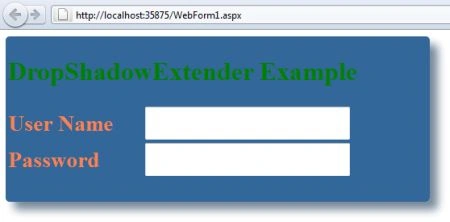
Here are some related resources.
Edison RomoPosted Jun 3, 2013, 8:54 PM
Greetings, I have a problem with DropShadowExtender in a Panel, the Panel not have the width or the height defined, because the dimensions will change according to the content that this has internally, but when I placing the DropShadowExtender the panel width changed to 100%. Thanks.