

This chapter is taken from book "Programming Windows Phone 7" by Charles Petzold published by Microsoft press. http://www.charlespetzold.com/phone/index.html
Page navigation would seem to be an advanced Silverlight programming topic, and a topic that applies only to Silverlight programming rather than XNA programming. However, there are issues involved with navigation that are related to the very important topic of tombstoning, which is what happens to your Windows Phone 7 application when the user navigates to another application through the phone's Start screen. Tombstoning is very much an issue that also affects XNA programmers.
Basic Navigation
The SilverlightSimpleNavigation project begins as usual with a
MainPage class, and as
usual I set the two TextBlock
elements for the titles and the content area of MainPage.xaml contains
only a TextBlock
that
sets a handler for its ManipulationStarted
event:
<StackPanel
x:Name="TitlePanel"
Grid.Row="0"
Margin="12,17,0,28">
<TextBlock
x:Name="ApplicationTitle"
Text="SIMPLE NAVIGATION"
Style="{StaticResource
PhoneTextNormalStyle}"/>
<TextBlock
x:Name="PageTitle"
Text="main page"
Margin="9,-7,0,0"
Style="{StaticResource
PhoneTextTitle1Style}"/>
</StackPanel>
<!--ContentPanel - place
additional content here-->
<Grid
x:Name="ContentPanel"
Grid.Row="1"
Margin="12,0,12,0">
<TextBlock
Text="Navigate to 2nd
Page"
HorizontalAlignment="Center"
VerticalAlignment="Center"
Padding="0 34"
ManipulationStarted="OnTextBlockManipulationStarted"
/>
</Grid>
Notice the Text
property on the TextBlock:
"Navigate to 2nd page." The code-behind file contains the handler for
ManipulationStarted but
also overrides the OnManipulationStarted
method for the whole page:
namespace
SilverlightSimpleNavigation
{
public partial
class MainPage
: PhoneApplicationPage
{
Random rand =
new Random();
public MainPage()
{
InitializeComponent();
}
void OnTextBlockManipulationStarted(object
sender, ManipulationStartedEventArgs args)
{
this.NavigationService.Navigate(new
Uri("/SecondPage.xaml",
UriKind.Relative));
args.Complete();
args.Handled = true;
}
protected
override void OnManipulationStarted(ManipulationStartedEventArgs
args)
{
ContentPanel.Background = new
SolidColorBrush(
Color.FromArgb(255, (byte)rand.Next(255),
(byte)rand.Next(255),
(byte)rand.Next(255)));
base.OnManipulationStarted(args);
}
}
}
If you touch anywhere on the page outside of the TextBlock, the background of the ContentPanel is set to a random color. Touch the TextBlock, and the handler accesses the NavigationService property of the page.
I created a second page in the SilverlightSimpleNavigation project by right-clicking the project name in the Visual Studio solution explorer, and selecting Add and New Item. From the Add New Item dialog box, I picked Windows Phone Portrait Page and gave it a name of SecondPage.xaml.
I gave the titles In SecondPage.xaml the same application name as
FirstPage.xaml but a page title of "second page" and the content area of
SecondPage.xaml is very much like MainPage.xaml but the
TextBlock reads "Go
Back to 1st Page":
<StackPanel
x:Name="TitlePanel"
Grid.Row="0"
Margin="12,17,0,28">
<TextBlock
x:Name="ApplicationTitle"
Text="SIMPLE NAVIGATION"
Style="{StaticResource
PhoneTextNormalStyle}"/>
<TextBlock
x:Name="PageTitle"
Text="second page"
Margin="9,-7,0,0"
Style="{StaticResource
PhoneTextTitle1Style}"/>
</StackPanel>
<!--ContentPanel - place additional content here-->
<Grid
x:Name="ContentPanel"
Grid.Row="1"
Margin="12,0,12,0">
<TextBlock
Text="Go Back to 1st Page"
HorizontalAlignment="Center"
VerticalAlignment="Center"
Padding="0 34"
ManipulationStarted="OnTextBlockManipulationStarted"
/>
</Grid>
The code-behind file of the
SecondPage class is also very much like the
FirstPage class:
namespace
SilverlightSimpleNavigation
{
public partial
class SecondPage
: PhoneApplicationPage
{
Random rand =
new Random();
public SecondPage()
{
InitializeComponent();
}
void OnTextBlockManipulationStarted(object
sender, ManipulationStartedEventArgs args)
{
this.NavigationService.GoBack();
args.Complete();
args.Handled = true;
}
protected
override void OnManipulationStarted(ManipulationStartedEventArgs
args)
{
ContentPanel.Background = new
SolidColorBrush(
Color.FromArgb(255, (byte)rand.Next(255),
(byte)rand.Next(255),
(byte)rand.Next(255)));
base.OnManipulationStarted(args);
}
}
}
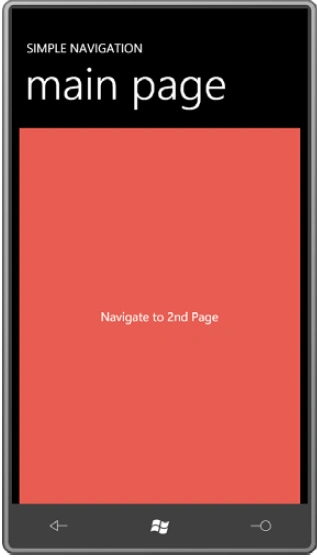
Let's run the program. The program begins with the main page, and you can touch the screen to change the color:
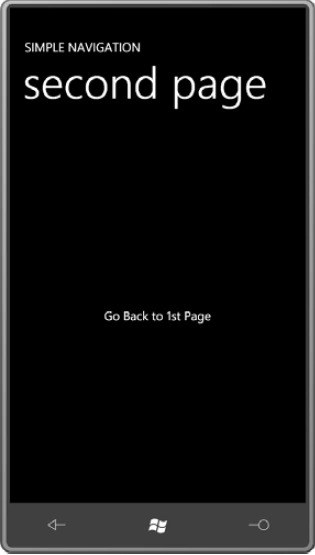
Now touch the TextBlock that says "Navigate to 2nd Page" and the second page comes into view:
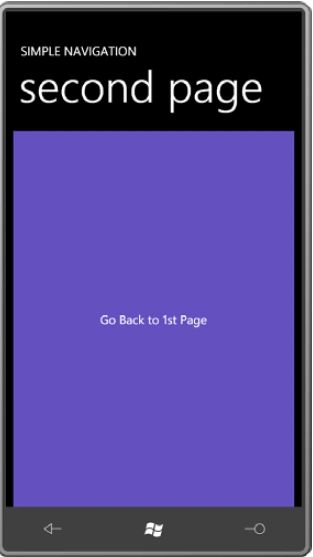
You can touch that screen to change to a different color:
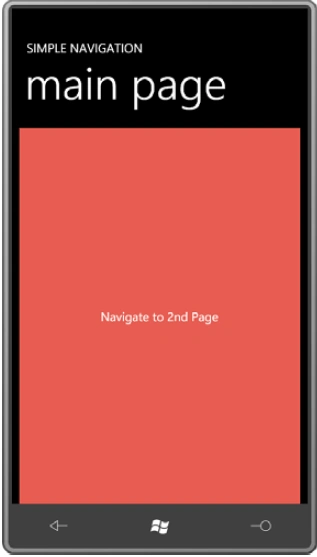
Now touch the TextBlock that says "Go Back to 1st Page". (Alternatively, you can press the phone's hardware Back button.) You'll be whisked back to the main page with the color just as you left it:
Passing Data to Pages
The possible use of pages as dialog boxes provokes two questions:
- How do I pass data from a source page to a destination page?
- How do I return data when going back to the original page?
The following project is called SilverlightPassData. It is very much
like the first project in this chapter except that when
MainPage
navigates to SecondPage,
it provides SecondPage
with its current background color, and
SecondPage
initializes itself with that color. Here's the content area of MainPage.xaml, the same as in the previous
program:
<Grid
x:Name="ContentPanel"
Grid.Row="1"
Margin="12,0,12,0">
<TextBlock
Text="Navigate to
2nd Page"
HorizontalAlignment="Center"
VerticalAlignment="Center"
padding="0 34"
ManipulationStarted="OnTextBlockManipulationStarted"
/>
</Grid>
I won't show you the
OnManipulationStarted
override because it's the same as in the previous program, but the
ManipulationStarted
event handler for the TextBlock
is a bit enhanced:
void OnTextBlockManipulationStarted(object
sender,
ManipulationStartedEventArgs args)
{
string
destination = "/SecondPage.xaml";
if
(ContentPanel.Background
is
SolidColorBrush)
{
Color clr = (ContentPanel.Background
as
SolidColorBrush).Color;
destination +=
String.Format("?Red={0}&Green={1}&Blue={2}",
clr.R, clr.G, clr.B);
}
this.NavigationService.Navigate(new
Uri(destination,
UriKind.Relative));
args.Complete();
args.Handled =
true;
}
The SilverlightPassData project also contains a
SecondPage class that
is the same as the one in the first project except that the code-behind file
contains an override of the OnNavigatedTo
method:
protected
override
void
OnNavigatedTo(NavigationEventArgs
args)
{
IDictionary<string,
string>
parameters = this.NavigationContext.QueryString;
if
(parameters.ContainsKey("Red"))
{
byte R =
Byte.Parse(parameters["Red"]);
byte G =
Byte.Parse(parameters["Green"]);
byte B =
Byte.Parse(parameters["Blue"]);
ContentPanel.Background =
new
SolidColorBrush(Color.FromArgb(255,
R, G, B));
}
base.OnNavigatedTo(args);
}
Now as you navigate from MainPage to SecondPage, the background color remains the same. As you go back, however, that's not the case. There is no built-in facility like the query string to return data from one page to another.
Sharing Data Among Pages
Keep in mind that all the pages in your program have convenient access to the App class that derives from Application. The static Application.Current property returns the Application object associated with the program, and you can simply cast that to App. This means that you can use the App class for storing data you want to share among multiple pages of the application.
In the SilverlightShareData project, I defined a simple public property in the App class, I defined this property of type nullable Color rather than just Color for those cases where a SolidColorBrush has not been set on the Background property of ContentPanel.
public
partial
class
App
: Application
{
//
public property for sharing data among pages
public
Color?
SharedColor { set;
get;
}
....
}
Much of the program remains the same, except that when you touch the TextBlock in MainPage, the handler first attempts to save a color in the new App class property before navigating to SecondPage:
void OnTextBlockManipulationStarted(object
sender,
ManipulationStartedEventArgs args)
{
if
(ContentPanel.Background is
SolidColorBrush)
(Application.Current
as
App).SharedColor
=
(ContentPanel.Background as
SolidColorBrush).Color;
this.NavigationService.Navigate(new
Uri("/SecondPage.xaml",
UriKind.Relative));
args.Complete();
args.Handled =
true;
}
The OnNavigatedTo override in SecondPage than accesses that
property:
protected
override
void
OnNavigatedTo(NavigationEventArgs
args)
{
Color?
sharedColor = (Application.Current
as
App).SharedColor;
if
(sharedColor != null)
ContentPanel.Background =
new
SolidColorBrush(sharedColor.Value);
base.OnNavigatedTo(args);
}
Similarly, when you press the TextBlock on SecondPage, the handler saves whatever color the background now happens to be back in the App class before calling GoBack:
void OnTextBlockManipulationStarted(object
sender,
ManipulationStartedEventArgs args)
{
if
(ContentPanel.Background is
SolidColorBrush)
(Application.Current
as
App).SharedColor
=
(ContentPanel.Background as
SolidColorBrush).Color;
this.NavigationService.GoBack();
args.Complete();
args.Handled =
true;
}
Retaining Data across Instances
If we want SecondPage to "remember" the last color it was set to, something outside of SecondPage must be responsible for saving that data. That could be MainPage. Or, SecondPage could save its state in isolated storage. Isolated storage is much like regular disk storage. To access it, you use classes in the System.IO.IsolatedStorage namespace. Every Windows Phone 7 application has access to isolated storage but only to files that the application itself has created. Isolated storage allows an application to save data between multiple executions, and is ideal for saving application settings.
Let's modify the previous program so that
SecondPage uses this State property. In the
SilverlightRetainData project, everything is the same except for a using
directive for the Microsoft.Phone.Shell namespace and two overrides in
SecondPage. Here they are:
protected
override
void
OnNavigatedFrom(NavigationEventArgs
args)
{
if
(ContentPanel.Background is
SolidColorBrush)
{
Color clr = (ContentPanel.Background
as
SolidColorBrush).Color;
if (args.Content
is
MainPage)
(args.Content
as
MainPage).ReturnedColor
= clr;
// Save color
PhoneApplicationService.Current.State["Color"]
= clr;
}
base.OnNavigatedFrom(args);
}
protected
override
void
OnNavigatedTo(NavigationEventArgs
args)
{
//
Retrieve color
if
(PhoneApplicationService.Current.State.ContainsKey("Color"))
{
Color clr = (Color)PhoneApplicationService.Current.State["Color"];
ContentPanel.Background =
new
SolidColorBrush(clr);
}
base.OnNavigatedTo(args);
}
Now go back to MainPage. The color you set in SecondPage is displayed. From MainPage, press the phone's hardware Start button, leaving the program. Navigate around a bit if you want but eventually start pressing the Back button to come back to SilverlightRetainData and MainPage.
Summary
I hope this article helps you to learn Page Navigation and Passing, Sharing and Retaining Data in Windows Phone 7.
Join the conversation! Your thoughts help the community grow.