
Use the for loop to draw a Checkerboard in the GDIDrawer.

When the program starts, ask the user to input the size of the square in pixels.

The value accepted from the user will be checked in a loop, and must be a valid integer in the range of 10 to 200.

All exceptions must be handled.

The user will be trapped in the loop until a valid square size has been entered.

The square size must be evenly divisible into the size of the GDIDrawer window (600 and 800). The remainder of
dividing the GDIDrawer window size by the square size should be zero.

Hint:

Use the remainder operator (%) to determine if the square size is evenly divisible into 800 and 600. Set the scale
of the drawing window to the square size. Draw a checkerboard by using the remainder operator to determine if the
x and y location is even or odd (x % 2 == 0 indicates even, x % 2 == 1 indicates odd), and switch the drawing colors.
Code:

Console.Title = "Checkboard Draw";
int
irange = 0;
bool
bError;
Console.WriteLine("{0,
40}", "Checkerboard GDIDrawer");
do
{
try
{
bError =
false;
Console.Write("\nEnter
the size of the squares: ");
irange =
int.Parse(Console.ReadLine());
if ((irange < 10) || (irange > 200))
{
Console.Write("\nThe
value entered is out of range.");
continue;
}
}
catch (FormatException)
{
Console.Write("\nAn
incorrect character was entered");
continue;
}
finally
{
Console.Write("");
bError =
true;
}
for (int row = 0; row <= irange / 800;
row++)
for (int column
= 0; column <= irange / 600; column++)
{
Color color;
if (row % 2 == 1)
{
if (column % 2 == 0) color = Color.Blue;
else color = Color.Red;
}
else
{
if (column % 2 == 0) color = Color.Red;
else color = Color.Blue;
}
CDrawer Canvas =
new CDrawer(800, 600);
Canvas.Scale =
irange;
Canvas.AddRectangle(row, column, irange, irange, color);
}
}
while
(bError);
Console.Write("Press
the <Enter> key to exit: ");
Console.Read();
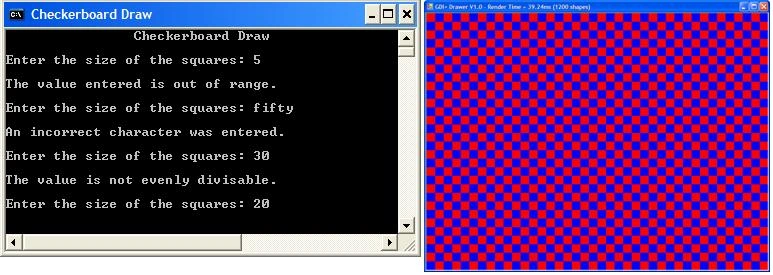
Output:
Greg BlairPosted Jan 7, 2016, 12:12 PM
why does a coding forum automatically change case when displaying a post?
Greg BlairPosted Jan 7, 2016, 12:10 PM
color = ((row + column) % 2) == 1 ? Color.Red: Color.Blue;
Greg BlairPosted Jan 7, 2016, 12:09 PM
To simplify the color selection logic.
Lance RosePosted Nov 11, 2011, 5:26 PM
Why does everyone assume people trying to learn will know which using (using GDIDrawer;) to add? I hope I don't sound overly critical, and I do appreciate people sharing their efforts. Very good article. I have a couple of kids (12 & 14) trying to learn programming and a lot of articles on the internet don't have the using included. Maybe it is a good exercise for them to look them up... :) Thanks again.