

Introduction
The database I will use is MySQL. I will tell you how to connect a database and how to make a simple login form. To do this, just use the following simple procedure.
Note. Now you can read it on my blog. I have updated this article on my personal blog here.
Step 1. Open Visual Studio and create a new Windows Forms project.
Step 2. Make a simple form having the 2 text fields username and password and a login button.
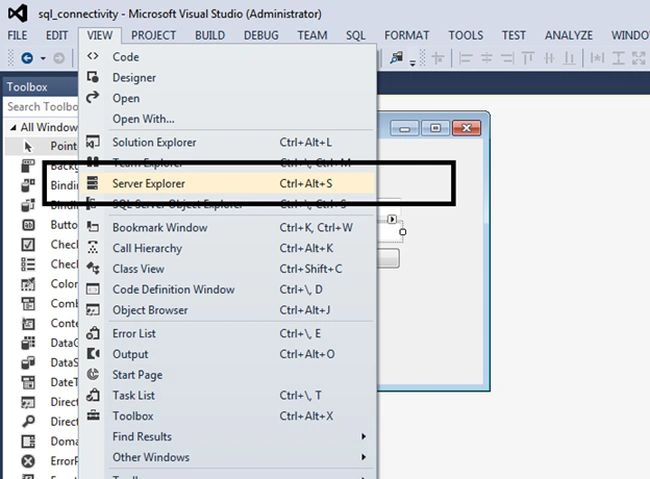
Step 3. Now go to the menu bar, select the view option, and there you can see “Server Explorer”. Just click on that, and the Server Explorer will be opened.
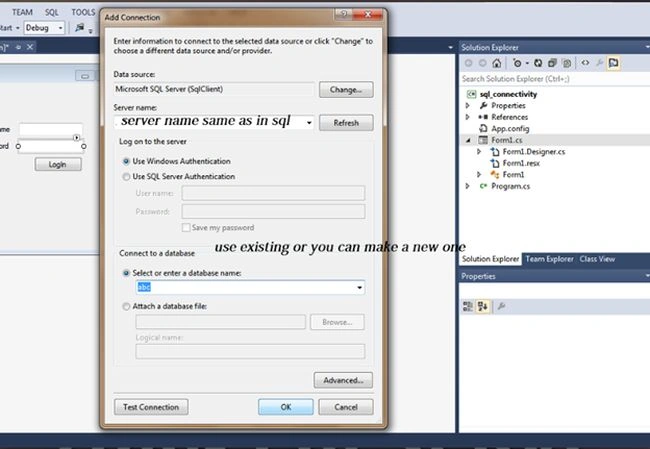
Step 4. Now add your connection. There you can see an option of server name. Here you need to write the name of your server, the same as in your SQL. When you provide the server name, just go to the select option, there you'll see the entire database name that you have made. You can create your new database too.
Step 5. It'll ask for permission, and click Yes.
Step 6. Now you'll be able to see your DB in your Server Explorer tab.
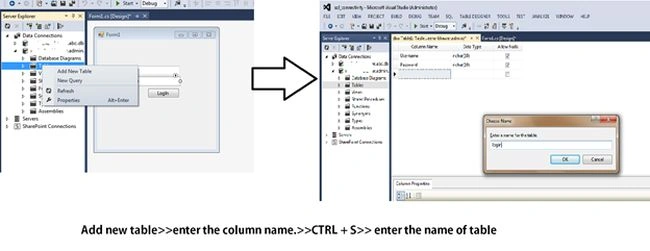
Step 7. Click on it. There you'll see tables. To create a new one, right-click on that and add a new table.
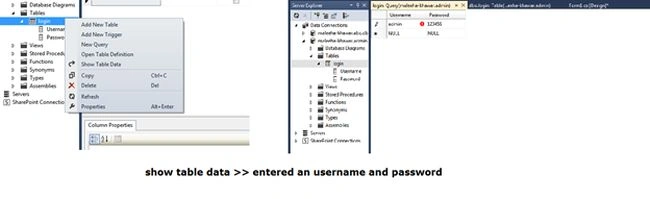
Step 8. Now you need to add some data to it. To do so, just follow the figure.
Step 9. Now your database is created, we only need to connect it with our form. To do this, open your form and double-click on the button you have made. It"ll take you to the code of that button.
Example. Here write the following code.
public void button1_Click(object sender, EventArgs e)
{
    SqlConnection con = new SqlConnection(@"Data Source=USER;Initial Catalog=admin;Integrated Security=True"); // Making a database connection
    SqlDataAdapter sda = new SqlDataAdapter("SELECT COUNT(*) FROM login WHERE username='" + textBox1.Text + "' AND password='" + textBox2.Text + "'", con);
    /* In the above line, the program is selecting the whole data from the table and matching it with the username and password provided by the user. */
    DataTable dt = new DataTable(); // Creating a virtual table
    sda.Fill(dt);
    if (dt.Rows[0][0].ToString() == "1")
    {
        /* I have made a new page called the home page. If the user is successfully authenticated, then the form will be moved to the next form. */
        this.Hide();
        new home().Show();
    }
    else
    {
        MessageBox.Show("Invalid username or password");
    }
}
Step 10. Don't forget to import its library file.
using System.Data.SqlClient;
After this, just debug your code.
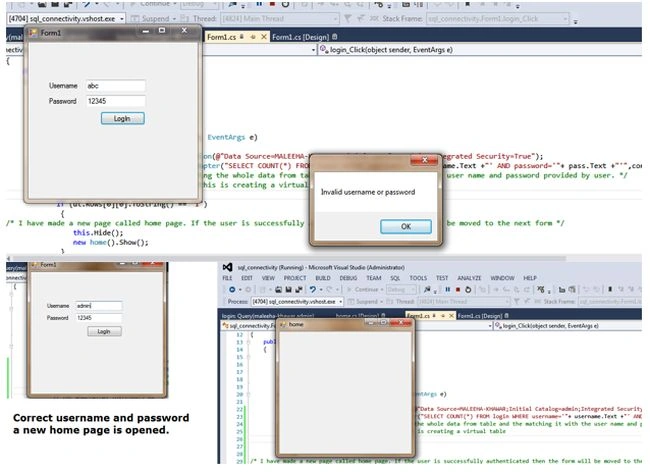
I hope you have gotten all this. Thank you.
Šăňi BābaPosted Jun 2, 2020, 11:30 PM
Plz help me out why it is?
Šăňi BābaPosted Jun 2, 2020, 11:30 PM
I am facing a problem with coding and shows problem in sda. Fill(dt); here
Šăňi BābaPosted Jun 2, 2020, 11:28 PM
Sir i need ur cell number plz my cell number is 03135436528
riann qistinaPosted Jan 8, 2019, 8:57 PM
How to select different table to show to the next new page. For example i have 2 table. First table name tblUser which have column name username and password and roleid and the second table is tblerole which have column name roleid and rolename. How i want to select rolename to display on the next page after sucessfully login?
Paramee EkanayakePosted Jul 31, 2018, 6:33 PM
Hmmmmm....u-iju huhdesew nuttytvsea deyaekman use.......
Cesar SalazarPosted Feb 1, 2018, 10:10 PM
Excelent Method, thanks!!
Krishna Rajput SinghPosted Mar 2, 2016, 5:38 AM
http://www.c-sharpcorner.com/UploadFile/a5f59f/how-to-create-log-in-form-in-visual-studio-and-connection-wi/
Evans KyeiPosted Feb 16, 2016, 10:28 PM
Nice, but Connection property has not been initialized. , you need to open and close the connection like this = private void button1_Click(object sender, EventArgs e) { SqlConnection conn=new SqlConnection (connString ); conn.Open(); SqlDataAdapter sda = new SqlDataAdapter("select count (*) from tblogin where uname='" + txtuname.Text + "' AND pass='" + txtpass.Text + "'", conn); DataTable dt = new DataTable(); sda.Fill(dt); if (dt.Rows[0][0].ToString() == "1") { this.Hide(); new frmMain ().Show(); //this.Dispose(); } else MessageBox.Show("Invalid username or password"); conn.Close(); } }
Santhakumar MunuswamyPosted Feb 12, 2016, 11:29 PM
Thanks for nice share
Waseem AfePosted Aug 22, 2015, 7:31 AM
Oh thank you very very much i am very glad after solving this problem
Jyotsna BetkarPosted Aug 11, 2015, 3:11 PM
thnx..this code useful to me...keep it on
ARJUN SINGH YADAVPosted Aug 7, 2015, 2:06 PM
follow us
Pramod LawatePosted Dec 22, 2014, 12:21 PM
keep it up.....
Ankit MishraPosted Dec 22, 2014, 5:04 AM
After Creating the connection you have not opened it and neither closed it.
Ehtesham MehmoodPosted Dec 21, 2014, 12:16 PM
Sure Mahesh Chand sir :)
Mahesh ChandPosted Dec 21, 2014, 9:08 AM
Yes as other comment says, use the "using" keyword for better object and resource management. Cheers!