

Markers are text annotations embedded at certain points in a media file. They help you in several cases. For example, you might use markers to set captions or subtitles for a video file, or maybe you use them to identify particular points in a media file so you can play the media starting at particular points.
Marker Support
Silverlight has native support for video markers; you can subscribe to the MarkerReached event of MediaElement control to get notified whenever you reach a marker. However, in order to use video markers you need to encode them in the video file. The best application that you can use to encode markers in a video file for Silverlight is Microsoft Expression Encoder.
Marker Encoding
After you have your video file added to Expression Encoder, you can use the timeline to set the markers at the desired locations. You can add a marker by moving to the position where you want to set the marker at, then right-clicking the timeline and selecting Add Marker to add a new marker.
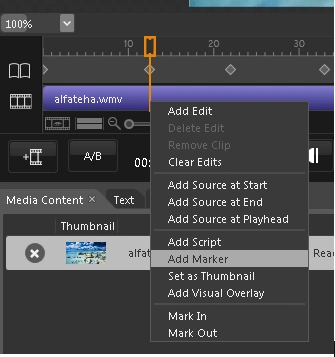
You then go to the Markers window where you can set marker text (value) and manage existing markers.
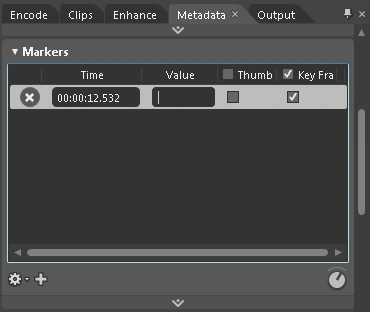
Notice that every marker is identified on the timeline by a symbol that resembles a diamond
 . You can change marker position by moving this symbol, and you can remove it by right-clicking it and choosing Remove (you can also use the Markers window.)
Now encode the video and prepare it to be used in Silverlight.
Code
After you have created your MediaElement and prepared it with the video, you can then subscribe to the MarkerReached event and handle the marker when the video reaches it. An example of handling markers is to display the marker text on the screen if, for example, it is a caption/subtitle for the video:
void theMedia_MarkerReached(object sender, TimelineMarkerRoutedEventArgs e)
{
theTextBlock.Text = e.Marker.Text;
}
And you can also load the markers to a list box (for example) and let the user move to the position of the markers he chooses (it is worth mentioning that markers are only available after the MediaOpened event is raised):
void theList_SelectionChanged(object sender, SelectionChangedEventArgs e)
{
if (this.theList.SelectedIndex > -1)
theMedia.Position = theMedia.Markers[theList.SelectedIndex].Time;
}
Makes sense?
Wilson LastimozaPosted Mar 19, 2012, 9:01 AM
Hi, For creating a Silverlight chat application I can recommend the Ozeki VoIP SIP SDK. For sample source codes check this: www.voip-sip-sdk.com/p_257-silverlight-video-chat-example-voip.html The support team is also responsive so you can make your project even faster with the help of them. BR