
In this article, you will see how to create a generic data access layer (DAL) in a WCF project. I will use the ADO.NET Entity Framework to create a Data Model for the database. The
Challenge is to pass the Entities to and from using a WCF Service.
If any of you have tried doing this before you would have faced the problem of
serializing and de-serializing the entities. I will discuss the problems when we actually face them within the project.
Create a Data Access Layer
Let's start creating a generic data access layer (DAL).
In this article, I create a DAL and give some details about it. Since this is
a detailed project, I will break down this article in a series of a few articles.
Create a new Visual Studio Project as shown below.
Select Project Type Class Library.
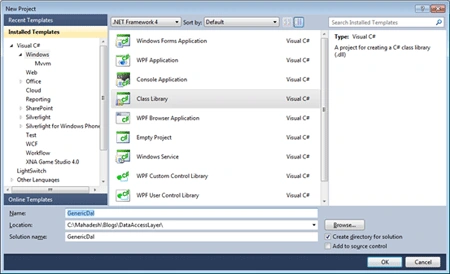
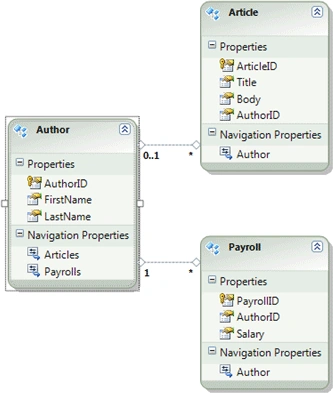
Once a Class Library project is created, let's create a Data Model that will actually use as our Data Access
Layer. We are using the ADO.NET Entity Data Model to create the data model
for our database.
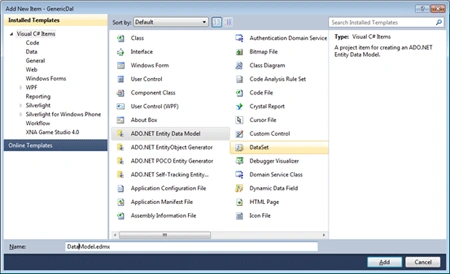
Add a new Item and select ADO.NET Entity Data Model template from the selected templates.
The next steps are self explanatory. Just follow the wizard steps. Select a database, connection string, select tables, and other objects and so on.
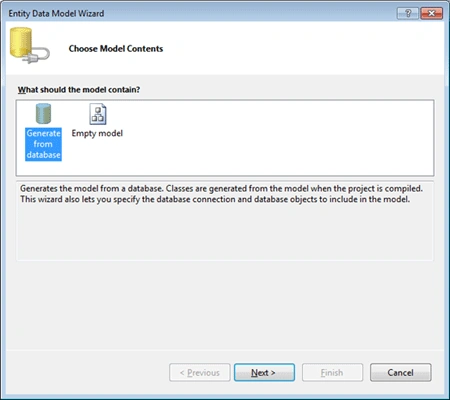
Select Generate from database option.
Choose your data connection. If you do not have a data connection, click on New Connection and the wizard will guide you.
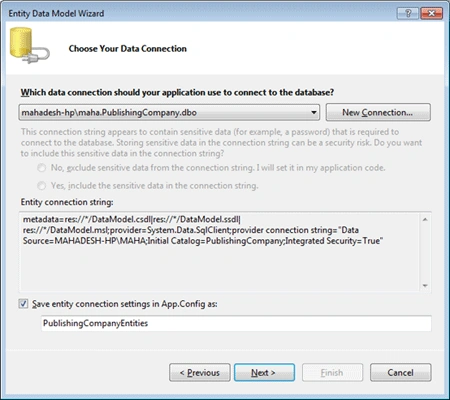
This option will create a connection string. Next step, select your database objects - Tables, Views, and Stored Procedures.

Join the conversation! Your thoughts help the community grow.