Introduction Set Connection, output folder and language settings Click Get Tables to retrieve all tables schema
Go to Generate stored procedure tab and click generate In this step the application will get saved stored procedure template then loop on database tables and get table name then replace #Table Name# with the table name in the template and save it as sql file
Go to Generate data objects tab and click generate in this step the application get the data object template for selected language and put fields and variables according to the selected language Vb or C#
Go to Generate data access layer tab and click generate the same as the previous step but it read from DAL Template according to the selected language and create method parameters and return types then create the new DAL Class for each table in selected database
Go to Generate business layer tab and click generate using the bus template
Go to Generate web layer (GUI) tab and click generate in this step the application generate master page ,base web form and for each table it generate details page and list
The attached application helps developers to save time and effort in creating N-tier applications.
It creates stored procedures, adds data, data access layer, business layer and web pages in ASP.NET version and all layers works with C# and data, data access layer, business layer with c# and vb.net.
The system has code template for each layer then according to the selected language it create properties and events and methods then find the properties region or method region and replace the region in templates with the code then save it as files for selected layer
How to Use Steps:
Select C# as a language;
check Use Data Object so the methods take one object as parameter (its recommendation to set primary key name table name + "Id"
---- page the details page contain textbox ,required validation ,save and delete button the detail page works in two modes (Insert new item and update exists data)
---- list page contain the list of all data in the table in data grid view and edit link in each row to open detail page in edit mode
The DB Manager Class
Used to get tables and columns schema and required columns and primary keys and foreign keys
The File Manager
Used to manage templates and layers files to create files from templates and save it in selected output folder 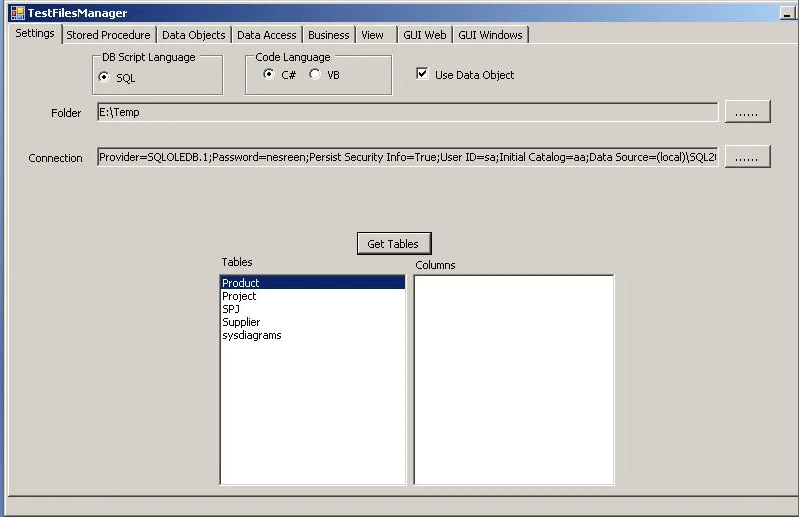
Download and run the attached application for more details.

N-Tier Code Generator for ASP.NET
Join the conversation! Your thoughts help the community grow.
Sign in to leave a comment
It is the same account you read, post and publish with — and you will come straight back to this page.
lakshan meeriyagallaPosted Jan 17, 2017, 12:41 AM
Hi Nesreen! this is a great article. can you please let me know which architecture you have been used and the article that helped you to build such a thing. Because i also wanted to build a code generator by using templates, that template can be different from project to project, so only changing the template i want to to use it every where(any project).
Mujahid AzamPosted Feb 1, 2013, 5:50 AM
Hi, As of now, when code is generated, in the aspx search page, in the gridview only one column from the Tables is listed and the Email column and Details columns are added, how can we list out all the fields from the table in the gridview with both item template and edit item template. let me knw if this is possible.
sudhir BelanieditedPosted Feb 4, 2010, 1:07 PMEdited Feb 4, 2010, 1:10 PM
I am getting conversion error . Error : Unable to parse project file codeGenerator2005.csproj I can not see project because of non-conversion
DougPosted Jun 30, 2009, 6:06 PM
Hello Nesreen, Would you be able to provide an example of a generated application using a simple database? I creating an empty .NET project in Visual Studio and copied the contents of the top-most generated folder to the new project. Unfortunately, I encountered a few compile errors. For example: public class personDL : BaseDL,IDL -> "The type or namespace name 'BaseDL' could not be found..." Is it possible that BaseDL.cs is missing...? (same with IDL, Utilities, BaseBL, IBL) Many thanks for all the hard work you've put into your code generator! Regards, --Doug
atraktorPosted Jun 6, 2009, 7:36 AM
thank you Nesreen
Nesreen MagededitedPosted May 21, 2009, 1:40 PMEdited May 23, 2009, 1:25 PM
thanks a lot for your reply I already uploaded a new version thanks alot
Carlos LuiPosted May 20, 2009, 10:04 AM
I can't run this application.... Error 1 Source file 'C:\Temp\CodeGeneratorSourceCode\CodeGenerator2005\VarietyClasses\Controls\web\wucLogin.ascx.cs' could not be opened ('The system cannot find the file specified. ') CodeGenerator2005