

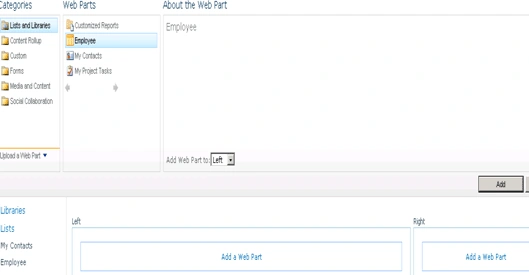
I have added this web part into the zone:

When you edit such a Web Part, once it has been added to a page, you'll notice there is a new AJAX Options section in the Web Part properties. AJAX stands for Asynchronous JavaScript and XML and is a web development technique to build more interactive, rich web sites. The AJAX Options are disabled by default, but we can enable them as shown below.

Once you open in Edit mode you can see a screen like below:
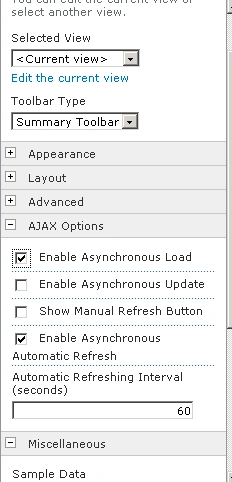
- Enable Asynchronous Update: enabling this option will make paging, sorting, filtering work without full page refreshes.
- Show Manual Refresh Button: Enabling this option will show an icon to allow the user the refresh the data manually, without refreshing the rest of the page.
- Enable Asynchronous Automatic Refresh: when enabled, the Web Part will dynamically refresh the date it's showing, without completely reloading the page. The interval can be specified in the textbox as shown above.
- Automatic Refreshing Interval: specifies the interval used in the previous option.
- Enable Asynchronous Load: Web Part will initially be displayed without any data in it. But once the page is loaded, the Web Part will asynchronously fetch the data afterwards. When the data is being loaded, the Web Part will display an animation. This option can be used to reduce the page load time.
Maunish ShahPosted Jun 5, 2015, 3:39 AM
Hi. Can we also change the refresh button icon image here? And please guide me for moving manual refresh button next to Add new item.
Venkatesh KumarPosted Feb 7, 2013, 9:29 AM
It's really useful. Thanks for sharing...
chandrika soniPosted Jul 3, 2012, 12:34 PM
sir, how to we disable right click (copy option) on selecting image in .net. Thanks chandrika
Jonathan CortezPosted Mar 29, 2012, 5:20 PM
Destin, Have you come across the cmdlets to enable the AJAX options via PowerShell? Thanks, Jonathan
Michael GallPosted Dec 18, 2011, 9:45 PM
I created a SharePoint 2010 Site Page and added a list view webpart. When I edit the webpart, the property dialog displays the Appearance, Layout and Advanced sections but not the AJAX Options nor Miscellaneous sections. How do I make the AJAX Options appear? Perhaps a Feature needs to be activated? Please advise. Thanks, Mike G.