

Once you are done with the custom form with SharePoint Designer, in the XSL code block, locate the following code:
<xsl:template name="dvt_1">
<xsl:variable name="dvt_StyleName">ListForm</xsl:variable>
<xsl:variable name="Rows" select="/dsQueryResponse/Rows/Row"/>
<table border="0" width="100%">
<xsl:call-template name="dvt_1.body">
<xsl:with-param name="Rows" select="$Rows"/>
</xsl:call-template>
</table>
</xsl:template>
Find the tag as shown below:
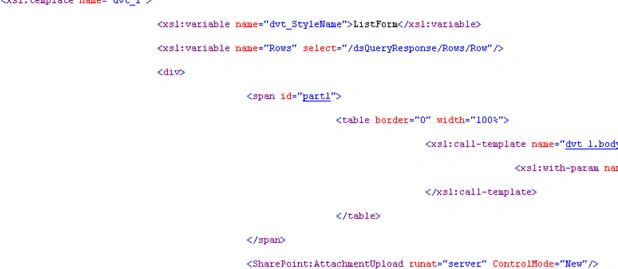
Replace the lines of code that you located in step 2a with the following lines of code:
<xsl:template name="dvt_1">
<xsl:variable name="dvt_StyleName">ListForm</xsl:variable>
<xsl:variable name="Rows" select="/dsQueryResponse/Rows/Row"/>
<div>
<span id="part1">
<table border="0" width="100%">
<xsl:call-template name="dvt_1.body">
<xsl:with-param name="Rows" select="$Rows"/>
</xsl:call-template>
</table>
</span>
<SharePoint:AttachmentUpload runat="server" ControlMode="Edit"/>
<SharePoint:ItemHiddenVersion runat="server" ControlMode="Edit"/>
</div>
</xsl:template>
Once you have done that you will get the Attachment option: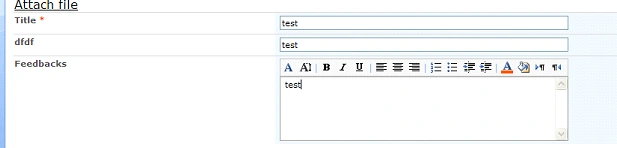
Cathy HennessyPosted Jan 3, 2013, 7:51 AM
Need assistance. Tried your code above, however it still will not allow me to attach a document. The Attach File button now works, and allows me to browse and attach, however, when I click OK to upload, I am getting an error message: 'document.getElementByID(...)' is null or not an object form.js Code: 0 Line: 5774 Char: 3 URI:.... Any ideas/recommendations?
hasan siddiquiPosted Mar 2, 2012, 6:53 AM
check this link http://support.microsoft.com/kb/953271
hasan siddiquiPosted Mar 2, 2012, 6:53 AM
check this link http://support.microsoft.com/kb/953271
hasan siddiquiPosted Mar 2, 2012, 6:53 AM
check this link http://support.microsoft.com/kb/953271
hasan siddiquiPosted Mar 2, 2012, 6:53 AM
check this link http://support.microsoft.com/kb/953271
hasan siddiquiPosted Mar 2, 2012, 6:53 AM
check this link http://support.microsoft.com/kb/953271