

Introduction
Today, I will introduce Azure BLOB storage, a very simple and useful way to create a storage account and container, where we can maintain files (byte arrays and objects). There are basically these
following 4 basic hierarchies for Azure BLOB storage:
- CloudStorageAccount: This is a reference to storage account (we will create a new sample storage account in this article).
- CloudBlobClient: This reference to the object is used to perform operations on a BLOB storage account.
- CloudBlobContainer: This is a reference to the container where the BLOB resides in.
- CloudBlockBlob: This refer to actual BLOB.
First of all we will need to create a new storage account in Azure.
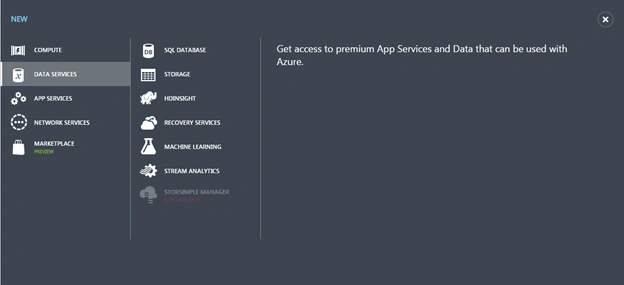
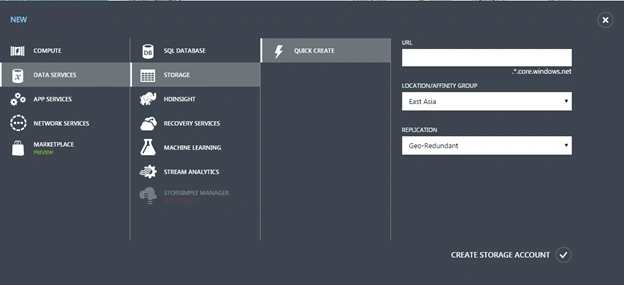
After creating a sample account we will get the storageaccount and sample key where we will create the container and put our BLOB. Now we will create a sample application for the BLOB storage.
Creating a Sample Application
Create a simple Console application, AzureStorageSample.
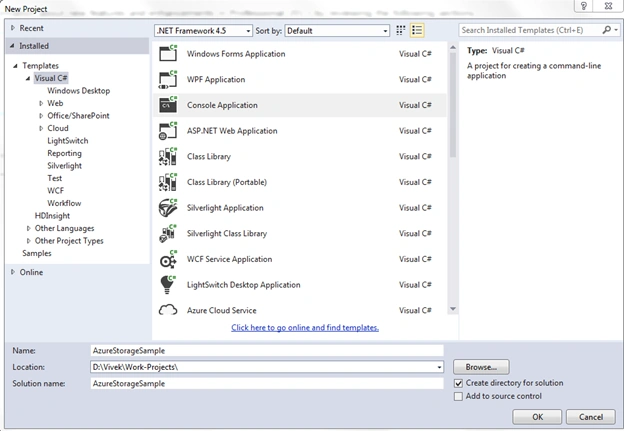
Then add a sample class library project.

Now add a WindowsAzure.storage Nuget package.

Now I am adding the following code to the TestAzureRespository class.
- using System;
- using System.Collections.Generic;
- using System.Configuration;
- using System.Linq;
- using System.Text;
- using System.Threading.Tasks;
- using Microsoft.WindowsAzure.Storage;
- using Microsoft.WindowsAzure.Storage.Blob;
- namespace AzureBlobRepository
- {
- public class TestAzureRespository
- {
- public CloudBlobClient BlobClient
- {
- get;
- set;
- }
- public CloudBlobContainer BlobContainer
- {
- get;
- set;
- }
- public TestAzureRespository()
- { }
- private void GetContainer(string ContainerName)
- {
- var connectionString = ConfigurationManager.ConnectionStrings["connectionstring"].ConnectionString;
- var storageAccount = CloudStorageAccount.Parse(connectionString);
- BlobClient = storageAccount.CreateCloudBlobClient();
- // Retrieve a reference to a container.
- BlobContainer = BlobClient.GetContainerReference(ContainerName);
- // Create the container if it doesn't already exist.
- BlobContainer.CreateIfNotExists();
- }
- public string AddToBlobSTorage(string ContainerName, byte[] FileStream)
- {
- GetContainer(ContainerName);
- string blobName = Guid.NewGuid().ToString();
- CloudBlockBlob blockBlob = BlobContainer.GetBlockBlobReference(blobName);
- blockBlob.UploadFromByteArray(FileStream, 0, FileStream.Length);
- return blobName;
- }
- public string AddToBlobSTorage(string ContainerName, string Text)
- {
- GetContainer(ContainerName);
- string blobName = Guid.NewGuid().ToString();
- CloudBlockBlob blockBlob = BlobContainer.GetBlockBlobReference(blobName);
- blockBlob.UploadText(Text);
- return blobName;
- }
- public byte[] GetBytesFromBlobStorage(string ContainerName, string BlobName)
- {
- GetContainer(ContainerName);
- CloudBlockBlob blockBlob = BlobContainer.GetBlockBlobReference(BlobName);
- blockBlob.FetchAttributes();
- byte[] byteArray = new byte[blockBlob.Properties.Length];
- blockBlob.DownloadToByteArray(byteArray, 0);
- return byteArray;
- }
- public string GetStringFromBlobStorage(string ContainerName, string BlobName)
- {
- GetContainer(ContainerName);
- CloudBlockBlob blockBlob = BlobContainer.GetBlockBlobReference(BlobName);
- blockBlob.FetchAttributes();
- return blockBlob.DownloadText();
- }
- }
- }
Where the connection string is set on the web config file like this:
- <connectionStrings>
- <add name="connectionstring_name" connectionString="DefaultEndpointsProtocol=https;AccountName=your_azure_storage_account_name;AccountKey=your_azure_storage_account_key" />
- </connectionStrings>
Now I will introducing the calling code as in the following:
- using System;
- using System.Collections.Generic;
- using System.Linq;
- using System.Text;
- using System.Threading.Tasks;
- using AzureBlobRepository;
- namespace AzureStorageSample
- {
- class Program
- {
- static void Main(string[] args)
- {
- TestAzureRespository aurRepos = new TestAzureRespository();
- string test = "Hi Vivek This is only for test purpose";
- byte[] array = Encoding.ASCII.GetBytes(test);
- string guid1 = aurRepos.AddToBlobSTorage("Azure_Container_Name_1", array);
- string guid2 = aurRepos.AddToBlobSTorage("Azure_Container_Name_2", test);
- string getmesg = aurRepos.GetStringFromBlobStorage("Azure_Container_Name_2", guid2);
- Console.WriteLine(getmesg);
- }
- }
- }
When running this code you will see the same string message when fetching from the BLOB.
For a better understanding, please follow the link:
How to use BLOB.
Vishwajeet JhaPosted Nov 4, 2015, 4:17 AM
A container name must be a valid DNS name, conforming to the following naming rules: Container names must start with a letter or number, and can contain only letters, numbers, and the dash (-) character. Every dash (-) character must be immediately preceded and followed by a letter or number; consecutive dashes are not permitted in container names. All letters in a container name must be lowercase. Container names must be from 3 through 63 characters long.
Deepak JainPosted Jul 4, 2015, 11:30 PM
Very helpful
Gowtham RajamanickamPosted May 18, 2015, 12:58 PM
informative..
Sibeesh VenuPosted May 7, 2015, 2:25 AM
Good one :)
Vidya Vrat AgarwalPosted May 6, 2015, 7:22 PM
Good one. Keep it up.
Santhakumar MunuswamyPosted May 6, 2015, 2:28 PM
Thanks for nice article
Vijay SPosted May 6, 2015, 8:53 AM
Nice