

Introduction
In this article we will see how to use Angular.js in a LightSwitch application. Please check the previous articles on LightSwitch by visiting the following links.
Please have a look at the previus articles since this is the continuation of them.
- Step 1: Right-click on the Server project and select Add then New Folder. Name the folder Model and then add a class named AngularProduct.cs to it as shown below.
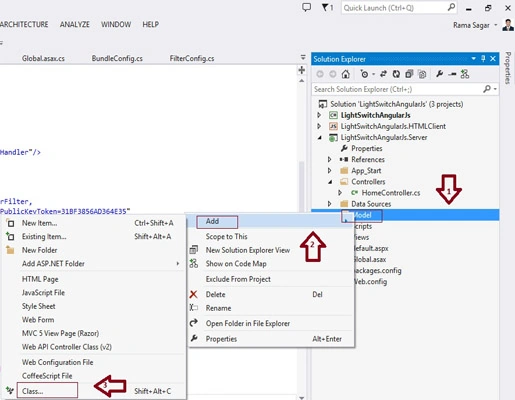
Add the following properties to the class:
- using System;
- using System.Collections.Generic;
- using System.Linq;
- using System.Web;
- namespace LightSwitchApplication.Model
- {
- public class AngularProduct
- {
- public int Id { get; set; }
- public string ProductName { get; set; }
- public string ProductManufacturer { get; set; }
- public string Manfacturerdate { get; set; }
- }
- }
- Step 2: Create WebAPI2 Controller class as shown below:
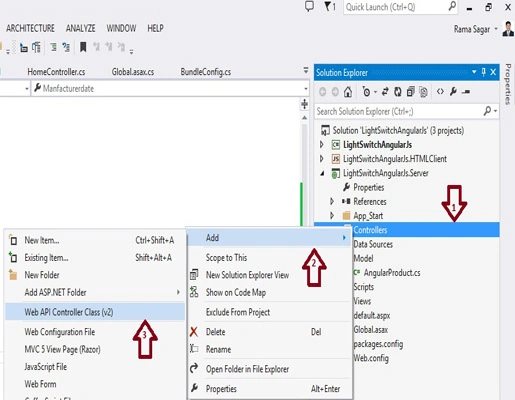
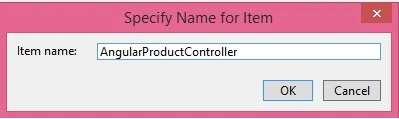
Name the controller AngularProductController and add the following Implementation.
Here we have used the following methods:
- GetStore(): gets all the Products from the store.
- GetProduct: gets the single product based on id.
- PutProduct: updates the product.
- PostProduct: inserts a new product.
- DeleteProduct: deletes the product.
The ServerApplicationContext API is a new feature in LightSwitch, available with Visual Studio 2012 Update 2 or later, that allows you to create entirely new ways to call custom business logic on the LightSwitch Server.
- using LightSwitchApplication.Model;
- using System;
- using System.Collections.Generic;
- using System.Linq;
- using System.Net;
- using System.Net.Http;
- using System.Text;
- using System.Web.Http;
- namespace LightSwitchApplication.Controllers
- {
- public class AngularPersonController : ApiController
- {
- // GET api/AngularProduct
- public IEnumerable<AngularProduct> GetStore() // Get All Products
- {
- using (var serverContext = GetServerContext())
- {
- var ProductSet = from objProduct in serverContext.DataWorkspace
- .ApplicationData.Store.GetQuery().Execute()
- select new AngularProduct
- {
- Id = objProduct.Id,
- ProductName = objProduct.ProductName,
- ProductManufacturer = objProduct.ProductManufacturer,
- Manfacturerdate=objProduct.ManfacturerDate.ToShortDateString()
- };
- return ProductSet.AsEnumerable();
- }
- }
- // GET api/AngularProduct/
- public AngularProduct GetProduct(int id) // get one Product
- {
- using (var serverContext = GetServerContext())
- {
- var objAngularProduct = (from objProduct in serverContext.DataWorkspace
- .ApplicationData.Store.GetQuery().Execute()
- where objProduct.Id == id
- select new AngularProduct
- {
- Id = objProduct.Id,
- ProductName = objProduct.ProductName,
- ProductManufacturer = objProduct.ProductManufacturer,
- Manfacturerdate = objProduct.ManfacturerDate.ToShortDateString()
- }).FirstOrDefault();
- return objAngularProduct;
- }
- }
- // PUT api/AngularProduct/
- public HttpResponseMessage PutProduct(int id, AngularProduct product) // An Update
- {
- if (!ModelState.IsValid)
- {
- return Request.CreateErrorResponse(HttpStatusCode.BadRequest, ModelState);
- }
- try
- {
- using (var serverContext = GetServerContext())
- {
- var objLightSwitchProduct = (from LightSwitchProduct in serverContext.DataWorkspace
- .ApplicationData.Store.GetQuery().Execute()
- where LightSwitchProduct.Id == product.Id
- select LightSwitchProduct).FirstOrDefault();
- if (objLightSwitchProduct == null)
- {
- return Request.CreateErrorResponse(HttpStatusCode.NotFound, "not found");
- }
- else
- {
- objLightSwitchProduct.ProductName = product.ProductName;
- objLightSwitchProduct.ProductManufacturer = product.ProductManufacturer;
- objLightSwitchProduct.ManfacturerDate = Convert.ToDateTime(product.Manfacturerdate);
- serverContext.DataWorkspace.ApplicationData.SaveChanges();
- }
- }
- return Request.CreateResponse(HttpStatusCode.OK);
- }
- catch (Exception ex)
- {
- // Throw the exception so it will be caught by 'notificationFactory'
- throw new Exception(GetLightSwitchError(ex));
- }
- }
- // POST api/AngularProduct
- public HttpResponseMessage PostProduct(AngularProduct product) // An Insert
- {
- if (ModelState.IsValid)
- {
- using (var serverContext = GetServerContext())
- {
- try
- {
- var objLightSwitchProduct = serverContext.DataWorkspace
- .ApplicationData.Store.AddNew();
- objLightSwitchProduct.ProductName = product.ProductName;
- objLightSwitchProduct.ProductManufacturer = product.ProductManufacturer;
- objLightSwitchProduct.ManfacturerDate = Convert.ToDateTime(product.Manfacturerdate);
- serverContext.DataWorkspace.ApplicationData.SaveChanges();
- // Set the Id so it can be returned
- product.Id = objLightSwitchProduct.Id;
- HttpResponseMessage response = Request.CreateResponse(HttpStatusCode.Created, product);
- response.Headers.Location = new Uri(Url.Link("DefaultApi", new { id = product.Id }));
- return response;
- }
- catch (Exception ex)
- {
- // Throw the exception so it will be caught by 'notificationFactory'
- throw new Exception(GetLightSwitchError(ex));
- }
- }
- }
- else
- {
- return Request.CreateErrorResponse(HttpStatusCode.BadRequest, ModelState);
- }
- }
- // DELETE api/AngularProduct/5
- public HttpResponseMessage DeleteProduct(int id) // Delete Product
- {
- AngularProduct objProduct = GetProduct(id);
- if (objProduct == null)
- {
- return Request.CreateResponse(HttpStatusCode.NotFound);
- }
- using (var serverContext = ServerApplicationContext.CreateContext())
- {
- try
- {
- var objLightSwitchProduct = (from LightSwitchProduct in serverContext.DataWorkspace
- .ApplicationData.Store.GetQuery().Execute()
- where LightSwitchProduct.Id == id
- select LightSwitchProduct).FirstOrDefault();
- if (objLightSwitchProduct == null)
- {
- return Request.CreateResponse(HttpStatusCode.NotFound);
- }
- else
- {
- objLightSwitchProduct.Delete();
- serverContext.DataWorkspace.ApplicationData.SaveChanges();
- return Request.CreateResponse(HttpStatusCode.OK, objProduct);
- }
- }
- catch (Exception ex)
- {
- // Throw the exception so it will be caught by 'notificationFactory'
- throw new Exception(GetLightSwitchError(ex));
- }
- }
- }
- // Utility
- private static ServerApplicationContext GetServerContext()
- {
- ServerApplicationContext serverContext =
- (LightSwitchApplication.ServerApplicationContext)ServerApplicationContext.Current;
- if (serverContext == null)
- {
- serverContext =
- (LightSwitchApplication.ServerApplicationContext)ServerApplicationContext.CreateContext();
- }
- return serverContext;
- }
- private string GetLightSwitchError(Exception ex)
- {
- string strError = "";
- Microsoft.LightSwitch.ValidationException ValidationErrors =
- ex as Microsoft.LightSwitch.ValidationException;
- if (ValidationErrors != null)
- {
- StringBuilder sbErrorMessage = new StringBuilder();
- foreach (var error in ValidationErrors.ValidationResults)
- {
- sbErrorMessage.Append(string.Format("<p>{0}</p>", error.Message));
- }
- strError = sbErrorMessage.ToString();
- }
- else
- {
- if (ex.InnerException != null)
- {
- strError = ex.InnerException.InnerException.Message;
- }
- else
- {
- // This is a simple error -- just show Message
- strError = ex.Message;
- }
- }
- return strError;
- }
- }
- }
Step 3: Now let's add the Angular Grid control.
Download: Jon Gallant Angular Grid Control
Insert the folders and files into the Scripts folder as shown below.
Note, we need to create the folders and import each file into each folder one by one using Add, then Existing Item.
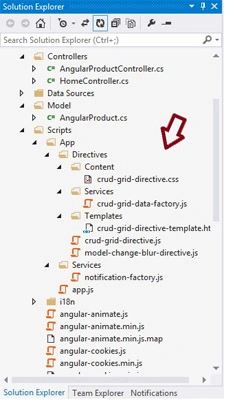
Angular Grid Control
Replace the contents of Index.cshtml (in the Views/Home folder) with the following:
- <!doctype html>
- <html ng-app="app">
- <head>
- <title>AngularJS-WebApi-EF</title>
- @Styles.Render("~/content/bootstrap/base")
- @Styles.Render("~/content/toastr")
- @Styles.Render("~/content/css")
- @Styles.Render("~/content/angular")
- </head>
- <body>
- <h1>Products</h1>
- <div crud-grid table='AngularProduct'
- columns='[
- {"name":"Id", "class":"col-md-1", "autoincrement": "true"},
- {"name":"ProductName"},
- {"name":"ProductManufacturer"},
- {"name":"ManufacturerDate"}
- ]'></div>
- @Scripts.Render("~/bundles/jquery")
- @Scripts.Render("~/bundles/angular")
- @Scripts.Render("~/bundles/toastr")
- @Scripts.Render("~/bundles/bootstrap")
- </body>
- </html>
Control BundleConfigcs
Update the file called BundleConfig.cs (in the App_Start directory) and add the following implementation:
- using System.Web;
- using System.Web.Optimization;
- namespace LightSwitchApplication
- {
- public class BundleConfig
- {
- // For more information on Bundling, visit http://go.microsoft.com/fwlink/?LinkId=254725
- public static void RegisterBundles(BundleCollection bundles)
- {
- bundles.Add(new ScriptBundle("~/bundles/jquery").Include(
- "~/Scripts/jquery-{version}.js"));
- bundles.Add(new ScriptBundle("~/bundles/angular").Include(
- "~/Scripts/angular.js", "~/Scripts/angular-resource.js",
- "~/Scripts/App/app.js",
- "~/Scripts/App/Services/*.js",
- "~/Scripts/App/Directives/*.js", "~/Scripts/App/Directives/Services/*.js"));
- bundles.Add(new ScriptBundle("~/bundles/toastr").Include(
- "~/Scripts/toastr.js"));
- bundles.Add(new ScriptBundle("~/bundles/jqueryui").Include(
- "~/Scripts/jquery-ui-{version}.js"));
- bundles.Add(new ScriptBundle("~/bundles/jqueryval").Include(
- "~/Scripts/jquery.unobtrusive*",
- "~/Scripts/jquery.validate*"));
- // Use the development version of Modernizr to develop with and learn from. Then, when you're
- // ready for production, use the build tool at http://modernizr.com to pick only the tests you need.
- bundles.Add(new ScriptBundle("~/bundles/modernizr").Include(
- "~/Scripts/modernizr-*"));
- bundles.Add(new StyleBundle("~/Content/css").Include("~/Content/site.css"));
- bundles.Add(new StyleBundle("~/Content/angular").Include("~/Scripts/App/Directives/Content/*.css"));
- bundles.Add(new StyleBundle("~/Content/toastr").Include("~/Content/toastr.css"));
- bundles.Add(new StyleBundle("~/Content/themes/base/css").Include(
- "~/Content/themes/base/jquery.ui.core.css",
- "~/Content/themes/base/jquery.ui.resizable.css",
- "~/Content/themes/base/jquery.ui.selectable.css",
- "~/Content/themes/base/jquery.ui.accordion.css",
- "~/Content/themes/base/jquery.ui.autocomplete.css",
- "~/Content/themes/base/jquery.ui.button.css",
- "~/Content/themes/base/jquery.ui.dialog.css",
- "~/Content/themes/base/jquery.ui.slider.css",
- "~/Content/themes/base/jquery.ui.tabs.css",
- "~/Content/themes/base/jquery.ui.datepicker.css",
- "~/Content/themes/base/jquery.ui.progressbar.css",
- "~/Content/themes/base/jquery.ui.theme.css"));
- }
- }
- }
Run the application and navigate to the Home directory.
Note: Here I didn't define a home screen in Lightswitch.
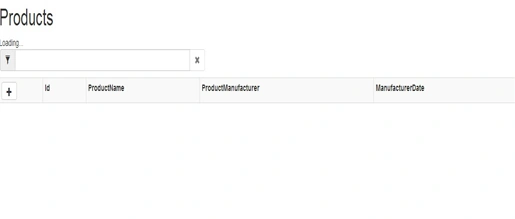
You will find the following output:
Summary
In this article we learned how to use Angular.js in a Lightswitch application.
Join the conversation! Your thoughts help the community grow.