

Integration Services is a platform for building high performance data integration and workflow solutions, including extraction, transformation and loading (ETL) operations for data warehousing.
This includes graphical tools and wizards for building and debugging packages.
Uses of Integration Services
One use of Integration Services is to merge data from multiple data stores and update the data to data warehouses and/or data marts. Create the Data Transformation process logic and automate the data loading process.
ETL Working Model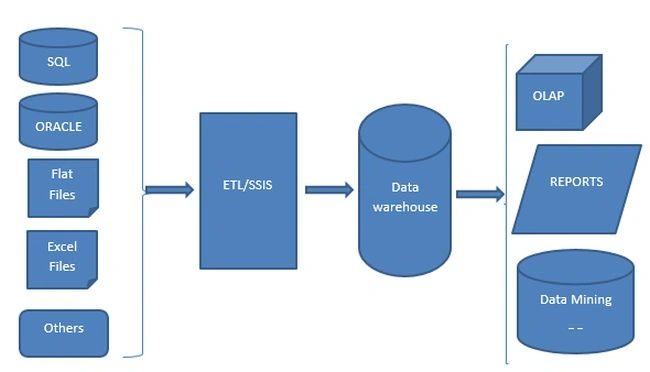
Reference: Introduction to Microsoft Business Intelligence (MSBI).
Architecture of Integration Services
Image source: TechNet (MSDN)
Some important components to using Integration Services:
- SSIS Designer
- Runtime engine
- Tasks and other executables
- Data Flow engine and Data Flow components
- API or object model
- Integration Services Service
- SQL Server Import and Export Wizard
- Other tools, wizards and command prompt utilities
This is the collection of data flow, control flow, variables, events, connections and configurations that are stored in SQL Server, SSIS package store, or in the file system.
The package is the unit of work that is retrieved, executed and saved.
Control Flow Elements
It provides the following three types of control flow elements:
- Containers that provide structure in packages
- Tasks that provide functionality
- Precedence constraints

Image source: TechNet(MSDN)
Integration Services Containers
- The Foreach Loop container
- For Loop container
- The Sequence container
Integration Services Tasks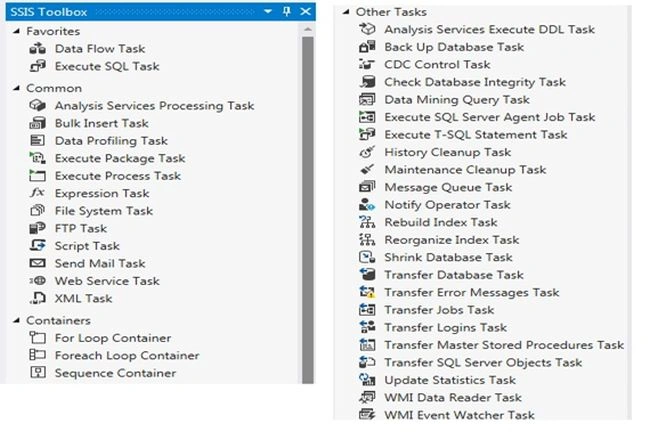
- Analysis Services Execute DDL Task
Executes Data Definition Language (DDL) statements in the package.
- Analysis Services Processing Task
Processes the cubes and dimensions in the package.
- Back Up Database Task
SQL Server database backup using the package.
- Bulk Insert Task
Provides an efficient way to copy large amounts of data into a SQL Server table or view.
- CDC Control Task
Controls the life cycle of Change Data Capture (CDC) packages.
- Check Database Integrity Task
We can check the structural integrity of all the objects in the specified database.
- Data Mining Query Task
Runs prediction queries based on data mining models built in Analysis Services.
- Data Profiling Task and Viewer
Provides data profiling functionality in the process of extracting, transforming and loading data.
- Execute Package Task
Runs other packages as part of a workflow.
- Execute Process Task
Helps to run an application or batch file as part of a SQL SSIS package.
- Execute SQL Task
Executes SQL statements or a Stored Procedure from an SSIS package.
- Execute T-SQL Statement Task
Execute Transact-SQL statements.
- File System Task
For the operations on files and directories.
- FTP Task
Uploads or downloads and manages directories.
- History Cleanup Task
Deletes entries in the history tables in the SQL Server msdb database.
- Maintenance Cleanup Task
Removes files related to maintenance plans, including database backup files and reports created by maintenance plans.
- Message Queue Task
Allows you to use MSMQ to send and receive messages between SQL Server Integration Services packages.
- Notify Operator Task
Sends notification messages to a SQL Server Agent operator.
- Rebuild Index Task
Rebuild indexes in SQL Server database tables and views.
- Reorganize Index Task
Reorganizes indexes in SQL Server database tables and views.
- Script Task
We have an option to write code to do functions that are not available in the built-in tasks and transformations that SSIS provides.
- Send Mail Task
Send E-mail from the package.
- Shrink Database Task
Reduces the size of the SQL database data and log file.
- Transfer Database Task
Transfers a SQL Server database between two instances of SQL Server.
- Transfer Error Messages Task
Configured to transfer all error messages.
- Transfer Jobs Task
Transfers one or more SQL Server Agent jobs between instances of SQL Server.
- Transfer Logins Task
Transfers one or more logins between instances of SQL Server.
- Transfer Master Stored Procedures Task
Transfers one or more user-defined Stored Procedures between master databases on instances of SQL Server.
- Transfer SQL Server Objects Task
Transfers one or more types of objects in a SQL Server database between instances of SQL Server.
- Select Objects to Transfer
Use this dialog box to select objects to transfer from one instance of SQL Server to another by using an Integration Services transfer task.
- Update Statistics Task
Updates information about the distribution of key values for one or more statistics groups (collections) in the specified table or indexed view.
- Web Service Task
Executes a Web service method.
- WMI Data Reader Task
Runs queries using the Windows Management Instrumentation (WMI) Query Language that returns information from WMI about a computer system.
- WMI Event Watcher Task
Watches for a Windows Management Instrumentation (WMI) event using a Management Instrumentation Query Language (WQL) event query to specify events of interest.
- XML Task
The XML task is used to work with XML data.
Precedence Constraints
Precedence constraints link executables, containers and tasks in packages into a control flow and specify conditions that determine whether the executable run.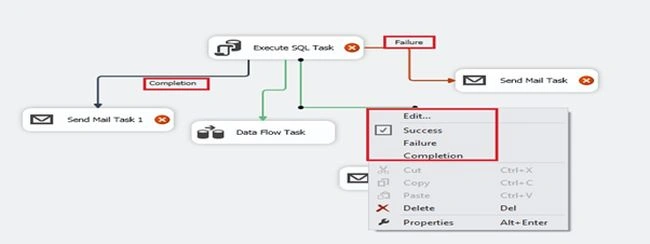
Edit option in Precedence constraints.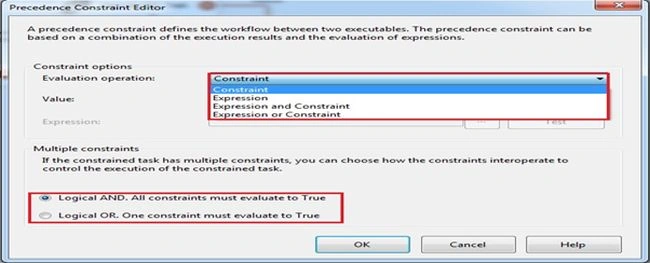
Data Flow Elements
There are mainly the following three types of data flow components:
- Sources
- Transformation
- Destination
The diagram includes the various data flow components: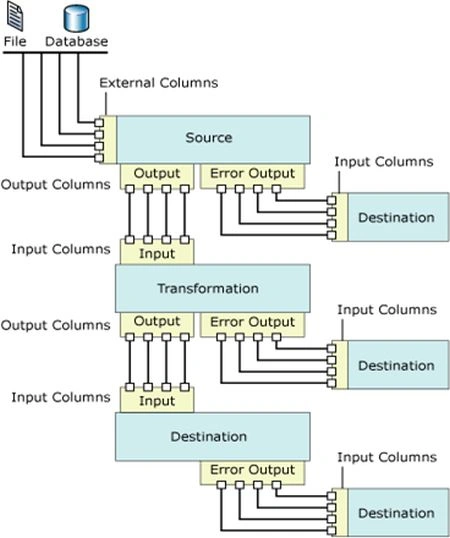
Image source: TechNet(MSDN).
Sources
Sources extract data from data stores such as tables and views in relational databases, files and Analysis Services databases.
Transformations
Transformations modify, summarize and clean data.
Destinations
Destinations load data into data stores or create in-memory datasets.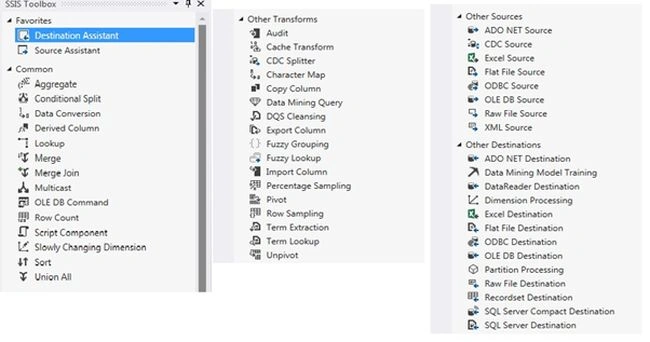
- Source Assistant: Helps to create a source component and connection manager.
- Destination Assistant: Helps to create a destination component and connection manager.
- ADO NET Source: The ADO NET source consumes data from a .NET provider and makes the data available to the data flow.
- ADO NET Destination: The ADO NET destination loads data into a variety of ADO.NET-compliant databases that use a database table or view.
- ADO.NET Connection Manager: Enables a package to access data sources using a .NET provider.
- ADO NET Custom Properties: The ADO .NET source has both custom properties and the properties common to all data flow components.
- ADO Connection Manager: This will enable a package to access data sources using a .NET provider.
- CDC Flow Components: Help SSIS developers work with CDC and reduce the complexity of CDC packages.
- Excel Source: The Excel source extracts data from worksheets or ranges in Microsoft Excel workbooks.
- Excel Destination: The Excel destination loads data into worksheets or ranges in Microsoft Excel workbooks.
- Excel Connection Manager: Enables a package to connect to an existing Microsoft Excel workbook file.
- Connect to an Excel Workbook: To connect an SSIS package to an Excel file requires an Excel connection manager.
- Excel Custom Properties: The Excel source has both custom properties and the properties common to all data flow components.
- File Connection Manager: Enables a package to reference an existing file or folder, or to create a file or folder at run time.
- Flat File Source: Reads data from a text file.
- Flat File Destination: Writes data to a text file.
- Flat File Connection Manager: This will enable a package to access data in a flat file.
- Multiple Flat Files Connection Manager: It will help to enable a package to access data in multiple flat files.
- ODBC Flow Components: For creating an ODBC data flow using SQL Server 2014 Integration Services (SSIS).
- ODBC Connection Manager: Enable a package to connect to a data source using an OLE DB provider.
- OLE DB Source: Extracts data from a variety of OLE DB-compliant relational databases using a database table, a view, or an SQL command.
- OLE DB Destination: Loads data into a variety of OLE DB-compliant databases using a database table or view or an SQL command.
- OLE DB Connection Manager: Enables a package to connect to a data source by using an OLE DB provider.
- Raw File Source: Reads raw data from a file.
- Raw File Destination: Writes raw data to a file.
- Data Mining Model Training Destination: Trains data mining models by passing the data that the destination receives through the data mining model algorithms.
- DataReader Destination: Exposes the data in a data flow by using the ADO.NET DataReader interface.
- Dimension Processing Destination: Loads and processes an SQL Server Analysis Services dimension.
- Partition Processing Destination: Loads and processes an SQL Server Analysis Services partition.
- Recordset Destination: Creates and populates an in-memory ADO recordset.
- SQL Server Compact Edition Destination: Writes data to SQL Server Compact databases.
- SQL Server Compact Edition Connection Manager: Enables a package to connect to a SQL Server Compact database.
- SQL Server Destination: Connects to a local SQL Server database and bulk loads data into SQL Server tables and views.
- XML Source: Reads an XML data file and populates the columns in the source output with the data.
- Connect to an Access Database: Connect an SSIS package to access database require an OLEDB connection manager and a data provider.
- Integration Services Paths: A path connects two components in a data flow by connecting the output of one data flow component to the input of another component.
- Data in Data Flows: A set of data types that are used in data flows like data type conversion, data type comparison, Data Flow Troubleshooting and so on.
- Error Handling in Data: Handles the errors.
- Data Flow Tab: Creates data flows in a package.
- Data Flow Task: Encapsulates the data flow engine that moves data between sources and destinations.
- Data Viewer: Displays the data buffer by buffer as data moves between two data flow components.
- OData Connection Manager: Enables a package to connect to an OData source.
- OData Source: Consumes data from Open Data Protocol (OData) services.
- Integration Services Transformations: Are the components in the data flow of a package that aggregates, merges, distributes and modifies data.
- Aggregate Transformation: Does the aggregate functions, for example: Average.
- Audit Transformation: Enables the data flow in a package to include data about the environment in which the package runs.
- Balanced Data Distributor Transformation: Distributes buffers of the incoming rows uniformly across outputs on separate threads.
- Character Map Transformation: Does the string functions like lower to upper and so on.
- Conditional Split Transformation: Can route data rows to multiple outputs depending on the content of the data.
- Copy Column Transformation: Creates new columns by copying input columns and adding the new columns to the transformation output.
- Data Conversion Transformation: Converts the data in an input column to a different data type and then copies it to a new output column.
- Data Mining Query Transformation: Performs prediction queries against data mining models.
- DQS Cleansing Transformation: Performs the Data quality services.
- Derived Column Transformation: Creates new column values by applying expressions to transformation input columns.
- Export Column Transformation: Reads data in a data flow and inserts the data into a file.
- Fuzzy Grouping Transformation: Identifies rows of data that are likely to be duplicates and selects a canonical row of data to use in standardizing the data.
- Fuzzy Lookup Transformation: Performs data cleaning tasks such as standardizing data, correcting data and providing missing values.
- Import Column Transformation: Reads data from files and adds the data to columns in a data flow.
- Lookup Transformation: Performs lookups by joining data in input columns with columns in a reference dataset.
- Merge Transformation: combines two sorted datasets into a single dataset.
- Merge Join Transformation: Provides an output that is generated by joining two sorted datasets using a FULL, LEFT, or INNER joins.
- Multicast Transformation: Distributes its input to one or more outputs.
- OLE DB Command Transformation: Runs an SQL statement for each row in a data flow.
- Percentage Sampling Transformation: Creates a sample data set by selecting a percentage of the transformed input rows.
- Pivot Transformation: Makes a normalized data set into a less normalized, but more compact version by pivoting the input data on a column value.
- Row Count Transformation: Counts rows as they pass through a data flow and stores the final count in a variable.
- Row Sampling Transformation: Obtains a randomly selected subset of an input dataset.
- Script Component: Hosts a script and enables a package to include and run custom script code.
- Slowly Changing Dimension Transformation: Coordinates the updating and inserting of records in a data warehouse dimension tables.
- Sort Transformation: Sorts input data in ascending or descending order and copies the sorted data to the transformation output.
- Term Extraction Transformation: Extracts terms from text in a transformation input column and then writes the terms to a transformation output column.
- Term Lookup Transformation: Matches terms extracted from text in a transformation input column with terms in a reference table.
- Union All Transformation: Combines multiple inputs into one output.
- Unpivot Transformation: Makes a normalized dataset into a more normalized version by expanding values from multiple columns in a single record into multiple records with the same values in a single column.
Integration Services Connections
SSIS packages use connections to do various tasks and to implement Integration Services.
Some of the examples, like connecting to source and destination, connecting to relational databases, connecting to Analysis Services and so on.
Connection Managers
SQL Server Integration Services provides various types of connection managers that enable packages to connect to a variety of data sources and servers:
- Built-in connection managers.
- Available for download from the Microsoft Web site.
- Custom connection manager.
The following are some of the examples:
- ADO
- ADO.NET
- CACHE
- Excel
- FILE
- FLATFILE
- FTP
- HTTP
- MSMQ
- MSOLAP100
- MULTIFILE
- MULTIFLATFILE
- OLEDB
- ODBC
- SMOServer
- SMTP
- SQLMOBILE
- WMI
References
SQL Server Integration Services
SQL Server Integration Services
Conclusion
In this article we learned some basics of SQL Server Integration Services.
Shobana JPosted Jul 12, 2016, 3:31 AM
Nice one
Shiju JosephPosted Oct 31, 2014, 9:22 AM
Thanks Dinesh
Dinesh BeniwalPosted Oct 31, 2014, 6:39 AM
Good work Shiju.
Khan Abrar AhmedPosted Oct 30, 2014, 7:48 AM
Very good artical sir.