

Introduction
Some web site administrators need to track user's last login date and time. There may be many solutions for this like updating the database through a landing page or a user's profile page or even any other page where the user lands first.
Even I have used a couple of ways for this but finally found a time mechanism. Maybe this is not too good but it is the best for me.
If we write some code in code-behind for this, then the query will execute each time the user navigates to the web site; this will increase the site response time. So, what's now? Let's take a look at my idea.
Sample Database
Look at the sample database table named 'users' having user account details like username, password, joining_date, last_login_date etc.
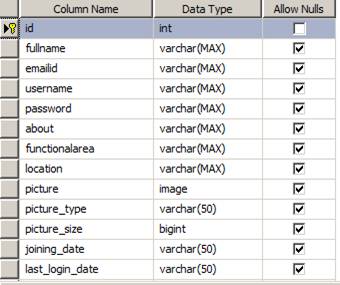
Follow the steps:
Step 1
Add a Global.asax file in your web project.
Step 2
Add the following namespaces in Global.asax.
<%@ Import Namespace="System.Data.SqlClient" %>
<%@ Import Namespace="System.Data" %>
Step 3
Place the following code in 'Session_Start()' event.
using (SqlConnection connection = new SqlConnection(GetConnectionString()))
{ string dateandtime = DateTime.Now.ToString(); string loggedusername = HttpContext.Current.User.Identity.Name;
string sql = "UPDATE users SET last_login_date=@dateandtime WHERE username=@loggedusername"; connection.Open(); SqlCommand cmd = new SqlCommand(sql, connection);
SqlParameter[] pram = new SqlParameter[2];
pram[0] = new SqlParameter("@dateandtime", SqlDbType.VarChar, 49);
pram[1] = new SqlParameter("@loggedusername", SqlDbType.VarChar, 49);
pram[0].Value = dateandtime;
pram[1].Value = loggedusername;
for (int i = 0; i < pram.Length; i++)
{
cmd.Parameters.Add(pram[i]);
}
cmd.ExecuteNonQuery();
}
Step 4
Define the 'GetConnectionString()' function.
public string GetConnectionString()
{
return System.Configuration.ConfigurationManager.ConnectionStrings["ConnStrName"].ConnectionString;
}
That's all about the sample update of the last login date and time of a user in the database without effecting speed of website.
HAVE A HAPPY CODING!!
Suthish NairPosted May 23, 2011, 5:32 AM
why we need Global method for that?