

Abstract
In this wonderful article series, we'll examine the core details of creating, deploying, and configuring .NET assemblies and their advantages over existing COM technology. This article goes deeper in terms of understanding the role and format of .NET assemblies and modules. You'll explore assembly manifests and how exactly the .NET runtime resolves the location of the assembly and you'll also get an understanding of the assembly CIL code. This article also states the distinction between single-file and multi-file assemblies.
Problem with COM
Microsoft itself introduced the phrase “DLL Hell” to describe the traditional problem with existing COM DLLs. Often an old DLL is replaced by a new version and breaks an application because the newly installed application overwrites a DLL that has also been used by another application. In fact, such a problem occurs due to not checking the versions of the DLL properly by the installation program while the new DLL should be backward compatible with the old version to continue the existing functionality. There is no side-by-side DLL installation feature provided by the existing COM technology. A DLL incorporates various functionality features and it is also referenced from other locations but such functionality is terminated when the old version is replaced by a new version with new functionality.
You can install two versions of a single assembly in the side-by-side installation feature. Although this can be applied with COM DLLs a problem exists in such a case. Literally, COM DLLs are not self-describing. The configuration of a COM component is stored in the registry, not in the Component DLL itself. So the configuration information is taken from the last version rather than two versions of a single DLL simultaneously.
Understanding Assembly
The .NET Framework overcomes the DLL Hell or version issues with existing COM technology by introducing assemblies. Assemblies are a self-describing installation unit, consisting of single or multiple files. Virtually, every file that is developed and executed under the .NET Common Language Runtime (CLR) is called an assembly. One assembly file contains metadata and could be an .EXE, DLL, or Resource file. Now, let's discuss some of the comprehensive benefits provided by the assembly.
- Assemblies can be deployed as private or shared. Private assemblies reside in the same solution directory. Shared assemblies, on the other hand, are libraries intended to be consumed by numerous applications on a single machine because they are deployed to a central repository called the GAC.
- The .NET assemblies are assigned a special 4-digit number to concurrently run the multiple versions of an assembly. The 4-digit special number can be specified as “<major>.<minor>.<build>.<revision>”.
- Assembly archives every external assembly reference they must have access to in order to function properly. However, assemblies are self-describing by documenting all the external references in the manifest. The comprehensive details of assemblies such as member function, variable name, base class, interface, and constructors are placed in the metadata so that the CLR does not need to consult the Windows system registry to resolve its location.
- The .NET Framework offers you to reuse types in a language-independent manner so it does not matter how a code library is packaged.
- Application isolation is ensured using application domains. A number of applications can run independently inside a single process with an application domain.
- Installation of an assembly can be as simple as copying all of its files. Unlike COM, there is no need to register them in the Windows system registry.
Modules
Before delving into assembly types in detail, let's discuss the modules. An assembly is typically composed of multiple modules. A module is a DLL without assembly attributes. To get a better understanding, we are creating a C# class library project as in the following.
- public class test
- {
- public test() { }
- public test(string fname, string lname)
- {
- this.FName = fname;
- this.LName = lname;
- }
- public string FName
- {
- get;
- set;
- }
- public string LName
- {
- get;
- set;
- }
- public override string ToString()
- {
- return FName + " " + LName;
- }
- }
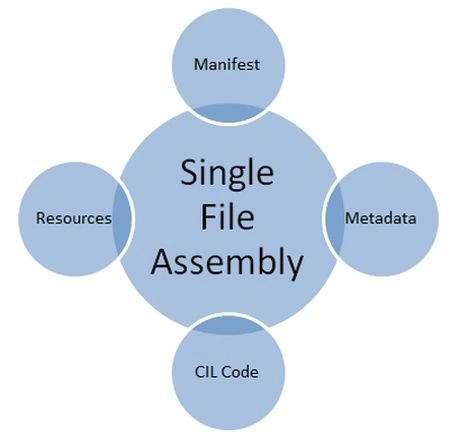


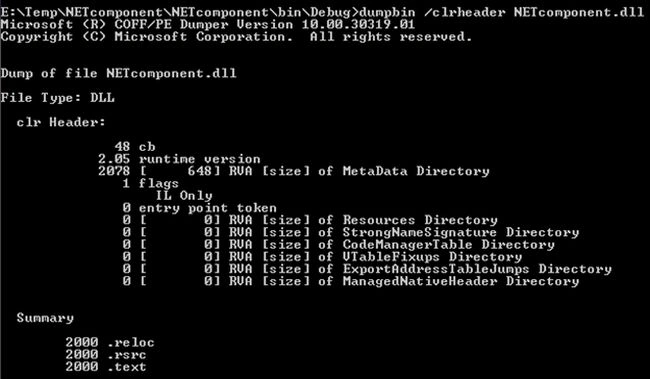

- IdentityIt includes version, name, culture, and public key details.
- Set of PermissionsThis portion displays the necessary permissions to run an assembly.
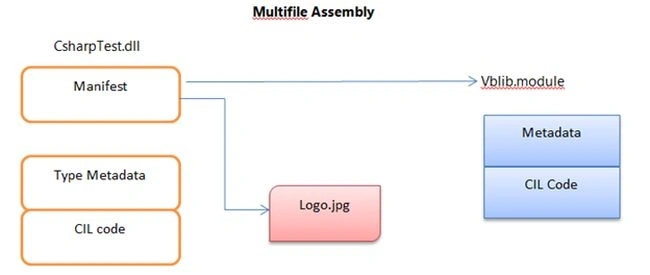
- List of FilesIt lists all the files belonging to a single-file or multiple-file assembly.
- External Reference AssembliesThe manifest also documents the external reference files that are needed to run an assembly.
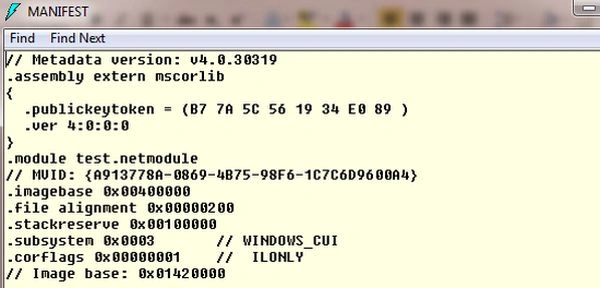
We can explore the assembly manifest using the ildasm.exe utility as in the following:
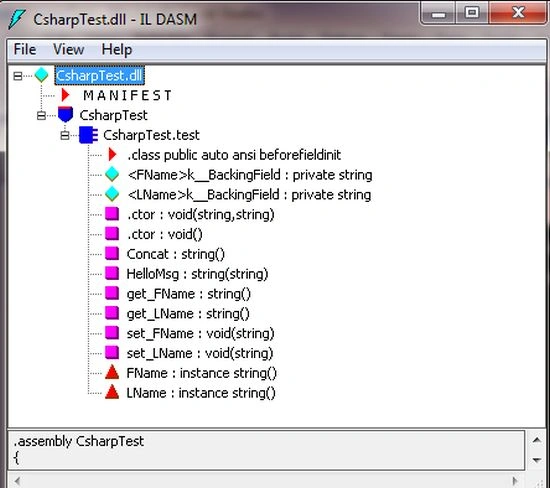 Now, open the CSharpTest.dll manifest by double-clicking the MANIFEST icon. The first code block specifies all the external assemblies, such as mscorlib.dll, required by the current assembly to function correctly. Here, each .assembly extern block is qualified by the .publickeytoken and .ver directive as in the following.
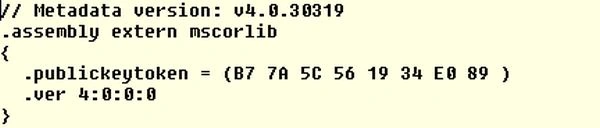 Typically, these settings can be configured manually that reside in the solution AssemblyInfo.cs file as in the following:
- using System.Reflection;
- using System.Runtime.CompilerServices;
- using System.Runtime.InteropServices;
- [assembly: AssemblyTitle("CsharpTest")]
- [assembly: AssemblyDescription("")]
- [assembly: AssemblyConfiguration("")]
- [assembly: AssemblyCompany("")]
- [assembly: AssemblyProduct("CsharpTest")]
- [assembly: AssemblyCopyright("Copyright © 2013")]
- [assembly: AssemblyTrademark("")]
- [assembly: AssemblyCulture("")]
- [assembly: ComVisible(false)]
- // The following GUID is for the ID of the typelib if this project is exposed to COM
- [assembly: Guid("2fcf6717-f595-4216-bb93-f6590e37b3e5")]
- [assembly: AssemblyVersion("1.0.0.0")]
- [assembly: AssemblyFileVersion("1.0.0.0")]
Sam HobbsPosted Nov 6, 2014, 1:46 PM
Rick Anderson described DLL Hell in an article "The End of DLL Hell" for Windows 2000 but I have my doubts that Microsoft used the word "hell" in an official term. Has "DLL Hell" ever been an official Microsoft term? It is not clear to me that Microsoft itself introduced the phrase “DLL Hell”. Was the term first used in that article? If not then when was it first used? I am interested in authoritative answers to those questions.