

Alternate Languages:
The installed languages in the SharePoint server can be supported by the site which is specified by the owner of the site, so that users who navigate to the site can then change the display language of the user interface to any of these alternate languages.
Go to Site Actions => Site Settings => Language Settings.
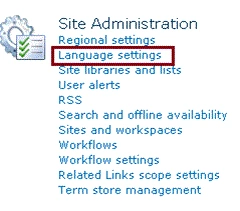
You can
see option Alternate languages. 
Note: MUI should be enabled for the website otherwise you will get only the default language.MUI can be enabled by setting the property web.IsMultilingual=true.
The alternate languages can be determined by using the SharePoint 2010 object model.
SupportedUICultures Property:
Namespace:
Microsoft.SharePoint
Assembly:
Microsoft.SharePoint (in Microsoft.SharePoint.dll)
Steps Involved:
-
Open Visual Studio 2010.
-
Go to File => New => Project.
-
Select Console Application template from the installed templates.
-
Enter the Name and click Ok.
-
Add the following assembly.
-Microsoft.SharePoint.dll -
Add the following namespace.
-Using Microsoft.SharePoint ;
-Using System.Globalization; -
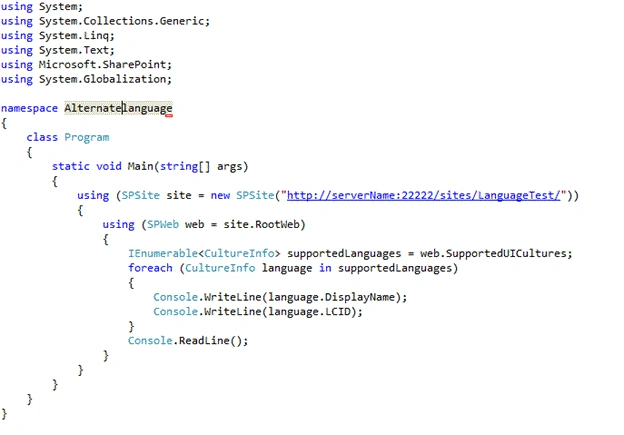
Program.cs looks like the following.
-
Build the solution.
-
Hit F5.
-
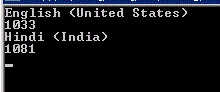
Output:
- Go to Start => All Programs => Microsoft SharePoint 2010 products =>
SharePoint 2010 Management Shell.
- Run as an administrator.
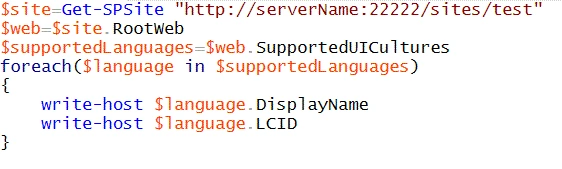
- Run the following script to get the Default language.
Alfonso RodriguezPosted Apr 6, 2012, 10:26 AM
very good article thanks i have you one question onc i have all available cultures how i change it to the site programatically.