

In this article we will be seeing how to configure forms based authentication for claims based web application using SQL provider.
Creating the database:
- Open the Visual Studio 2010 Command Prompt.
- Type aspnet_regsql.
- ASP.NET SQL Server Setup Wizard will pop up.

- Click on Next.

- Click on Next.

- Click on Next.

- Click on Finish.
- A database will be created as shown in the following.

Adding users to the SQL database using Web Site Administration Tool:
- Open Visual Studio 2010.
- Go to File => New => Web Site.
- Select the ASP.NET Empty Web Site template.

- Click Ok.
- Add the following entry in the web.config file.
|
<configuration> <system.web> <membership defaultProvider="AspNetSqlMembershipProvider"> <providers> <clear /> <add name="AspNetSqlMembershipProvider" connectionStringName="AspNetSqlProvider" applicationName="/" type="System.Web.Security.SqlMembershipProvider, System.Web, Version=2.0.0.0, Culture=neutral, PublicKeyToken=b03f5f7f11d50a3a" /> </providers> </membership> <roleManager enabled="true"> <providers> <clear /> <add connectionStringName="AspNetSqlProvider" applicationName="/" description="Stores and retrieves roles data from the local Microsoft SQL Server database" name="AspNetSqlRoleProvider" type="System.Web.Security.SqlRoleProvider, System.Web,Version=2.0.0.0, Culture=neutral, PublicKeyToken=b03f5f7f11d50a3a" /> </providers> </roleManager> </system.web> <connectionStrings> <clear/> <add name="AspNetSqlProvider" connectionString="data source=.; Integrated Security=SSPI;Initial Catalog=aspnetdb;" providerName="System.Data.SqlClient" /> </connectionStrings> </configuration> |
- Go to Website =>ASP.Net Configuration.

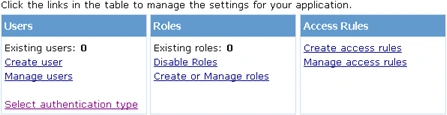
- Go to Security => Users => Select authentication type.

- Select "From the internet" option and click done.

- Go to Security => Roles => Enable Roles, enter the role name and click "Add Role".
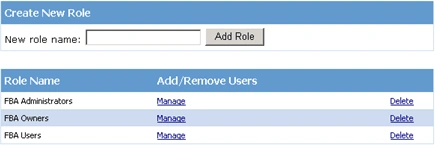
- Go to Security => Users => Create user.
- Create the new user as shown in the following.

- Once you have created the users you could see the users in the SQL database (Databases => aspnetdb =>Tables =>dbo.aspnet_users).

Create a claim based web application:
- Go to Central Administration =>Application Management => Manage web applications.
- In the Contribute group click on New.

- In the Authentication section of the Create New Web Application dialog box, click Claims Based Authentication.
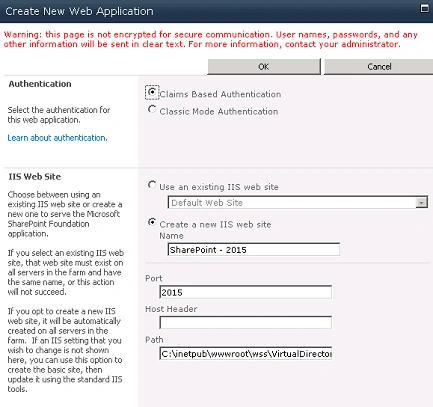
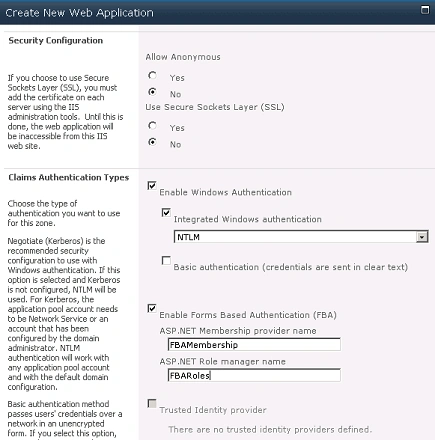
- In the Claims Authentication Types section, select Enable Forms Based Authentication (FBA).
- Type a membership provider name.
- Click OK to create the Web application.
- Create a site collection for the web application SharePoint - 2015.
Configure the web.config files:
- The Central Administration Web application Web.Config file.
- The forms-based authentication claims-based Web application Web.Config file.
- The Security Token Service Web.Config file.
Central Administration Web application web.config file:
- Go to Start => Run => inetmgr.
- Go to Sites => SharePoint Central Administration => Right Click => Explore.
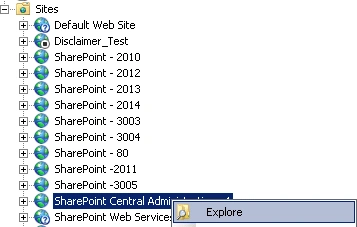
- Open the web.config file.
- Inside the <configuration></configuration> section add the following entry.
<connectionStrings>
<add connectionString="Server=.;Database=aspnetdb;Integrated Security=true" name="AspNetSqlProvider" />
</connectionStrings>
- And also add the following entry.
<roleManager defaultProvider="AspNetWindowsTokenRoleProvider" enabled="true">
<providers>
<clear />
<add applicationName="/" name="AspNetWindowsTokenRoleProvider" type="System.Web.Security.WindowsTokenRoleProvider, System.Web, Version=2.0.0.0, Culture=neutral, PublicKeyToken=b03f5f7f11d50a3a" />
<add name="FBARoles" type="System.Web.Security.SqlRoleProvider, System.Web, Version=2.0.0.0, Culture=neutral, PublicKeyToken=b03f5f7f11d50a3a" applicationName="/" connectionStringName="AspNetSqlProvider" />
</providers>
</roleManager>
<membership defaultProvider="FBAMembership">
<providers>
<clear />
<add name="FBAMembership" type="System.Web.Security.SqlMembershipProvider, System.Web, Version=2.0.0.0, Culture=neutral, PublicKeyToken=b03f5f7f11d50a3a" applicationName="/" connectionStringName="AspNetSqlProvider" enablePasswordReset="false" enablePasswordRetrieval="false" passwordFormat="Clear" requiresQuestionAndAnswer="false" requiresUniqueEmail="false" />
</providers>
</membership>
- Save and close the web.config file.
Forms-based authentication claims-based Web application Web.Config file:
- Go to Start => Run => inetmgr.
- Go to Sites => SharePoint - 2014 => Right Click => Explore.
- Open the web.config file.
- Inside the <configuration></configuration> section add the following entry.
<connectionStrings>
<add connectionString="Server=.;Database=aspnetdb;Integrated Security=true" name="AspNetSqlProvider" />
</connectionStrings>
- And also add the following entry.
<membership defaultProvider="i">
<providers>
<add name="i" type="Microsoft.SharePoint.Administration.Claims.SPClaimsAuthMembershipProvider, Microsoft.SharePoint, Version=14.0.0.0, Culture=neutral, PublicKeyToken=71e9bce111e9429c" />
<add name="FBAMembership" type="System.Web.Security.SqlMembershipProvider, System.Web, Version=2.0.0.0, Culture=neutral, PublicKeyToken=b03f5f7f11d50a3a" applicationName="/" connectionStringName="AspNetSqlProvider" enablePasswordReset="false" enablePasswordRetrieval="false" passwordFormat="Clear" requiresQuestionAndAnswer="false" requiresUniqueEmail="false" />
</providers>
</membership>
<roleManager defaultProvider="c" enabled="true" cacheRolesInCookie="false">
<providers>
<add name="c" type="Microsoft.SharePoint.Administration.Claims.SPClaimsAuthRoleProvider, Microsoft.SharePoint, Version=14.0.0.0, Culture=neutral, PublicKeyToken=71e9bce111e9429c" />
<add name="FBARoles" type="System.Web.Security.SqlRoleProvider, System.Web, Version=2.0.0.0, Culture=neutral, PublicKeyToken=b03f5f7f11d50a3a" applicationName="/" connectionStringName="AspNetSqlProvider" />
</providers>
</roleManager>
Security Token Service web.config file:
- Go to Start => Run => inetmgr.
- Go to Sites => SharePoint Web Services =>Security TokenServiceApplication => Right Click => Explore.
- Open the web.config file.
- Inside the <configuration></configuration> section add the following entry.
<connectionStrings>
<add name="AspNetSqlProvider"
connectionString="data source=.; Integrated Security=SSPI;Initial Catalog=aspnetdb;"
providerName="System.Data.SqlClient" />
</connectionStrings>
- And also add the following entry.
<membership defaultProvider="FBAMembership">
<providers>
<add name="FBAMembership"
connectionStringName="AspNetSqlProvider"
applicationName ="/"
type="System.Web.Security.SqlMembershipProvider, System.Web, Version=2.0.0.0, Culture=neutral, PublicKeyToken=b03f5f7f11d50a3a" />
</providers>
</membership>
<roleManager enabled="true"
defaultProvider="FBARoles">
<providers>
<add name="FBARoles"
connectionStringName="AspNetSqlProvider"
applicationName="/"
type="System.Web.Security.SqlRoleProvider, System.Web, Version=2.0.0.0, Culture=neutral, PublicKeyToken=b03f5f7f11d50a3a" />
</providers>
</roleManager>
Policy for Forms-based authentication claims-based Web application:
- Go to Central administration => Application management => Manage service applications.
- Select the web application (SharePoint - 2015).
- In the Policy group, select User policy.
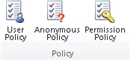
- Click on Next.
- In the Choose Users section, click on Browse option to search for the users.
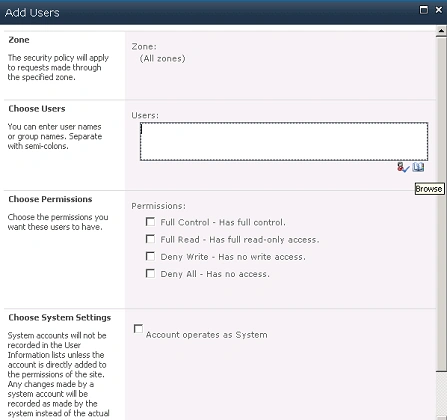
- Search for "admin" user who belongs to "Forms auth" category.
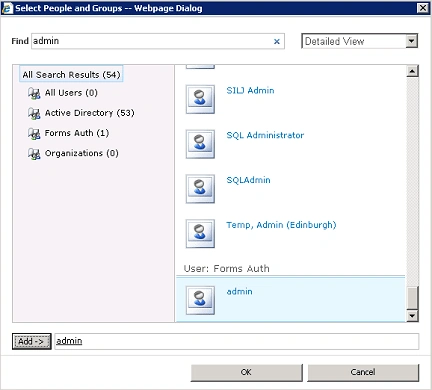
- Select the User =>Add => OK.
- Select the option "Full control - Has full control" from Choose permissions section.

- Click on Ok.
- Click on Finish.
- You could see the user added as shown in the following.

Testing:
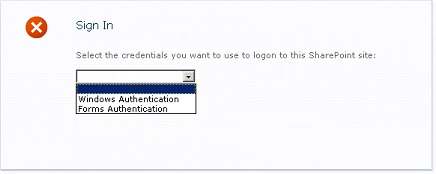
- When you try to access the site collection that belongs to the SharePoint - 2015 web application it will be redirected to the login page.
- Choose forms authentication.
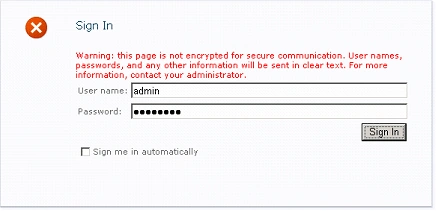
- Enter the user name and password.
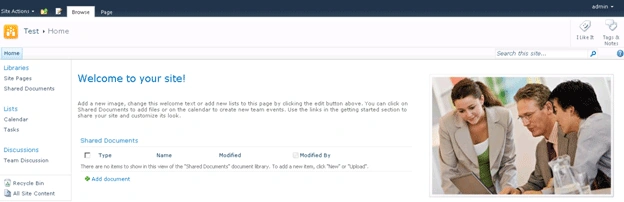
- You are now logged into your site as "admin", with site administrator privileges.
DavidPosted Apr 8, 2011, 12:32 PM
Douglas - I ran into this not long ago along my path to where I am now. Check your logs (event viewer > Windows Logs > Application). Do you see an error like this that is recorded when you attempt to login: "An exception occurred when trying to issue security token." Also check your SharePoint log (C:\Program Files\Common Files\Microsoft Shared\Web Server Extensions\14\LOGS). David
douglas wattseditedPosted Apr 7, 2011, 8:34 PMEdited Apr 7, 2011, 8:41 PM
When I try to use a user name already added to the SQL 2010 aspnetdb database, I cannot connect using the connection strings settings you provide. Also, when I try to verify the added user I see no accounts in the Forms Auth section. This makes me think that Sharepoint is not able to connect to the SQL database at all. What are your thoughts? Server Error in '/' Application. -------------------------------------------------------------------------------- The remote server returned an error: (500) Internal Server Error. Description: An unhandled exception occurred during the execution of the current web request. Please review the stack trace for more information about the error and where it originated in the code. Exception Details: System.Net.WebException: The remote server returned an error: (500) Internal Server Error. Source Error: An unhandled exception was generated during the execution of the current web request. Information regarding the origin and location of the exception can be identified using the exception stack trace below.
DavidPosted Apr 7, 2011, 7:22 PM
Fijai, After adding my fbaadmin account to the Security policy for my site (I also made fbaadmin the site's secondary site collection admin) I try to login as fbaadmin but I get "Access Denied". I extended an existing SharePoint Foundation 2010 site that uses Windows authentication; I set up the extended site to use form-based authentication. If you can help me get past this problem then you will be a hero! Thanks, David