

In this article we will be seeing how to get the list of holds for the specified
list item using powershell and programmatically in SharePoint 2010.
For Holds and Hold Reports in SharePoint 2010
http://www.c-sharpcorner.com/UploadFile/anavijai/5103/ (Copy the
hyperlink).
I have created two hold items "HR" and "Finance" in the Holds list
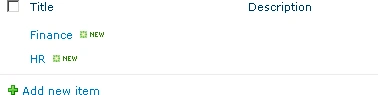
Which is available in Site Actions => Site Settings => Hold and eDiscovery =>
Holds.

In the Shared documents I have an item "New" for which both "HR" and "Finance"
holds are added.

Programmatically get the list of holds for the item "New":
- Open Visual Studio 2010.
- Create a new console application.
- Add the following references.
- Microssoft.Office.Policy.dll
- Microsoft.SharePoint.dll
- Add the following namespaces.
- using Microsoft.SharePoint;
- using Microsoft.Office.RecordsManagement.Holds;
- Replace the code with the following.
using System;
using System.Collections.Generic;
using System.Linq;
using System.Text;
using Microsoft.SharePoint;
using System.Xml;
using Microsoft.SharePoint.Administration;
using Microsoft.Office.RecordsManagement.Holds;namespace GetHolds
{
class Program
{
static void Main(string[] args)
{
using (SPSite site = new SPSite("http://servername:22222/sites/Test/"))
{
using (SPWeb web = site.RootWeb)
{
SPList list = web.Lists["Shared Documents"];
foreach (SPListItem item in list.Items)
{
if (item.DisplayName.ToString() == "New")
{
List<SPListItem> holds = Hold.GetHolds(item);
foreach (SPListItem holdItem in holds)
{
Console.WriteLine(holdItem.Title);
}
}
}
Console.ReadLine();
}
}
}
}
}
-
Build the solution.
-
Hit F5.
-
Output:
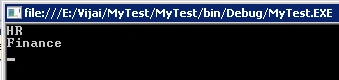
Gets the list of holds for the item "New" using powershell:
-
Go to Start => All Programs => Microsoft SharePoint 2010 Products => SharePoint 2010 Management Shell.
-
Run as an administrator.
-
Run the following script.
$site = get-SPSite("http://serverName:22222/sites/Test/")
$web = $site.RootWeb
$list = $web.Lists["Shared Documents"]
foreach ($item in $list.Items)
{
if ($item.DisplayName.ToString() -eq "New")
{
$holds = [Microsoft.Office.RecordsManagement.Holds.Hold]::GetHolds($item)
foreach ($holdItem in $holds)
{
write-host -f green $holdItem.Title
}
}
}
Join the conversation! Your thoughts help the community grow.