

I have created a sandbox solution (wsp file) which consists of a simple web part and I have deployed that in the site collection. Now I am going to block the sandbox solution that I have deployed so that it does not run. Sandbox solution can be blocked in the central administration by the farm administrator.
Steps Involved:
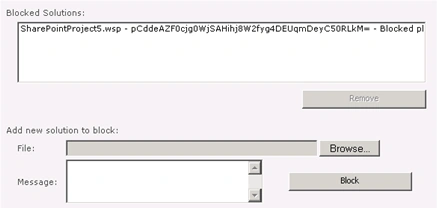
- Go to Central Administration => System Settings =>Farm Management => Manage User Solutions.

- Browse for the wsp file.
- Add the message and click on Block.
- Sandbox solution will be added to the Blocked Solutions as shown in the following.
- Click on ok.
- Open the SharePoint site.
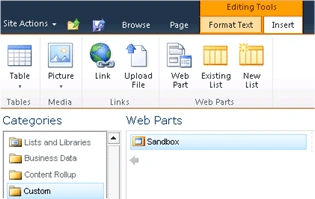
- Go to Site Actions =>Edit Page =>"Editing Tools" in the ribbon interface =>Insert.
- In the "Categories" select Custom => Sandbox (which is a custom web part).
- Click on Add.
- You will get the following error.
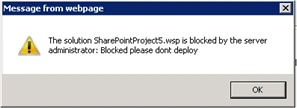
- This is because the sandbox solution is added to the blocked solutions.
Join the conversation! Your thoughts help the community grow.