In this article we will be seeing how to create a custom permission level in
SharePoint 2010.
In this article we will be seeing the following:
- Create a custom permission level using
console application
- Create a custom permission level using
powershell script
Steps Involved:
- Open visual studio 2010.
- Create a new console application.
- Add the following references.
- Add the following namespaces.
- Using Microsoft.SharePoint;
Create a custom permission level using
console application
using
System;
using
System.Collections.Generic;
using
System.Linq;
using
System.Text;
using
Microsoft.SharePoint;
namespace
CustomPermissionLevel
{
class Program
{
static void
Main(string[] args)
{
using (SPSite
site = new SPSite("http://servername:2020/"))
{
using (SPWeb
web = site.RootWeb)
{
SPRoleDefinition role =
new SPRoleDefinition();
role.Name = "Custom Permission
Level";
role.Description = "Description:
Custom Permission level";
role.BasePermissions =
SPBasePermissions.AddAndCustomizePages |
SPBasePermissions.ApplyStyleSheets;
web.RoleDefinitions.Add(role);
}
}
}
}
}
Create a custom permission level using powershell script:
$site=Get-SPSite "http://servername:2020/"
$web=$site.RootWeb;
$customPermissionLevel=New-Object Microsoft.SharePoint.SPRoleDefinition
$customPermissionLevel.Name="Custom Permission Level Test"
$customPermissionLevel.Description="Description: Custom Permission Level Test"
$customPermissionLevel.BasePermissions="EmptyMask,
ViewListItems,
AddListItems,
EditListItems,
DeleteListItems,
ApproveItems,
OpenItems,
ViewVersions,
DeleteVersions,
CancelCheckout,
ManagePersonalViews,
ManageLists,
ViewFormPages,
Open,
ViewPages,
AddAndCustomizePages,
ApplyThemeAndBorder,
ApplyStyleSheets,
ViewUsageData,
CreateSSCSite,
ManageSubwebs,
CreateGroups,
ManagePermissions,
BrowseDirectories,
BrowseUserInfo,
AddDelPrivateWebParts,
UpdatePersonalWebParts,
ManageWeb,
UseClientIntegration,
UseRemoteAPIs,
ManageAlerts,
CreateAlerts,
EditMyUserInfo,
EnumeratePermissions,
FullMask"
$web.RoleDefinitions.Add($customPermissionLevel);
$web.Dispose()
$site.Dispose()
Go to Site Actions => Site Settings => Site Permissions =>Permission Level.
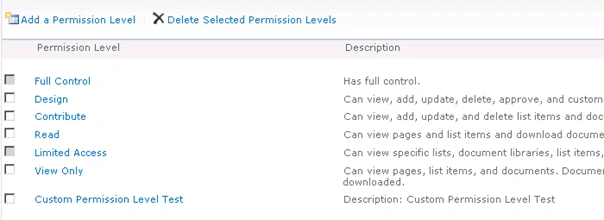
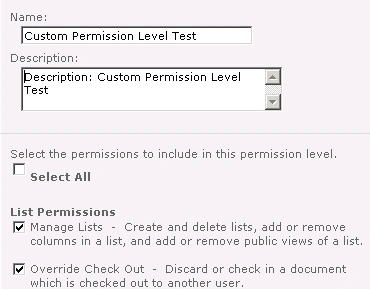
You could see a new custom permission level is created successfully.


Join the conversation! Your thoughts help the community grow.