

Steps Involved:
- Open Visual Studio 2010.
- Go to File => New => Project.
- Select Silverlight Application template and enter the Name for the project.
- Click Ok.
- Open MainPage.xaml and replace the code with the following one.
xmlns="http://schemas.microsoft.com/winfx/2006/xaml/presentation"
xmlns:x="http://schemas.microsoft.com/winfx/2006/xaml"
xmlns:d="http://schemas.microsoft.com/expression/blend/2008"
xmlns:mc="http://schemas.openxmlformats.org/markup-compatibility/2006"
xmlns:data="clr-namespace:System.Windows.Controls;assembly=System.Windows.Controls.Data"
mc:Ignorable="d"
d:DesignHeight="300" d:DesignWidth="400">
<Grid x:Name="LayoutRoot" Background="White">
<my:DataGrid x:Name="dgFilesFromDL" Height="200" Width="300" VerticalScrollBarVisibility="Auto" HorizontalScrollBarVisibility="Auto" AutoGenerateColumns="True"
Background="#FFEBD0D0" AlternatingRowBackground="#FFF8ECEC">
<my:DataGrid.RowGroupHeaderStyles>
<Style TargetType="my:DataGridRowGroupHeader">
<Setter Property="PropertyNameVisibility" Value="Collapsed" />
<Setter Property="Background" Value="#FF112255" />
<Setter Property="Foreground" Value="#FFEEEEEE" />
<Setter Property="SublevelIndent" Value="15" />
</Style>
<!-- Style for groups under the top level -->
<Style TargetType="my:DataGridRowGroupHeader">
<Setter Property="Background" Value="#44225566" />
</Style>
</my:DataGrid.RowGroupHeaderStyles>
</my:DataGrid>
<data:DataPager Source="{Binding Path=ItemsSource, ElementName=dgFilesFromDL}" PageSize="7" Margin="166,0,50,0"></data:DataPager>
</Grid>
</UserControl>
Open MainPage.xaml.cs and replace the code with the following.
using System;
using System.Collections.Generic;
using System.Linq;
using System.Net;
using System.Windows;
using System.Windows.Controls;
using System.Windows.Documents;
using System.Windows.Input;
using System.Windows.Media;
using System.Windows.Media.Animation;
using System.Windows.Shapes;
using Microsoft.SharePoint.Client;
using System.Threading;
using System.Windows.Data;
namespace SLGetFilesFromDL
{
public partial class MainPage : UserControl
{
private ListItemCollection _empDetails;
public class Project
{
public String empName { get; set; }
}
public MainPage()
{
InitializeComponent();
ClientContext context = new ClientContext(ApplicationContext.Current.Url);
context.Load(context.Web);
List empDetails = context.Web.Lists.GetByTitle("Employee Details");
context.Load(empDetails);
CamlQuery query = new Microsoft.SharePoint.Client.CamlQuery();
string camlQueryXml = "<View><ViewFields>" +
"<FieldRef Name=\"Title\" />" +
"</ViewFields></View>";
query.ViewXml = camlQueryXml;
_empDetails = empDetails.GetItems(query);
context.Load(_empDetails);
context.ExecuteQueryAsync(new ClientRequestSucceededEventHandler(OnRequestSucceeded), null);
}
private void OnRequestSucceeded(Object sender, ClientRequestSucceededEventArgs args)
{
// This is not called on the UI thread.
Dispatcher.BeginInvoke(BindData);
}
private void BindData()
{
List<Project> projects = new List<Project>();
foreach (ListItem li in _empDetails)
{
projects.Add(new Project()
{
empName = li["Title"].ToString(),
});
}
PagedCollectionView pcv = new PagedCollectionView(projects);
this.dgFilesFromDL.ItemsSource = pcv;
pcv.SortDescriptions.Add(new System.ComponentModel.SortDescription("empName", System.ComponentModel.ListSortDirection.Ascending));
}
}
}
Refer to the following link Integrating Silverlight in SharePoint 2010 to add Silverlight webpart in the SharePoint 2010.
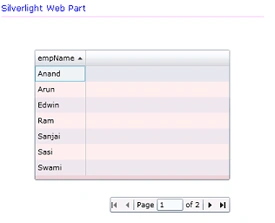
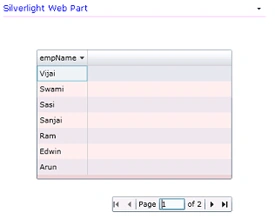
Output:
Names are sorted in Ascending Order:
Names are sorted in Descending Order:
rohith bsPosted Nov 16, 2012, 5:53 AM
after i pasted the above code, using Microsoft.SharePoint.Client; PagedCollectionView,ListItemCollection etc. are not being recognized even after adding respective dlls
Kunajn SanghaviPosted Jul 29, 2011, 3:00 PM
Hey I followed same steps as you mentioned but when it executes below statement context.ExecuteQueryAsync(new ClientRequestSucceededEventHandler(OnRequestSucceeded), new ClientRequestFailedEventHandler(failed)); it throws this exception."ServerVersion = 'context.ServerVersion' threw an exception of type 'Microsoft.SharePoint.Client.PropertyOrFieldNotInitializedException'" And it doesn't go in any success and failed event handlers. What could be the issue? My code exactly look like:http://msdn.microsoft.com/en-us/library/ff728647.aspx Thanks in advance. Waiting for your response.
raviPosted Jan 6, 2011, 2:28 PM
Hi, I got an error as Field or Property not initialized in the line _empDetails = empDetails.GetItems(query); Could you please help me resolving this issue... Thanks, Reena