

In this article we will be seeing how to unpublish a content type in SharePoint
2010.
In this article we will be seeing the following:
- UnPublish a content type using console application
- UnPublish a content type using powershell script
Steps Involved:
- Open visual studio 2010.
- Create a new console application.
- Add the following references.
- Microsoft.SharePoint.dll
- Microsoft.SharePoint.Taxonomy.dll
- Add the following namespaces.
- Using Microsoft.SharePoint;
- Using Microsoft.Sharepoint.Taxonomy.ContentTypeSync;
UnPublish a content type using console application:
using
System;
using
System.Collections.Generic;
using
System.Linq;
using
System.Text;
using
Microsoft.SharePoint;
using
Microsoft.SharePoint.Taxonomy.ContentTypeSync;
namespace
EMM
{
class Program
{
static void
Main(string[] args)
{
using (SPSite site =
new SPSite("http://servername:10/"))
{
using (SPWeb web = site.RootWeb)
{
SPContentType contentType = web.ContentTypes["_bContentType"];
if (ContentTypePublisher.IsContentTypeSharingEnabled(site))
{
ContentTypePublisher ctPublisher =
new ContentTypePublisher(site);
ctPublisher.UnPublish(contentType);
Console.WriteLine(contentType.Name
+ " is unpublished successfully");
Console.ReadLine();
}
}
}
}
}
}

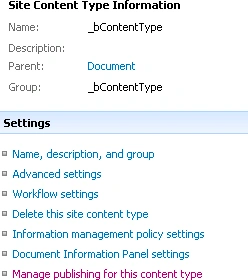
Go to Site Actions=> Site Settings => Galleries => Site Content Types => Manage
publishing for the content type.
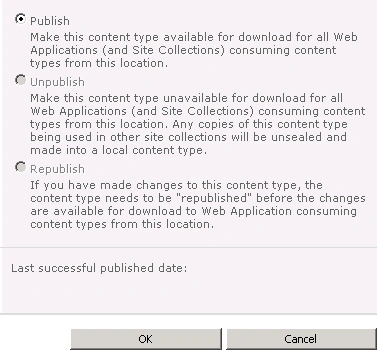
You could see the content type is unpublished successfully.
Publish a content type using powershell script:
$hubSite=Get-SPSite "http://servername:10/"
$hubWeb=$hubSite.RootWeb
$contentType=$hubWeb.ContentTypes["_bContentType"]
$ctPublisher=New-Object
Microsoft.SharePoint.Taxonomy.ContentTypeSync.ContentTypePublisher($hubSite)
$ctPublisher.UnPublish($contentType)
Join the conversation! Your thoughts help the community grow.