

Installed Languages:
An installed language is either the SKU language or a language that administrator adds to servers in the farm by downloading and installing a language pack.
Download and install the language packs in the following link http://www.microsoft.com/downloads/en/details.aspx?FamilyID=046f16a9-4bce-4149-8679-223755560d54&displaylang=en
We can get all the installed languages using SharePoint object model.
Steps Involved:
- Open Visual Studio 2010.
- Go to File => New => Project.
- Select Console Application template from the installed templates.
- Enter the Name and click Ok.
- Add the following assembly.
- Microsoft.SharePoint.dll
- Add the following namespace.
- Using Microsoft.SharePoint ;
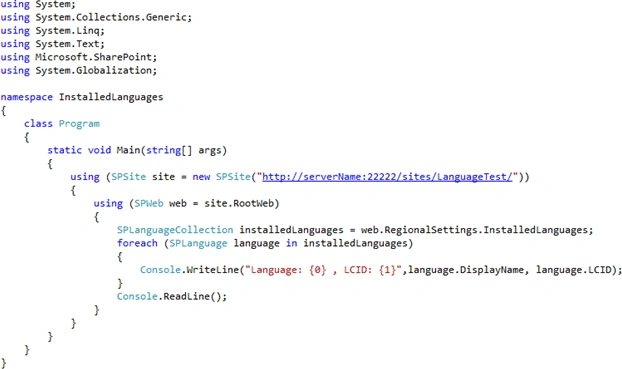
- Program.cs looks like the following.
- Build the solution.
- Hit F5.
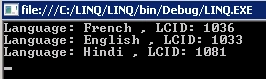
- Output:
PowerShell script:
- Go to Start => All Programs => Microsoft SharePoint 2010 products => SharePoint 2010 Management Shell.
- Run as an administrator.
- Run the following script to get the installed languages.

Join the conversation! Your thoughts help the community grow.