

In this article we will be seeing how to configure recycle bin settings for
Sharepoint 2010 web application using object model and powershell.
Microsoft SharePoint Server 2010 supports two stages of Recycle Bins.
- First-stage Recycle Bin.
- Second-stage Recycle Bin.
When a user deletes an item, the item is
automatically sent to the first-stage Recycle Bin. By default, when an item is
deleted from the first-stage Recycle Bin, the item is sent to the second-stage
Recycle Bin. A site collection administrator can restore items from the
second-stage Recycle Bin.
Go to Central Administration => Web Applications =>Manage Web Applications =>
Select the web application.
In the ribbon interface go to Manage => General Settings.
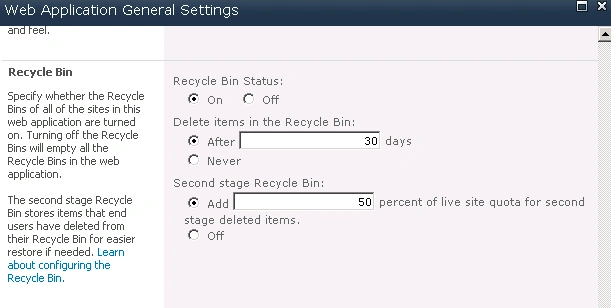
Using SharePoint object model:
- Open Visual Studio 2010.
- Go to File => New => Project.
- Select the Console Application template from the installed templates.
- Enter the Name and click on Ok.
- Add the following assembly.
- Microsoft.SharePoint.dll
- Add the following namespaces.
- using Microsoft.SharePoint.Administration;
- using Microsoft.SharePoint;
- Program.cs:
using System;
using System.Collections.Generic;
using System.Linq;
using System.Text;
using Microsoft.SharePoint.Administration;
using Microsoft.SharePoint;namespace RecycleBinSettings
{
class Program
{
static void Main(string[] args)
{
SPWebApplication webApp = SPWebApplication.Lookup(new Uri("https://anavijai.com/"));// -------------SharePoint Recycle Bin Settings -------------------------------------
}
}
}
Recycle Bin Status:
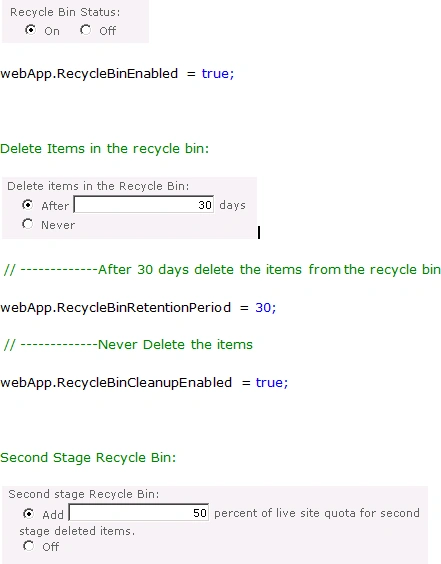
webApp.SecondStageRecycleBinQuota = 50;
// -------------for Off option to be enabled
webApp.SecondStageRecycleBinQuota = 0;
Update the changes:
webApp.Update();
PowerShell script:
- Go to Start => All Programs => Microsoft SharePoint 2010 products => SharePoint 2010 Management Shell.
- Run as an administrator.
- Run the following script to get the
installed languages.
$webApp = get-spwebapplication "https://anavijai.com/"
# -------------SharePoint Recycle Bin Settings-------------------------------------
$webApp.RecycleBinEnabled = $true
$webApp.RecycleBinRetentionPeriod = 30
$webApp.RecycleBinCleanupEnabled = $truee
$webApp.SecondStageRecycleBinQuota = 50
$webApp.Update()
Join the conversation! Your thoughts help the community grow.