

In this article we will be seeing about retention policy for content type in
SharePoint 2010.
In SharePoint 2010 we can apply the retention policy to a content type, to a
list or document library, to a folder. Here we will be applying the retention
policy to a content type.
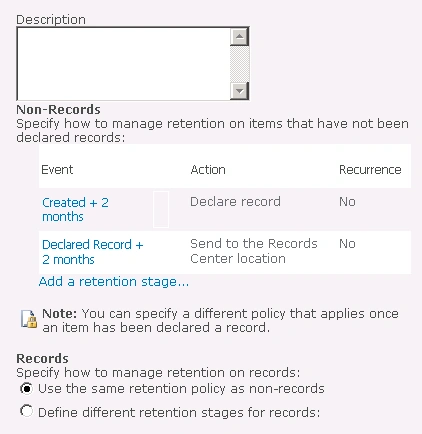
For example I will be creating the following retention policy.
- Any document created should be declared as a record after 2 months.
- Any declared record should be transferred to other location after 2 months.
Retention Policy for content type:
- Go to Site Actions => Site Settings =>
Galleries => Site Content Types =>Select the content type for which you
want to apply the retention policy.
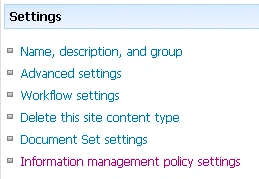
- Go to the Site content type => Settings
=>Information policy management settings.
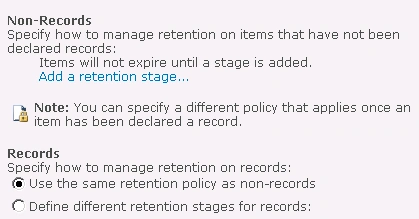
- Check the "Enable Retention" option
in the Retention.

- Click on "Add a retention stage"
link.
- In the Event category select the
time period as shown in the following.
- In the Action category select the
option "Declare Record".
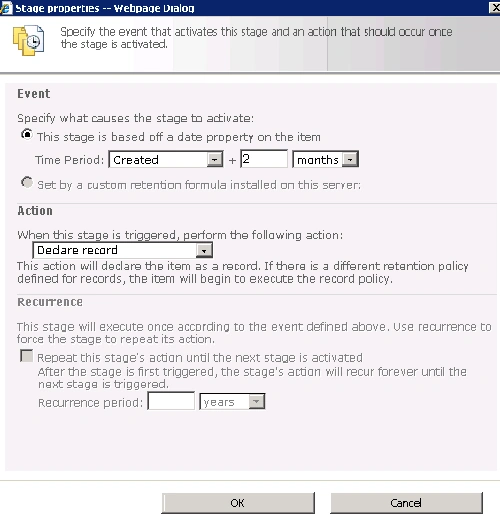
- Click Ok.
- Similarly create the other stage policy as
shown in the following.
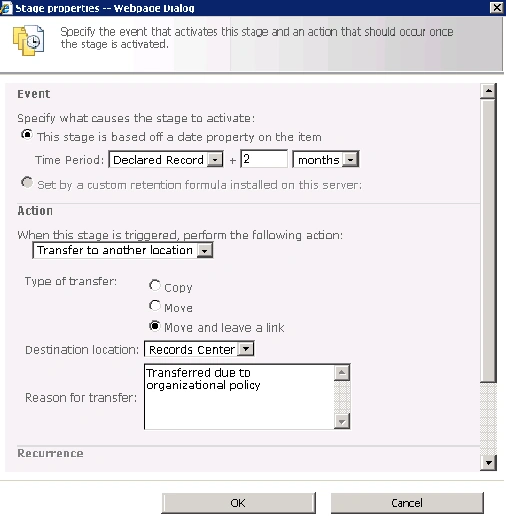
- Retention Policies for the content type:
amienPosted Feb 14, 2011, 1:10 AM
Dear Sir, I have created a publishing site as parent site and named it as e-Document Management in SharePoint 2010. Then I have created a team site as a child site in that publishing site by clicking on SITE ACTION MORE OPTIONS SITES TEAM SITE in my publishing site e-Document Management which I have created as my first step. I named TEAM SITE as E-Document. I changed ICON image in my e-Document Management publishing site but is not reflected in my E-Document team site which is a child site of publishing site. I am forced to change ICON image in each and every child site of e-Document Management publishing site. Is there any way so that if I change ICON image in parent site then it will b reflected in every child site. Regards, Amien