
Introduction
In this article you will see how to set the default value for the field in SharePoint 2010 using ECMAScript. I have a list named "List Request" which has the following fields (Navigate to the list, click on List tab in the ribbon interface. Click on List Settings button).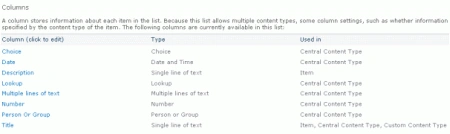
I am going to set the default value for the column named "Description" using ECMAScript.
Steps Involved
Step 1 : Navigate to the SharePoint site (I have a site page created in my site where I am going to add the content editor web part).
Step 2 : Go to Site Actions, click on Edit Page.
Step 3 : Click on the Insert tab in the ribbon interface and then click on Web Part button.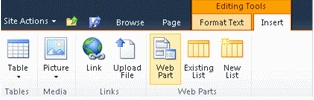
Step 4 : Select Media and Content in the Categories section and then click on Content Editor.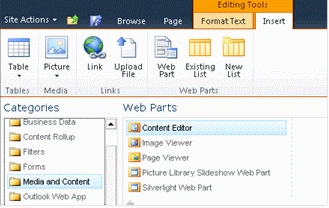
Step 5 : Click on Add.
Step 6 : The Content Editor web part will be added to the site page.
Step 7 : Click on the down arrow and then click on Edit Web Part.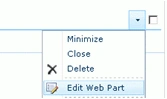
Step 8 : Click on "Click here to add new content".
Step 9 : Click on Format Text tab in the ribbon interface and then click on HTML drop down.
Step 10 : Click on Edit HTML source.
Step 11 : The HTML source window will pop up.
Step 12 : Copy and paste the following script.
<script language="ecmascript" type="text/ecmascript">
var fieldCollection;
var field;
var list;
function fieldDefaultValue() {
var clientContext = SP.ClientContext.get_current();
if (clientContext != undefined && clientContext != null) {
var webSite = clientContext.get_web();

Set the Default Value for the Field in SharePoint 2010 using ECMAScript
Join the conversation! Your thoughts help the community grow.
Sign in to leave a comment
It is the same account you read, post and publish with — and you will come straight back to this page.

Sanjoli GuptaPosted Jan 24, 2012, 11:33 PM
nice article...
Davin MartynPosted Jan 24, 2012, 11:06 PM
Good Explanation.....
Sonakshi SinghPosted Jan 24, 2012, 11:06 PM
Thankss for sharing
Daisy KrausePosted Jan 24, 2012, 11:02 PM
Hi Vijay. Very nicely presented article.
Jimmy UnderwoodPosted Jan 24, 2012, 5:11 PM
Thanks, Nice performance
Arjun PanwarPosted Jan 24, 2012, 4:32 PM
Thanks for good work