

In this article we will be seeing how to manage SharePoint Designer settings for
SharePoint 2010 web application using object model and powershell.
Go to Central Administration => Web Applications => Manage Web Applications
=>Select the Web Application.
In the ribbon interface go to Manage => General Settings => SharePoint
Designer.
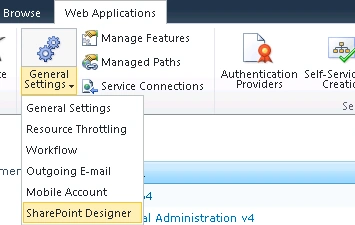
You can modify the SharePoint Designer Settings.
The same can be achieved using SharePoint object model and powershell.
Using SharePoint object model:
- Open Visual Studio 2010.
- Go to File => New => Project.
- Select the Console Application template from the installed templates.
- Enter the Name and click on Ok.
- Add the following assembly.
- Microsoft.SharePoint.dll
- Add the following namespaces.
- using Microsoft.SharePoint.Administration;
- using Microsoft.SharePoint;
- Program.cs:
using System;
using System.Collections.Generic;
using System.Linq;
using System.Text;
using Microsoft.SharePoint.Administration;
using Microsoft.SharePoint;namespace DesignerSettings
{
class Program
{
static void Main(string[] args)
{
SPWebApplication webApp = SPWebApplication.Lookup(new Uri("https://anavijai.com/"));// -------------SharePoint Designer Settings-------------------------------------
}
}
}
Enable SharePoint Designer:
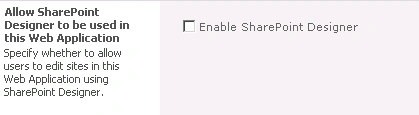
//Enable SharePoint Designer
webApp.AllowDesigner
= false;
Enable Detaching Pages from the Site Definition:
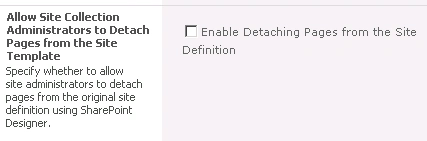
//Enable Detaching Pages from the Site Definition
webApp.AllowRevertFromTemplate = false;
Enable Customizing Master Pages and Layout Pages:
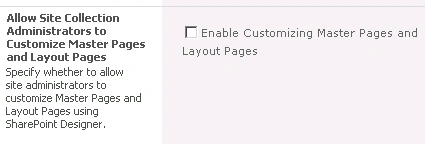
//Enable Customizing Master Pages and Layout Pages
webApp.AllowMasterPageEditing = false;
Enable Managing of the Web Site URL Structure:
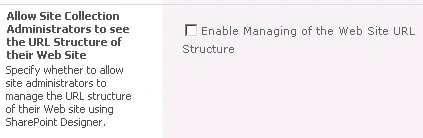
//Enable Managing of the Web Site URL Structure
webApp.ShowURLStructure = false;
Update the changes:
//Update the changes
webApp.Update();
Using powershell:
$webApp
= get-spwebapplication "https://anavijai.com/"
# -------------SharePoint Designer Settings-------------------------------------
#--------------Enable SharePoint Designer
$webApp.AllowDesigner
= $false
#--------------Enable Detaching Pages from the Site Definition
$webApp.AllowRevertFromTemplate
= $false
#--------------Enable Customizing Master Pages and Layout Pages
$webApp.AllowMasterPageEditing
= $false
#--------------Enable Managing of the Web Site URL Structure
$webApp.ShowURLStructure
= $false
#--------------Update the changes
$webApp.Update()
Join the conversation! Your thoughts help the community grow.