

In this article we will be seeing the following:
- Create a new TermSet for a group
- Get all the termsets for a particular group
Steps Involved:
- Open visual studio 2010.
- Create a new console application.
- Add the following references.
o Microsoft.SharePoint.dll
o Microsoft.SharePoint.Taxonomy.dll
- Add the following namespaces.
o Using Microsoft.SharePoint;
o Using Microsoft.Sharepoint.Taxonomy;
Create a new TermSet for a group:
using System;
using System.Collections.Generic;
using System.Linq;
using System.Text;
using Microsoft.SharePoint;
using Microsoft.SharePoint.Taxonomy;
namespace EMM
{
class Program
{
static void Main(string[] args)
{
using (SPSite site = new SPSite("http://serverName:10/"))
{
TaxonomySession taxonomySession = new TaxonomySession(site);
TermStore termStore = taxonomySession.TermStores["MMS"];
Group group = termStore.Groups["SharePoint Group"];
TermSet termSet = group.CreateTermSet("Word Automation Term Set");
termStore.CommitAll();
}
}
}
}
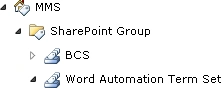
Get all the termsets of a particular group:
using System;
using System.Collections.Generic;
using System.Linq;
using System.Text;
using Microsoft.SharePoint;
using Microsoft.SharePoint.Taxonomy;
namespace EMM
{
class Program
{
static void Main(string[] args)
{
using (SPSite site = new SPSite("http://serverName:10/"))
{
TaxonomySession taxonomySession = new TaxonomySession(site);
TermStore termStore = taxonomySession.TermStores["MMS"];
Group group = termStore.Groups["SharePoint Group"];
TermSetCollection termSetCol = group.TermSets;
foreach (TermSet termSet in termSetCol)
{
Console.WriteLine(termSet.Name);
}
Console.ReadLine();
}
}
}
}
Join the conversation! Your thoughts help the community grow.