

Introduction
To work with Asynchronous programming we use the await keyword, and also the "Async" keyword. We call the asynchronous APIs in response to a user's action, such as when the user presses the button etc. In this article I explain how to perform asynchronous programming.
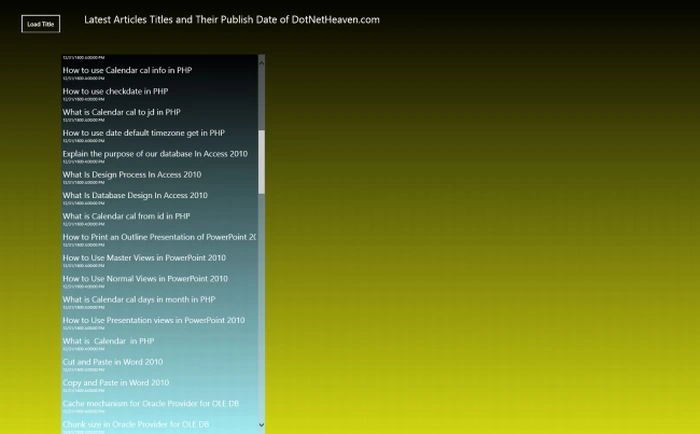
In this article I use an example in which, when I click on the button, it fetches the RSS Feed using the syndication class. This feed includes all the latest articles and their published date of any website; in this example I fetch the RSS feed from the http://www.dotnetheaven.com/ site. The asynchronous method SyndicationClient.RetrieveFeedAsync is used to fetch or download the feed.
To work with it use the following steps.
Step 1
First open Visual Studio 2012 RC in Windows 8. Then click File -> New -> Project. Then select Window Store from Visual C#, and select a blank page in the center tab then give the name of the application and then click ok.
Step 2
Add XAML code to MainPage.xaml as in the following:
<Page
x:Class="acron.MainPage"
xmlns="http://schemas.microsoft.com/winfx/2006/xaml/presentation"
xmlns:x="http://schemas.microsoft.com/winfx/2006/xaml"
xmlns:local="using:acron"
xmlns:d="http://schemas.microsoft.com/expression/blend/2008"
xmlns:mc="http://schemas.openxmlformats.org/markup-compatibility/2006"
mc:Ignorable="d">
<Grid>
<Grid.Background>
<LinearGradientBrush EndPoint="0.5,1" StartPoint="0.5,0">
<GradientStop Color="Black"/>
<GradientStop Color="#FFD2D710" Offset="1"/>
</LinearGradientBrush>
</Grid.Background>
<StackPanel HorizontalAlignment="Left" VerticalAlignment="Top" Height="96" Width="983" Orientation="Horizontal">
<Button Margin="50,50,0,0" Height="50" Width="100" HorizontalAlignment="Left" VerticalAlignment="Top" Content="Load Titles" Click="Button_Click_1"></Button>
<TextBlock Margin="50,50,0,0" Text=" Latest Articles Titles and Their Publish Date of DotNetHeaven.com" HorizontalAlignment="Left" VerticalAlignment="Top" Height="50" Width="750" FontSize="25"></TextBlock>
</StackPanel>
<StackPanel Orientation="Horizontal">
<ListView x:Name="listitems" HorizontalAlignment="Left" Margin="150,150,0,0" ItemsSource="{Binding}" SelectionChanged="listitems_SelectionChanged_1" Width="500">
<ListView.Background>
<LinearGradientBrush EndPoint="0.5,1" StartPoint="0.5,0">
<GradientStop Color="Black"/>
<GradientStop Color="#FFA3ECF3" Offset="1"/>
</LinearGradientBrush>
</ListView.Background>
<ListView.ItemTemplate>
<DataTemplate>
<StackPanel>
<TextBlock Text="{Binding Title}" FontSize="20" ></TextBlock>
<TextBlock Text="{Binding Date}" FontSize="10"></TextBlock>
</StackPanel>
</DataTemplate>
</ListView.ItemTemplate>
</ListView>
<WebView x:Name="web" Visibility="Collapsed" Width="1000" Margin="150,150,0,0"></WebView>

Join the conversation! Your thoughts help the community grow.