

By default the project comes with a class class1.
Write the following code in it
Public Class Class1
Public Function Add(ByVal x As Integer, ByVal y As Integer) As Integer
Return x + y
End Function
Public Sub Hello(ByVal name As String)
Console.WriteLine("Hello" & name)
End Sub
End Class
As we can't execute the class we need to only compile it & convert it into an assembly. To do this open the solution explorer and right click on the project.
Select Build to build your project
Consuming the Class from C# programing-
Now create a new project in C#; name it Testvb and add a reference for the vb project assembly from its physical location which is in projects bin\Debug folders.
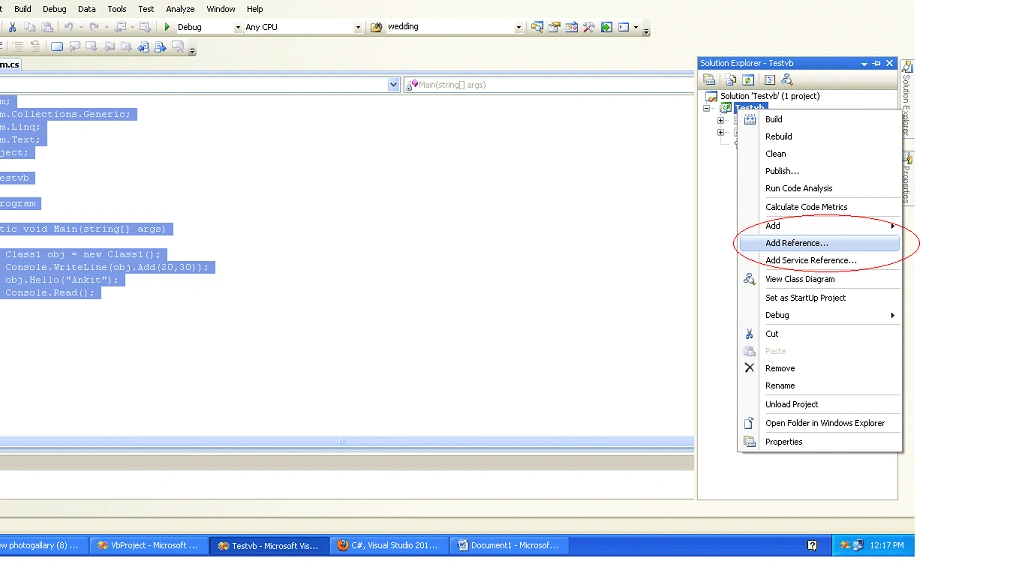
To add a reference follow following steps-
- Open solution explorer.
- Right Click on project .
- Click on Add reference..
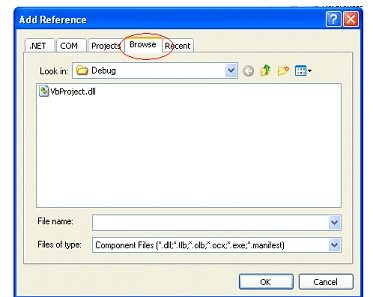
- Click on Browse Button.
- Go to your project's physical path for example if your project name is myvb then assembly path will be C:\myvb\bin\Debug here you can find the assembly.
- Click the OK Button.
Here is a Screen shot which will help you to add a reference:
Now write Following code under Testvb
Note: don't Forget to add a namspace using VbProject; which is our VB project name.
using System;
using System.Collections.Generic;
using System.Linq;
using System.Text;
using VbProject;
namespace Testvb
{
class Program
{
static void Main(string[] args)
{
Class1 obj = new Class1();
Console.WriteLine(obj.Add(20,30));
obj.Hello("Ankit");
Console.Read();
}
}
}
Now Run your Console Application .
Mayur GujrathiPosted Apr 21, 2011, 5:18 AM
Good going Ankit keep it up