

Introduction
In my previous article you learned How to Dynamically Add New Data in the Observable Array and how to Make a Data Editable using Knockoutjs in ASP.NET Application.
In that article we dynamically added the data on the click of a button but what to do if you want the user to stop it when he clicks a specified number of times? For that we need a Click Counter and using that Click Counter the button will become disabled and the user will not be allowed to click anymore.
This article explains how to disable the click of a button using a Click Counter and using Knockoutjs.
Now I will show you the procedure to make such a wonderful thing.
Step 1
First we will work on the View Model.
<script>
function x(car, features) {
var self = this;
self.name = car;
self.feature = ko.observable(features);
}
function y() {
var self = this;
self.carModel = [
{ carName: "I20", price: 600000 },
{ carName: "Verna", price: 1200000 },
{ carName: "Duster", price: 800000 }
];
self.numberOfClicks = ko.observable(0);
self.hasClickedTooManyTimes = ko.computed(function () {
return self.numberOfClicks() >= 3;
}, self);
self.cars = ko.observableArray([
new x("Anubhav", self.carModel[1]),
new x("Mohit", self.carModel[0])
]);
self.addCar=function(){
self.cars.push(new x("Anubhav", self.carModel[1]));
self.numberOfClicks(this.numberOfClicks() + 1);
};
self.removeCar = function (cars) {
self.cars.remove(cars);
};
}
ko.applyBindings(new y());
</script>
In the function x() we create a class that will store the Buyer Name with the Car Selection made by him. Notice that the "feature" property is made observable .
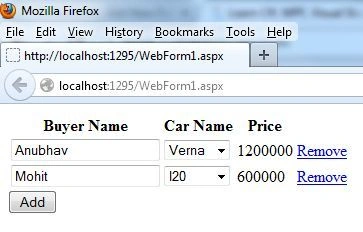
After that a new function y() is created in which first the Car Name and it's prices are declared under the carModel and after that in "self.cars" the selection made by the buyer is shown along with his name, "self.cars" is an Observable Array, which means that it will show the results instantly in the UI.
After that a property is made named as "numberOfClicks", it's made Observable, which means it can be read or written whenever needed and it's initial value is set to "0". After that I created a function that will work when the number of clicks becomes equal to or greater than "3".
Now I had worked on the addCar function to be executed on the click of a button, the prupose of this function is to make a new entry in the Array and to increase the counter by one.
self.addCar=function(){
self.cars.push(new x("Anubhav", self.carModel[1]));
self.numberOfClicks(this.numberOfClicks() + 1);
};
At the end, one more function is created that will help to remove the raw data from the Array at run time.
Step 2
Our work on the ViewModel is now completed. Now we will work on the View of this application, in other words on the design part of our application.
<table>
<thead><tr>
<th>Buyer Name</th><th>Car Name</th><th>Price</th><th></th>
</tr></thead>
<tbody data-bind="foreach: cars">
<tr>
<td><input data-bind="value: name" /></td>
<td><select data-bind="options: $root.carModel, value: feature, optionsText: 'carName'"></select></td>
<td data-bind="text: feature().price"></td>
<td><a href="#" data-bind="click:$root.removeCar">Remove</a></td>
</tr>
</tbody>
</table>
Join the conversation! Your thoughts help the community grow.