

Oh, you still want to proceed; in other words I expect that you have both of them. Fine, we know that the Web API provides the notion of a RESTful service on top of HTTP; that is the sweet, old, important and most used protocol in the www.
One of the REST principals says that the client and server should or must be different physically and logically. What does that mean? It implies that the client and server should be very de-coupled in nature and the server will not maintain a state of the client like for a general web application normally.
So, a true RESTful service will not remember the client anymore using a state management technique like session/cookie and many more.
Now, the approach is very fine, it's a very de-coupled architecture, we can separate the client or server at any time without effecting either and the client could be any kind of application like JavaScript or any other programming language like C# or Java or even any kind of device too but the style has a great problem. Since the server does not remember the client, each and every request from the client is very new to the server and the server needs to check the request (most of the time the HTTP header) to identify the user.
So, the policy is something like this, the client will attach it's credentials along with every HTTP request and the server will check and match the credentials with some persistent storage. If the credentials match then the server will treat the HTTP request as a valid request and process it.
Yes, this is the general scenario. Now, the next point is that there are many ways to implement authentication and authorization in an application, in this article we will see how to implement basic authentication.
The principal of basic authentication is, we will send a username and password or authentication token in the header of the HTTP request and the server will parse the header to get the token.
Since we will attach sensitive data (username and password) along with every HTTP request it should be transfered in an encoded format and the protocol should be HTTPS, then we can protect our data over the internet.
Ok, so let's start the implementation. Here is my UserMaster table where I am storing the user's credentials.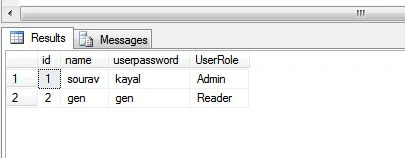
I have two users with roles since we also implement authorization in the application.
Cool, we have now created a Web API application and it's time to write some code. I suggest you choose the Web API 2.0 version since I am also using that to get all the features demonstrated in this article. Once you have created it, just add one controller called “test” . Oh!! I used to use it when I tested something, please provide something meaningful in yours.
Here is the code of the controller. We see that both Get and Post are decorated with an Authorise attribute and we have specified a role over each action. So, the specific role can access a specific action. Since the Get() is to read data, generally both the Admin and the Reader can access it but a Post is only allowed for an Admin user, a reader cannot.
- using System;
- using System.Collections.Generic;
- using System.Linq;
- using System.Net;
- using System.Net.Http;
- using System.Web.Http;
- namespace WebAPI.Controllers
- {
- public class testController : ApiController
- {
- [Authorize(Roles="Admin,Reader")]
- public IHttpActionResult Get()
- {
- return Ok();
- }
- [Authorize(Roles = "Admin")]
- public IHttpActionResult Post()
- {
- return Ok();
- }
- }
- }
In ASP.NET / Web API a HTTP request goes through a specified pipeline, in the case of the Web API we can implement a message handler between the HTTP request and the response. So, once we implement our custom message handler in the request and response pipeline, we are done. We can implement a security mechanism like authentication and authorization in this. So, let's implement one message handler that will be derived from the Delegating handler and place it between the HTTP request and response pipeline. Just use the following procedure.
For further information of message handlers, please click here.
Now, let's implement our own message handler to check whether or not the user has sent an Authorization header along with the request, if it is presented then we will check the header value against the persistent storage, in our case it's the database table, that we have shown at first. Here is the full code sample.
- using System;
- using System.Collections.Generic;
- using System.Linq;
- using System.Net;
- using System.Net.Http;
- using System.Security.Principal;
- using System.Text;
- using System.Threading;
- using System.Threading.Tasks;
- using System.Web;
- using System.Web.Http;
- namespace WebAPI
- {
- public class CredentialChecker
- {
- public UserMaser CheckCredential(string username, string password)
- {
- using(var ctx = new ApiSecurityEntities())
- {
- return ctx.UserMasers.Where(un => un.name == username && un.userpassword == password).FirstOrDefault();
- }
- }
- }
- public class AuthenticationHandler :DelegatingHandler
- {
- protected override Task<HttpResponseMessage> SendAsync(HttpRequestMessage request, CancellationToken cancellationToken)
- {
- try
- {
- var tokens = request.Headers.GetValues("Authorization").FirstOrDefault();
- if (tokens != null)
- {
- byte[] data = Convert.FromBase64String(tokens);
- string decodedString = Encoding.UTF8.GetString(data);
- string[] tokensValues = decodedString.Split(':');
- UserMaser ObjUser = new CredentialChecker().CheckCredential(tokensValues[0], tokensValues[1]);
- if(ObjUser != null)
- {
- IPrincipal principal = new GenericPrincipal(new GenericIdentity(ObjUser.name), ObjUser.UserRole.Split(','));
- Thread.CurrentPrincipal = principal;
- HttpContext.Current.User = principal;
- }
- else
- {
- //The user is unauthorize and return 401 status
- var response = new HttpResponseMessage(HttpStatusCode.Unauthorized);
- var tsc = new TaskCompletionSource<HttpResponseMessage>();
- tsc.SetResult(response);
- return tsc.Task;
- }
- }
- else
- {
- //Bad Request request because Authentication header is set but value is null
- var response = new HttpResponseMessage(HttpStatusCode.Forbidden);
- var tsc = new TaskCompletionSource<HttpResponseMessage>();
- tsc.SetResult(response);
- return tsc.Task;
- }
- return base.SendAsync(request, cancellationToken);
- }
- catch
- {
- //User did not set Authentication header
- var response = new HttpResponseMessage(HttpStatusCode.Forbidden);
- var tsc = new TaskCompletionSource<HttpResponseMessage>();
- tsc.SetResult(response);
- return tsc.Task;
- }
- }
- }
- }
So, if the credentials are present in the database then we will consider the user to be a valid user and then we will set the user principals along with the current thread.
The request will then be redirected towards a specific controller and action. Register the handler in the WebApiConfig file, just as in the following.
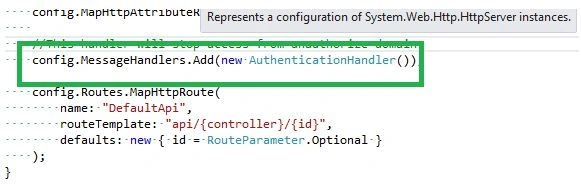
And we are done, now we will execute and test the application from the client and we have chosen Fillder as the client.
Now, at first let's try to access the Get action by passing an authorization header.
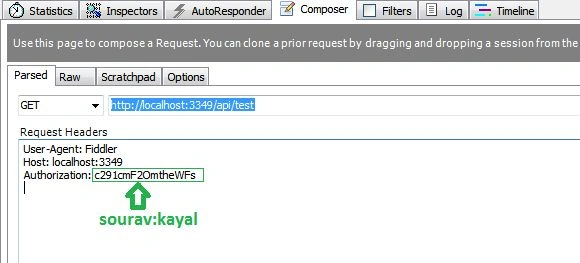
We are seeing that I am passing the username and password delimited by “:” and it's Base64 encoded. And the response is here:
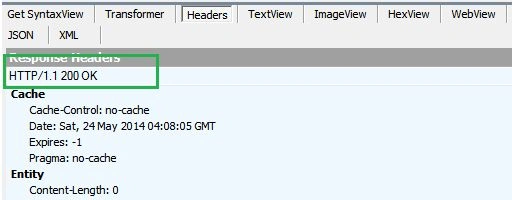
Ok, it's a 200 and everything is fine. Now, let's change the header value to “gen:gen” and make one Post request. As a rule a general user cannot Post data in our application. So, the request should fail.
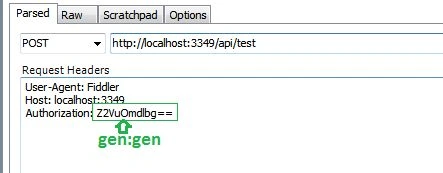
And it's throwing us an unauthorized request.
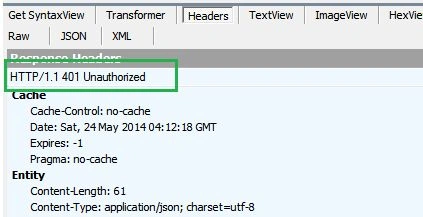
So, everything is cool and fine in the application. Now if you think that Fiddler is not the right client and you want to call the API from your application then just use the following code to call the API from the C# client.
- using System;
- using System.Collections.Generic;
- using System.Linq;
- using System.Text;
- using System.Threading.Tasks;
- using System.Net.Http;
- using System.Net;
- using System.Net.Http.Headers;
- namespace Client
- {
- class Program
- {
- static void Main(string[] args)
- {
- HttpClientHandler handler = new HttpClientHandler();
- HttpClient client = new HttpClient(handler);
- client.DefaultRequestHeaders.Authorization = new AuthenticationHeaderValue("Authorization","sourav:kayal");
- var result = client.GetAsync(new Uri("http://localhost:3349/api/test/")).Result;
- if (result.IsSuccessStatusCode)
- {
- Console.WriteLine("Done" + result.StatusCode);
- }
- else
- Console.WriteLine("Error" + result.StatusCode);
- Console.ReadLine();
- }
- }
- }
I hope you got the idea of basic authorization in the Web API and love this article. In the next article we will see more about API security. Thanks for reading. Have a nice day.
Mohamed CissePosted May 28, 2019, 9:18 AM
I am getting 403 forbidden
sunil bhoopalamPosted Mar 7, 2018, 6:05 AM
This article helps me a lot and clear my issue of Basic Authorization, happy.
Suraj SararfPosted May 5, 2017, 8:27 AM
How can i redirect to this url with Authorization in asp.net
Asish MohapatraPosted Dec 31, 2016, 11:08 AM
Hello, Thanks for the detailed article. Could you please help how to use WindowsPricipal instead of GenericPrincipal in the above case so that i can use the list of users configured in my server can access a specific action? REgards Asish MOhapatra
ankita patelPosted Jul 8, 2016, 8:52 AM
ApiSecurityEntities() is this is a function? Or I can find it in any reference? Please let me know.
Gowtham RajamanickamPosted Apr 26, 2016, 2:56 AM
good article
Shubh DasguptaPosted Jan 26, 2015, 12:19 PM
Nice Article. Can you please share the source code?
Mohan GopiPosted Dec 24, 2014, 2:39 AM
Good article.. thanks.....