

In this article we post data from a view to a controller using Html.BeginForm and receive using a Request object.
To post data from a view to a controller, we saw the following methods:
- Using Html.BeginForm() View To Controller Method 1
- Using Html.BeginForm() by passing action name and controller name explicitly View To Controller Method 2
- Using Html.BeginForm() by passing FormMethod View To Controller Method 3
- Using Html.BeginForm() by calling action method by action name View To Controller Method 4
- Create a MVC project from the "Empty" template.
Right-click on "Controllers" and select "Add" >> "Controller...".
- Select "MVC 5 Controller - Empty" to add an empty controller.
Click on the "Add" button.
Name the controller as "CalcController".
An Index() action result method will be added.
- To add a view, right-click on "Index" and select "Add View...".
Name the view and select "Empty (without model)" as the template. Click on the "Add" button.
Design a form inside Html.BeginForm, set the form method and create a submit button to submit the form.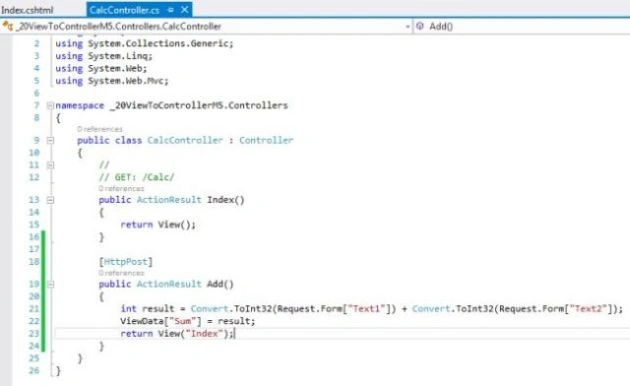
Request.Form is a namevaluecollection that access values sent using the post method. In previous articles we get from a FormCollection object and now in this method we get from a Request object. The following is sample code that shows how to retrieve data using a request object.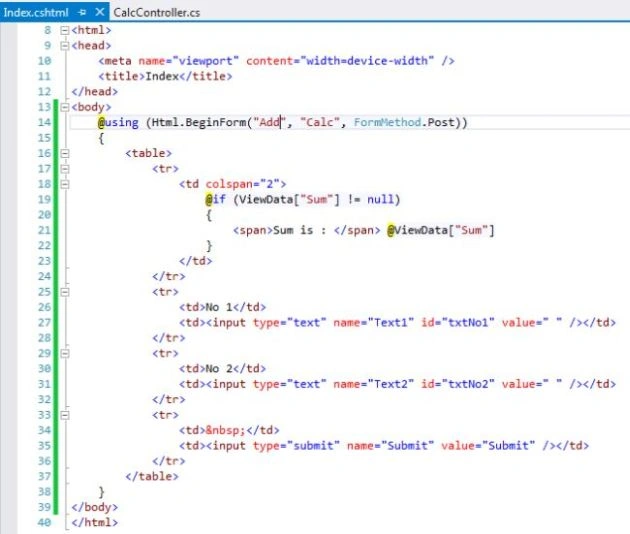
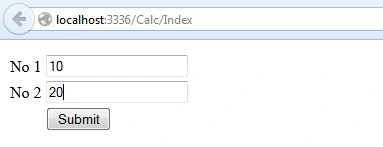
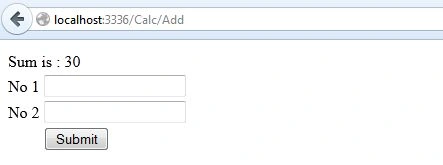
- Run the project, insert a value for no1 and no2 and click on the "Submit" button. The form will be submitted and we will get the sum of the two values.
<< View to Controller Method 4: Day 19 View to Controller Method 6: Day 21>>
Join the conversation! Your thoughts help the community grow.