

Introduction
In this article we will see how we achieve Drag and Drop behaviour for ListBox Item.
Creating WPF Project
Fire up Visual Studio 2008 and create a new WPF Project. Name it as DragDropListBoxSample.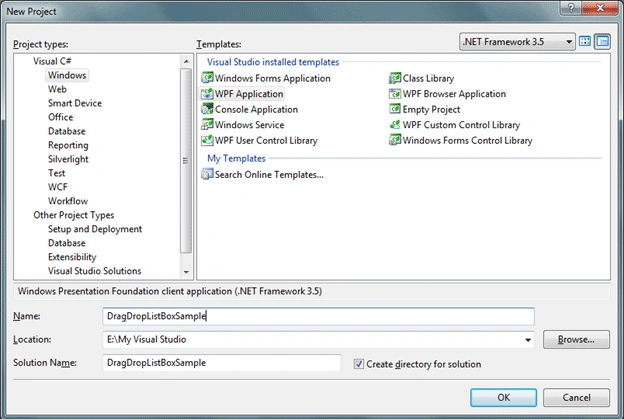
Basic idea of our sample application is to have two ListBox and we would provide Drag item from First ListBox and Drop into the Second ListBox.
So let's have two ListBox and name the ListBoxes as lbOne, lbTwo.
The following is the basic design how our application would look like.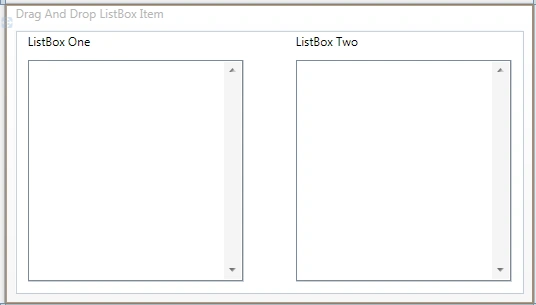
Here what we would list in the First ListBox. A list of TimeZones from the class TimeZoneInfo.
ObservableCollection<string> zoneList = new ObservableCollection<string>();
public Window1()
{
InitializeComponent();
foreach (TimeZoneInfo tzi in TimeZoneInfo.GetSystemTimeZones())
{
zoneList.Add(tzi.ToString());
}
lbOne.ItemsSource = zoneList;
}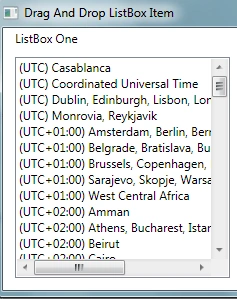
As you see our first listbox is loaded with all TimeZones.
Now to achieve Drag and Drop we need to make AllowDrop="True" for our target ListBox; and we need PreviewMouseLeftButtonDown event for the Source and Drop event for Target ListBoxes respectively.
Follow the below XAML code to see the events and properties.
<Window x:Class="DragDropListBoxSample.Window1"
xmlns="http://schemas.microsoft.com/winfx/2006/xaml/presentation"
xmlns:x="http://schemas.microsoft.com/winfx/2006/xaml"
Title="Drag And Drop ListBox Item" Height="300" Width="529">
<Grid>
<ListBox x:Name="lbOne" PreviewMouseLeftButtonDown="ListBox_PreviewMouseLeftButtonDown"
HorizontalAlignment="Left" Margin="12,29,0,12" Width="215"
ScrollViewer.VerticalScrollBarVisibility="Visible" />
<ListBox x:Name="lbTwo" Drop="ListBox_Drop" AllowDrop="True"
HorizontalAlignment="Right" Margin="0,29,12,12" Width="215"
ScrollViewer.VerticalScrollBarVisibility="Visible"/>
<TextBlock Height="21" Text="ListBox One" HorizontalAlignment="Left"
Margin="12,2,0,0" VerticalAlignment="Top" Width="120" />
<TextBlock Height="21" Text="ListBox Two" HorizontalAlignment="Right"
Margin="0,2,107,0" VerticalAlignment="Top" Width="120" />
</Grid>
</Window>
Now we would right code under the event handler ListBox_PreviewMouseLeftButtonDown.
ListBox dragSource = null;
ListBox dragSource = null;
private void ListBox_PreviewMouseLeftButtonDown(object sender, MouseButtonEventArgs e)
{
ListBox parent = (ListBox)sender;
dragSource = parent;
object data = GetDataFromListBox(dragSource, e.GetPosition(parent));
if (data != null)
{
DragDrop.DoDragDrop(parent, data, DragDropEffects.Move);
}
}
#region GetDataFromListBox(ListBox,Point)
private static object GetDataFromListBox(ListBox source, Point point)
{
UIElement element = source.InputHitTest(point) as UIElement;
if (element != null)
{
object data = DependencyProperty.UnsetValue;
while (data == DependencyProperty.UnsetValue)
{
data = source.ItemContainerGenerator.ItemFromContainer(element);
if (data == DependencyProperty.UnsetValue)
{
element = VisualTreeHelper.GetParent(element) as UIElement;
}
if (element == source)
{
return null;
}
}
if (data != DependencyProperty.UnsetValue)
{
return data;
}
}
return null;
}
#endregion
Now we would write code under ListBox_Drop event handler.
{
ListBox parent = (ListBox)sender;
object data = e.Data.GetData(typeof(string));
((IList)dragSource.ItemsSource).Remove(data);
parent.Items.Add(data);
}
That's it now run the application and Drag item from First ListBox and Drop into Second ListBox. You would achieve drag and drop functionality.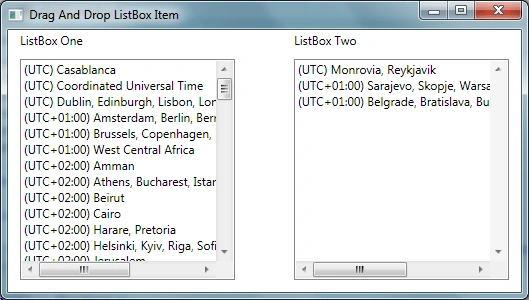
Hope this article helps.
Sõl ÕmñIbúsPosted Apr 1, 2017, 5:56 PM
Thank you thanks to you i could do a drag of an expander from a listbox to a second one but with the previewmousseleftbutton event i can 't open the expander any more what shoul i do ???
Malek AngelitaPosted Mar 2, 2016, 8:03 PM
hello, it's great what u did. pliz can u send me the code u did. thnx anyway ([email protected]) :)
El Not To WorryPosted Dec 30, 2015, 12:08 PM
Hello I have implemented your example works great, I want to find a way for the data to persist. in other words items dragged stay in list box 2. Right now when I restart the program everything goes back to list box 1
TC Serdar ŞengülPosted Nov 23, 2014, 5:09 AM
hello My application is some sort of a form designer. I want dynamic creating objects(textboxes, labels, buttons) from a toolbox. I want these objects to be dragged around as the user wishes but within a single division. I dont want these objects to be dragged outside that division. Can anyone plz help me with this drag and drop about example video http://www.youtube.com/watch?v=W6HMUmrL-Hk I want to make like visual studio ( drag drop object runtime create )
kalu singh raoPosted May 24, 2014, 8:58 AM
when drag and drop then cross image appear on mouse place so please tell me how to remove it.
Jayashree SubramanianPosted Aug 8, 2013, 7:55 AM
Thanks Much!
sawyer maksimovPosted Jul 8, 2013, 2:30 PM
Great! Thank you!!
mani TPosted Jan 11, 2011, 9:22 AM
Hi... This article is very useful to me... Where should i write the code if i want to show a message when user drops a control somewhere else not in listbox2.
vaishnavi desaiPosted Mar 10, 2010, 9:13 PM
Hi, Very nice article. Helped me a lot. Could you tell me how would i implement multiple drag and drop over to other listbox? Also what would i consider if i want to move items up and down in my listbox. I would appreciate any help. Thanks, CS