

What is MVVM Pattern?
MVVM (Model-View-View Model) is the design Pattern code model used for WPF/Silverlight UI. MVVM is the guideline a developer should follows in order to achieve a more testable, debug gable, manageable, readable Application.
MVVM is implemented with zero code behind. Yes, no button click event hander in the code behind file, no form/windows load logic, no UI binding logic, and no UI validation or type casting code in the code behind file. Yes, I mean absolutely no code or logic in the UI mainpage.xaml.cs file.
The reason we don't want to put code-behind in our project is so that one can write a unit test against the code and create instances and run methods on our instances in a unit test.
The following features are used in order to achieve the MVVM pattern with no logic on the UI code behind file and to make sure that the presentation layer and logic remain loosely couple.
-
Using the strong two-way binding capability of the WPF/Silverlight UI (through XAML)
-
Implementing an IValueConvert for binding (eg: string converted to a Color instance, and also avoid type casting)
-
Use INotification in our model or Dependency Property
-
Set the data context at the xaml level
-
Set Static resources at the xaml level
-
ICommand for avoiding the code behind event handler.
-
Use of validation=true in xaml(presentation layer)
Before MVVM, the MVP pattern was famous for its use in WinForm and WPF applications (it never took full advantage of the two-way binding feature of WPF). The MVC pattern is still well-known for its use with Asp.net Application.
Below are some drawbacks of the old fashion WinForm or WPF/Silverlight applications that didn't leverage the power of the mvvm pattern.
-
The presentation and the code behind logic is tightly coupled
-
If we change the UI control we are forced to change the logic in the code behind
-
It makes it hard to imagine a way of having more than one view sharing the same logic.
-
It's not possible to write a unit test for a view that uses code behind because the presentation layer is tightly couple to the control.
-
In previous practice with the WPF application, the view (xaml) often acted as a data store.
Advantages of MVVM pattern
-
Proper layering of the view and the data. The data is not stored in the view, The view is just for presenting the data.
-
Clean testable and manageable code.
-
No code behind so the presentation layer and the logic is loosely coupled.
-
With Silverlight 4.0 we have new ICommand Support (this was previously only present in the PRISM framework
The architect design of the MVVM pattern is as follows:
kindly visit http://www.elearningfromhome.com/Sample_Videos.php for more videos series on Silverlight and wcf videos.
Also visit http://silverlightmvvm.blogspot.com
Step 1: Create a Silverlight Application in Viual studio 2010 and name it as "simplePersonandageMVVM"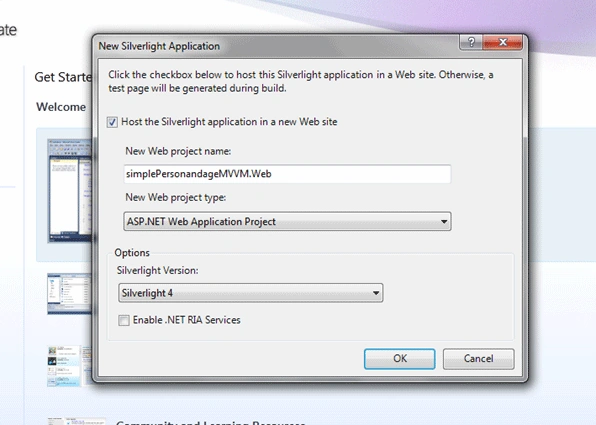
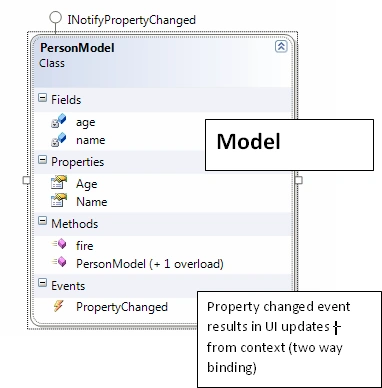
Step 2: Once the project is created, add a class file and call it as "PersonModel.cs" and paste the code below. (this would be the model that represents the data object)
using System.ComponentModel;
namespace simplePersonandageMVVM
{
public class PersonModel : INotifyPropertyChanged
{
string name;
public string Name
{
get { return this.name; }
set
{
this.name = value;
fire("Name");
}
}
int age;
public int Age
{
get { return this.age; }
set
{
this.age = value;
fire("Age");
}
}
public PersonModel() { }
public PersonModel(string name, int age)
{
this.name = name;
this.age = age;
}
public void fire(string x)
{
if (PropertyChanged != null)
{
PropertyChanged(this, new PropertyChangedEventArgs(x));
}
}
public event PropertyChangedEventHandler PropertyChanged;
}
}
Step 3: Create another class call it as "PersonViewModel.cs" shown below. This class is the viewModel and serves as an adapter between view(presentation layer) and the Model(entity class).
namespace simplePersonandageMVVM
{
public class PersonViewModel
{
public PersonModel p { get; set; }
public PersonViewModel()
{
p = new PersonModel("prabjot", 20);
}
public ICommand GetPerson
{
get { return new GetPersonCommand(this); }
}
public void Increaseage(PersonModel d)
{
d.Age++;
string x = d.Age.ToString();
MessageBox.Show(x);
}
}
}
Step 4: Create a Command object class implementing the ICommand interface and call it as "GetPersonCommand.cs". This class overrides two ICommand methods: Execute and CanExecute. The method CanExecute checks if the person's age is greater than 25 years old. If the condition if its met, then only the button click is enabled. The Execute method takes care of execution upon clicking a the button.
namespace simplePersonandageMVVM
{
public class GetPersonCommand : ICommand
{
PersonViewModel pincommand;
public GetPersonCommand( PersonViewModel Pcame)
{
pincommand= Pcame;
}
public bool CanExecute(object parameter)
{
if(pincommand.p.Age > 25)
{
return false ;
}
else
{
return true;
}
}
public event EventHandler CanExecuteChanged;
public void Execute(object parameter)
{
pincommand.Increaseage(pincommand.p);
}
}
}
Step 5: Finally your xaml file looks like this:
<UserControl x:Class="simplePersonandageMVVM.MainPage"
xmlns="http://schemas.microsoft.com/winfx/2006/xaml/presentation"
xmlns:x="http://schemas.microsoft.com/winfx/2006/xaml"
xmlns:d="http://schemas.microsoft.com/expression/blend/2008"
xmlns:mc="http://schemas.openxmlformats.org/markup-compatibility/2006"
xmlns:local="clr-namespace:simplePersonandageMVVM"
mc:Ignorable="d"
d:DesignHeight="300" d:DesignWidth="400">
<UserControl.Resources>
<local:PersonViewModel x:Key="pkey" />
</UserControl.Resources>
<Grid x:Name="LayoutRoot" Background="White"
DataContext="{Binding Source={StaticResource pkey}}" >
<Grid Name="hi" DataContext="{Binding Path=p, Mode=TwoWay}">
<TextBox Height="23" HorizontalAlignment="Left" Margin="53,30,0,0"
Name="textBox1" VerticalAlignment="Top" Width="120" Text="{Binding Path=Name, Mode=TwoWay}" />
<TextBox Height="23" HorizontalAlignment="Left" Margin="53,68,0,0" Name="textBox2"
Text="{Binding Path=Age, Mode=TwoWay}" VerticalAlignment="Top" Width="120" />
<Button Content="Button" Height="23" HorizontalAlignment="Left" Margin="53,112,0,0" Name="button1"
VerticalAlignment="Top" Width="75" Command="{Binding Path=DataContext.GetPerson, ElementName= LayoutRoot }"
CommandParameter="{Binding Path=Age, ElementName=hi}" />
</Grid>
</Grid>
</UserControl>
Please note that the videos series on Silverlight including video for this example with explanation of the command pattern plus other MVVM pattern examples with Database and wcf and linq with entity is all available on
www.elearningfromhome.com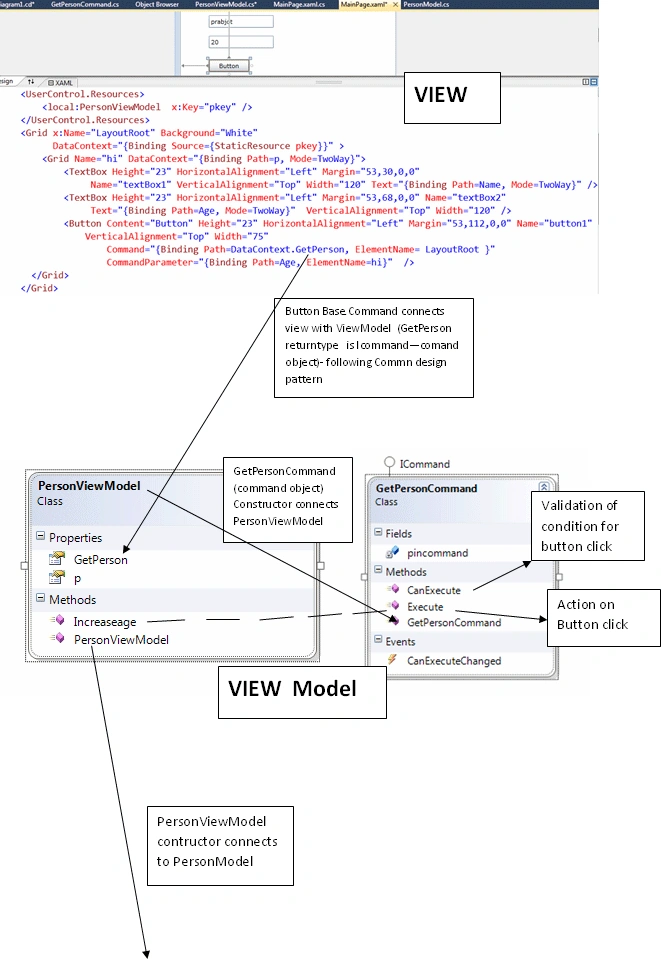
SubashPosted Sep 9, 2016, 9:20 PM
Verynice
ankit patelPosted Oct 9, 2012, 5:06 AM
tset
Rohit SakallePosted Jun 20, 2012, 7:05 AM
Copied the post from following path http://msdn.microsoft.com/en-us/library/gg430857(v=PandP.40).aspx
Marc RousseleditedPosted Nov 10, 2011, 8:23 PMEdited Nov 10, 2011, 8:25 PM
MVVM is crap. Sorry folks, You know, when you see the basic requirement for an app and look at all those xaml code of many pages what a nice challenge for modifications. I prefer the basic way, with base classes and nice C# code well formated with regions, well documented and the ease of debug. What a nice juice to have breakpoints and SEE with your own eyes, what's going on. I know today we can debug xaml binding, but what a pain ! Anyway, When I start app, I do the basic thing it needs, trying to avoid the cahos of GENERATED CODE where you loose control. It's like having a luxary car that stops for no reason. Try to find out where it is in the multiple sensors and computers on that car. If you have a LADA, you'll find out what the problem is in no time. MVVM = loosing control. This is my opinion only. If it's suitable for some peoples, it's ok, I just need to make sure people understand what's going on while using PATTERNS everywhere.
Nestor NarvaezPosted Mar 27, 2011, 4:35 PM
Thanks prabhjot, the article is very goos and understable for beginning the MVVM pattern.
vikas vyaseditedPosted Dec 13, 2010, 5:28 AMEdited Dec 13, 2010, 5:29 AM
Hello Sir, I was a great articl to understand what exactly MVVM is. Kindly let me know , is it mandatory to use icommand interface. Thanks....
Former memberPosted Jul 25, 2010, 7:45 AM
Here let me take this opporunity to say thank to such a great speaker. Prabhot sir is not only a great writer (as you can see from this article ) , he is a great speaker too. I attened his session in Ahmadabd Microsoft community techdays on the very same topic. He is a story teller. How simply , he explained MVVM model to audience was more than awesome. I shared next seat in flight with him from Ahmadabad to MUMBAI and I found this man got many things to share with community. I request you sir , please find some time for our site and give your articles to us . It will help the larger audience. Thank you so much Dhananjay Kumar
Stephen GyvesPosted Jun 14, 2010, 7:41 PM
The one thing I cannot find with this pattern is how to handle things like authentication session time out, or network failure messages. I want to handle these gracefully by say, allowing the user to log back in if they should time out by having a popup come up. Or if they try to execute a method that requires login...show a popup. How can this be done with no code behind. Please help I have been searching for a long time now. Do I have to get some event publishing in place?
Srihari ChinnaPosted May 19, 2010, 6:23 AM
Hi Prabhjot, One more good one from you man. excellent one for all the biginers. Thanks, Chinna
Mike GoldPosted Mar 29, 2010, 6:05 PM
Hi Prabhjot, I enjoyed your intro to MVVM. You touched on the important points of why you would want to use MVVM over code behind. I look forward to some more articles from you in the future. -Mike Gold Founding Member