

Introduction
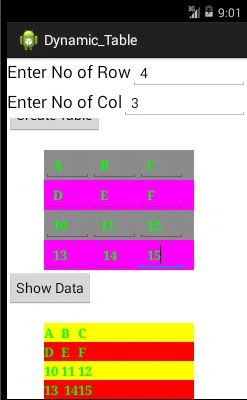
In this short article first, we will create a dynamic table and then we will insert some data into the table. Finally, we will retrieve data from this table and insert it into another table. Now we will move to the code section.
The following is the XML code of our project is,
- <LinearLayout xmlns:android="http://schemas.android.com/apk/res/android"
- android:layout_width="fill_parent"
- android:layout_height="fill_parent"
- android:orientation="vertical" >
- <LinearLayout
- android:layout_width="match_parent"
- android:layout_height="wrap_content" >
- <TextView
- android:id="@+id/textView1"
- android:layout_width="wrap_content"
- android:layout_height="wrap_content"
- android:text="@string/textview1"
- android:textAppearance="?android:attr/textAppearanceLarge" />
- <EditText
- android:id="@+id/editText1"
- android:layout_width="wrap_content"
- android:layout_height="wrap_content"
- android:layout_weight="1"
- android:ems="10" >
- <requestFocus />
- </EditText>
- </LinearLayout>
- <LinearLayout
- android:layout_width="match_parent"
- android:layout_height="wrap_content" >
- <TextView
- android:id="@+id/textView2"
- android:layout_width="wrap_content"
- android:layout_height="wrap_content"
- android:text="@string/textview2"
- android:textAppearance="?android:attr/textAppearanceLarge" />
- <EditText
- android:id="@+id/editText2"
- android:layout_width="wrap_content"
- android:layout_height="wrap_content"
- android:layout_weight="1"
- android:ems="10" />
- </LinearLayout>
- <ScrollView
- android:id="@+id/scrollView1"
- android:layout_width="match_parent"
- android:layout_height="wrap_content" >
- <LinearLayout
- android:layout_width="match_parent"
- android:layout_height="match_parent"
- android:orientation="vertical" >
- <Button
- android:id="@+id/button1"
- android:layout_width="wrap_content"
- android:layout_height="wrap_content"
- android:text="@string/button" />
- <TableLayout
- android:id="@+id/TableLayout"
- android:layout_width="200dp"
- android:layout_height="wrap_content"
- android:layout_alignParentLeft="true"
- android:layout_alignParentTop="true"
- android:layout_marginLeft="49dp"
- android:layout_marginTop="22dp" >
- </TableLayout>
- <Button
- android:id="@+id/Show"
- android:layout_width="wrap_content"
- android:layout_height="wrap_content"
- android:text="Show Data" />
- <TableLayout
- android:id="@+id/TableLayout2"
- android:layout_width="200dp"
- android:layout_height="wrap_content"
- android:layout_alignParentLeft="true"
- android:layout_alignParentTop="true"
- android:layout_marginLeft="49dp"
- android:layout_marginTop="22dp" >
- </TableLayout>
- </LinearLayout>
- </ScrollView>
- </LinearLayout>
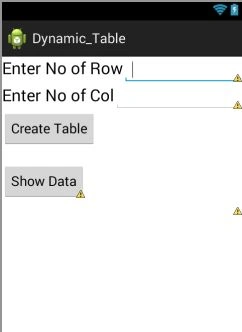
After creating the preceding XML file the Graphical Layout of the activity is as in the following:
The following is the source code of this Activity,
- EditText txt1;
- EditText txt2;
- int Row;
- int Col;
- int count, i, j;
- String str;
- String stm;
- Button Create;
- TableLayout TabLayout_Create;
- TableLayout TabLayout_Show;
- Button Show;
- protected void onCreate(Bundle savedInstanceState) {
- super.onCreate(savedInstanceState);
- setContentView(R.layout.activity_main);
- txt1 = (EditText) findViewById(R.id.editText1);
- txt2 = (EditText) findViewById(R.id.editText2);
- Create = (Button) findViewById(R.id.button1);
- Show = (Button) findViewById(R.id.Show);
- TabLayout_Create = (TableLayout) findViewById(R.id.TableLayout);
- TabLayout_Show = (TableLayout) findViewById(R.id.TableLayout2);
- Create.setOnClickListener(new View.OnClickListener() {
- @Override
- public void onClick(View arg0) {
- // TODO Auto-generated method stub
- /*
- Row= Integer.parseInt(txt1.getText().toString());
- Col= Integer.parseInt(txt2.getText().toString());
- */
- str = txt1.getText().toString();
- stm = txt2.getText().toString();
- Row = Integer.parseInt(str);
- Col = Row = Integer.parseInt(stm);
- Toast.makeText(MainActivity.this,
- str, Toast.LENGTH_SHORT).show();
- Toast.makeText(MainActivity.this,
- stm, Toast.LENGTH_SHORT).show();
- // TextView[] txt;
- for (i = 1; i <= Row; i++) {
- final TableRow row = new TableRow(MainActivity.this);
- if (i % 2 == 0) {
- row.setBackgroundColor(Color.MAGENTA);
- } else {
- row.setBackgroundColor(Color.GRAY);
- }
- for (j = 1; j <= Col; j++) {
- final EditText txt = new EditText(MainActivity.this);
- txt.setTextColor(Color.GREEN);
- txt.setTextSize(TypedValue.COMPLEX_UNIT_PT, 8);
- txt.setTypeface(Typeface.SERIF, Typeface.BOLD);
- txt.setGravity(Gravity.LEFT);
- txt.setText("C" + i + j + " ");
- row.addView(txt);
- }
- TabLayout_Create.addView(row);
- }
- }
- });
- Show.setOnClickListener(new View.OnClickListener() {
- @Override
- public void onClick(View arg0) {
- // TODO Auto-generated method stub
- for (i = 0; i < Row; i++) {
- final TableRow row = (TableRow) TabLayout_Create.getChildAt(i);
- final TableRow row1 = new TableRow(MainActivity.this);
- if (i % 2 == 0) {
- row1.setBackgroundColor(Color.YELLOW);
- } else {
- row1.setBackgroundColor(Color.RED);
- }
- for (j = 0; j < Col; j++) {
- final EditText etxt = (EditText) row.getChildAt(j);
- final TextView txt = new TextView(MainActivity.this);
- txt.setTextColor(Color.GREEN);
- txt.setTextSize(TypedValue.COMPLEX_UNIT_PT, 8);
- txt.setTypeface(Typeface.SERIF, Typeface.BOLD);
- txt.setGravity(Gravity.LEFT);
- txt.setText(etxt.getText());
- row1.addView(txt);
- }
- TabLayout_Show.addView(row1);
- }
- }
- });
- }
- };
- EditText txt1;
- EditText txt2;
- Button Create;
- TableLayout TabLayout_Create;
- TableLayout TabLayout_Show;
- Button Show;
- txt1=(EditText)findViewById(R.id.editText1);
- txt2=(EditText)findViewById(R.id.editText2);
- Create =(Button)findViewById(R.id.button1);
- Show=(Button)findViewById(R.id.Show);
- TabLayout_Create =(TableLayout) findViewById(R.id.TableLayout);
- TabLayout_Show=(TableLayout) findViewById(R.id.TableLayout2);
- Create.setOnClickListener(new View.OnClickListener() {
- @Override
- public void onClick(View arg0) {
- // TODO Auto-generated method stub
- str = txt1.getText().toString();
- stm = txt2.getText().toString();
- Row = Integer.parseInt(str);
- Col = Row = Integer.parseInt(stm);
- for (i = 1; i <= Row; i++) {
- final TableRow row = new TableRow(MainActivity.this);
- if (i % 2 == 0) {
- row.setBackgroundColor(Color.MAGENTA);
- } else {
- row.setBackgroundColor(Color.GRAY);
- }
- for (j = 1; j <= Col; j++) {
- final EditText txt = new EditText(MainActivity.this);
- txt.setTextColor(Color.GREEN);
- txt.setTextSize(TypedValue.COMPLEX_UNIT_PT, 8);
- txt.setTypeface(Typeface.SERIF, Typeface.BOLD);
- txt.setGravity(Gravity.LEFT);
- txt.setText("C" + i + j + " ");
- row.addView(txt);
- }
- TabLayout_Create.addView(row);
- }
- }
- });
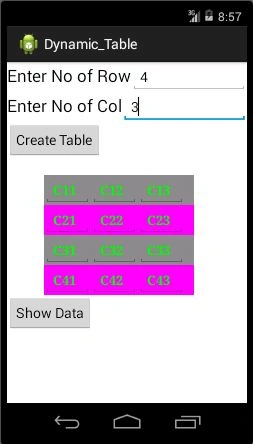
Code Section 3
- Show.setOnClickListener(new View.OnClickListener() {
- @Override
- public void onClick(View arg0) {
- // TODO Auto-generated method stub
- for (i = 0; i < Row; i++) {
- final TableRow row = (TableRow) TabLayout_Create.getChildAt(i);
- final TableRow row1 = new TableRow(MainActivity.this);
- if (i % 2 == 0) {
- row1.setBackgroundColor(Color.YELLOW);
- } else {
- row1.setBackgroundColor(Color.RED);
- }
- for (j = 0; j < Col; j++) {
- final EditText etxt = (EditText) row.getChildAt(j);
- final TextView txt = new TextView(MainActivity.this);
- txt.setTextColor(Color.GREEN);
- txt.setTextSize(TypedValue.COMPLEX_UNIT_PT, 8);
- txt.setTypeface(Typeface.SERIF, Typeface.BOLD);
- txt.setGravity(Gravity.LEFT);
- txt.setText(etxt.getText());
- row1.addView(txt);
- }
- TabLayout_Show.addView(row1);
- }
- }
- });
In the preceding code, first of all, we fetched the value of each EditText control that is present in ”TableLayout”, then insert this value into a TextView control and into a new TableLayout. The getChildAt method retrieves the child control of parent control. This method takes an integer value that represents the index number of the control. We used the addView method for inserting a view into another view. So we first insert each Textview into a row and at the end of the inner loop, we insert this row (view) into TabLayout_show view.
Santhakumar MunuswamyPosted Jul 17, 2015, 4:42 PM
Thanks for nice article:)
Pankaj Kumar ChoudharyPosted Jul 17, 2015, 12:08 PM
Thanks Neeraj........
Neeraj KumarPosted Jul 17, 2015, 9:58 AM
Good
Gopi ChandPosted Jul 17, 2015, 5:47 AM
Good performance
SharadPosted Jul 17, 2015, 5:40 AM
great article with examples..
Yatendra SharmaPosted Jul 17, 2015, 5:16 AM
nyc description
Nilesh JadavPosted Jul 17, 2015, 4:59 AM
Nice one sir