

Introduction
For some of our web applications we must validate the uniqueness of a field, for example when we create a user for the application then the user Id must be unique in order to provide login capability for the system. To do this we need to write code to make a remote server call to validate the field.
ASP.NET MVC provides a mechanism that can make a remote server call to validate the field without posting the entire form to the server. The "Remote" validation attribute is useful for that. This attribute is useful when we have a field that cannot be validated on the client side so we must validate it on to the server side.
Remote Attribute
The Remote attribute class uses the jQuery validation plug-in remote validator. With remote attribute, we need to pass a route name (to validate the text on the server side) or pass an action and controller name. This attribute enables a client-side validation and makes a call to the server when the actual validation is done.
For example, I want to create a customer registration form and it has a user id that must be unique within the database. I want to validate this user id using a remote attribute. The Following is the procedure to use a remote attribute in this case.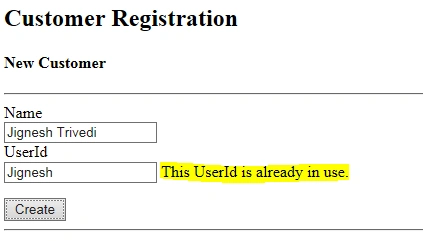
Step 1
Create a model for the customer and apply the report validation for the column user id.
- public class Customer
- {
- public int CustomerId
- {
- get;
- set;
- }
- public string Name
- {
- get;
- set;
- }
- [RemoteAttribute("IsUserExists", "Home")]
- public string UserId
- {
- get;
- set;
- }
- }
Create a method in the controller to check the validation. This controller's action method must return a JsonResult object (true or false) depending on the validation performed.
- public class HomeController: Controller
- {
- public JsonResult IsUserExists(string userId)
- {
- return IsExist(userId) ? Json(true, JsonRequestBehavior.AllowGet) : Json(false, JsonRequestBehavior.AllowGet);
- }
- public bool IsExist(string userId)
- {
- // Write code to validate UserId weather is Userid already exists or not and base on return true and false.
- if (string.IsNullOrEmpty(userId)) return false;
- else if (userId == "jignesh") return false;
- else return true;
- }
- }
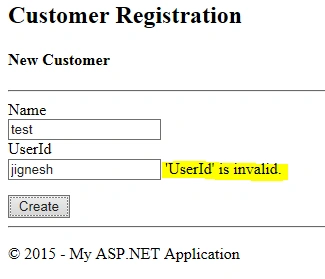
We can also send additional parameters from the screen by setting the additional field property. In the following example I want “name” properties along with a “UserId” property, so I have set an additional field property to “name".
- [RemoteAttribute("IsUserExists", "Home",AdditionalFields="Name")]
- public string UserId { get; set; }
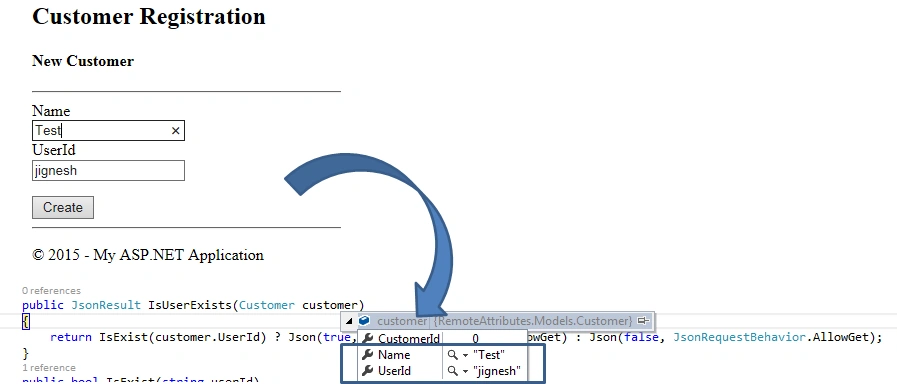
We can get multiple additional properties by passing property names separated by commas into the AdditionalFields property of the remote attribute.
- [RemoteAttribute("IsUserExists", "Home", AdditionalFields = "Name,Address”)]
- public string UserId { get; set; }
We can also customize the error message by passing the named parameter “ErrorMessage”. By default the message is “{property Name} is invalid”. Using this named property we can change the error message text.
- [RemoteAttribute("IsUserExists", "Home", ErrorMessage = "This UserId is already in use.")]
- public string UserId { get; set; }
Safvan AKPosted Aug 12, 2020, 1:20 AM
Can I pass Encrypted value instead of plain text ??
Jignesh TrivediPosted Apr 27, 2015, 12:19 AM
Thank you all for reading and commenting....
Ayush KumarPosted Apr 19, 2015, 11:33 PM
Thanks
Sibeesh VenuPosted Apr 15, 2015, 8:37 AM
Good one.
Manish Kumar ChoudharyPosted Apr 15, 2015, 4:55 AM
Good one.
NitinPosted Apr 15, 2015, 2:54 AM
good one
Santhakumar MunuswamyPosted Apr 14, 2015, 10:56 PM
Thanks for sharing