

But i've found something not a good idea but works anyway.
If we dont want to use XNA's Content Pipeline then what worse things can come out of it:
If we dont want to use XNA's Content Pipeline then what worse things can come out of it:
Well, much more lines of code!
Now, create a new Class Library Project in .NET Framework 4.5(later we'll transform it to Windows Application)
Now, create a new Class Library Project in .NET Framework 4.5(later we'll transform it to Windows Application)
Add reference from a .NET Framework 4.5 project as its displayed there you cant see XNA .dlls as a reference but as an extension!
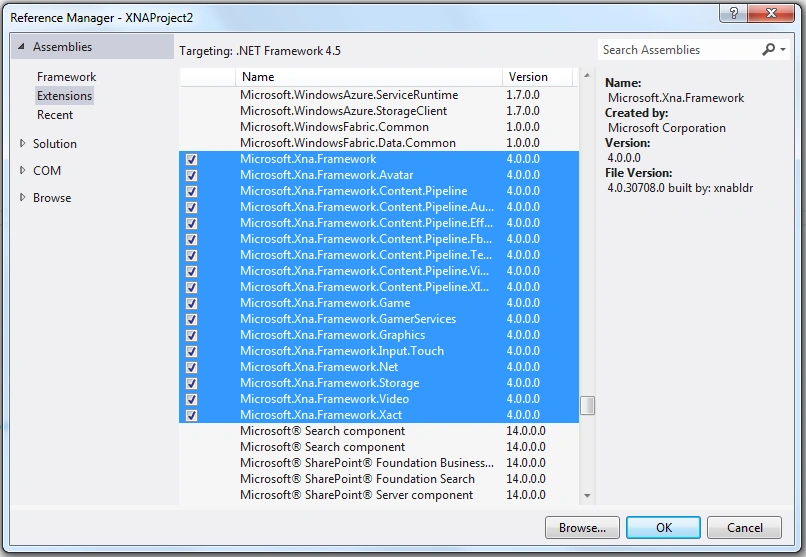
So we've added the .NET 4.0 extensions for XNA Framework
Now its better we write a Program.cs file and set it as a Startup Project
Program.cs:
using System;
namespace XNAProject2
{
static class Program
{
static void Main(string[] args)
{
using (Game1 game = new Game1())
{
game.Run();
}
}
}
} |
Later we set it as Startup Object from Project-> [YourProjectName]Properties
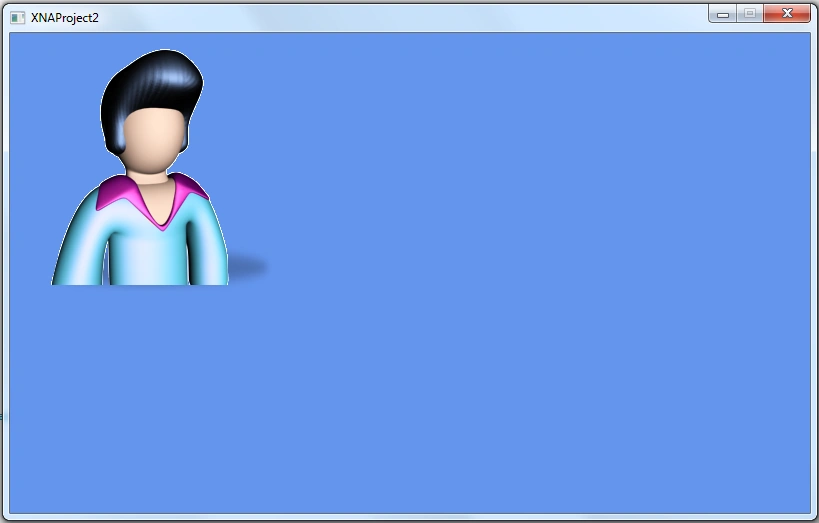
Now lets create a new Game class and add codes for it:
Now lets create a new Game class and add codes for it:
using System;
using System.Collections.Generic;
using System.Linq;
using System.Text;
using System.Threading.Tasks;
using Microsoft.Xna.Framework;
using Microsoft.Xna.Framework.Audio;
using Microsoft.Xna.Framework.Content;
using Microsoft.Xna.Framework.GamerServices;
using Microsoft.Xna.Framework.Graphics;
using Microsoft.Xna.Framework.Input;
using Microsoft.Xna.Framework.Media;
namespace XNAProject2
{
public class Game1 : Microsoft.Xna.Framework.Game
{
GraphicsDeviceManager graphics;
SpriteBatch spriteBatch;
public Game1()
{
graphics = new GraphicsDeviceManager(this);
Content.RootDirectory = "Content";
}
protected override void Initialize()
{
base.Initialize();
}
protected override void LoadContent()
{
spriteBatch = new SpriteBatch(GraphicsDevice);
}
protected override void UnloadContent()
{
}
protected override void Update(GameTime gameTime)
{
base.Update(gameTime);
}
protected override void Draw(GameTime gameTime)
{
GraphicsDevice.Clear(Color.CornflowerBlue);
base.Draw(gameTime);
}
}
} |

Mohammed AshrafPosted May 22, 2016, 8:09 PM
Really nice. .
Saurabh RaiPosted Apr 11, 2016, 12:36 PM
Good one!
NitinPosted Jun 1, 2015, 9:48 AM
nice
Sibeesh VenuPosted May 30, 2015, 1:15 PM
Good one.
Santhakumar MunuswamyPosted May 30, 2015, 12:39 PM
thanks for nice one
Shailesh UkePosted May 30, 2015, 9:20 AM
Nice ...
Saber ShaikhPosted May 30, 2015, 7:35 AM
Good
Santhakumar MunuswamyPosted May 29, 2015, 1:05 PM
Thanks for nice article
Tom MohanPosted Mar 21, 2015, 12:48 PM
nice one
marloo stuartPosted Jul 8, 2013, 11:57 AM
i wanna some help plzz i cant find in "Add reference" from a .NET Framework 4.5 project as its displayed there is no XNA .dlls :(
Ibrahim ErsoyPosted Sep 3, 2012, 8:10 AM
Your welcome,Bruce! Yes,Aaron Stebner has given the most available solution.i knew that one and thus i presented an alternative way.
Bruce BayleyPosted Sep 1, 2012, 10:18 PM
See also: http://stackoverflow.com/questions/9674758/how-can-i-work-with-xna-projects-in-visual-studio-11-beta
Bruce BayleyPosted Sep 1, 2012, 8:56 PM
Thanks Ibrahim, you've saved my day!
Saber ShaikhPosted Jul 30, 2012, 5:43 AM
Nice And thank you
Ibrahim ErsoyPosted Jul 10, 2012, 7:14 AM
its no wonder .NET 4.5 Framework isnt supported for XNA 4.0 development only runs in .NET Framework 4.0 but theres a trick Aaron Stebner wrote on his blog,i didnt try but i do hope it works.Check it out : http://blogs.msdn.com/b/astebner/archive/2012/02/29/10274694.aspx
Shubham SrivastavaPosted Jul 10, 2012, 7:00 AM
Sir , Can we also add XNA tool kit that support .Net version 4.0 can it will support for version 4.5
Ibrahim ErsoyPosted Jul 10, 2012, 6:25 AM
Thank you guys!
Arun ChoudharyPosted Jul 9, 2012, 11:19 AM
Good article
Vipendra VermaPosted Jul 9, 2012, 11:19 AM
Thank you for providing information about how to Developing XNA Apps.....
Shubham SrivastavaPosted Jul 9, 2012, 11:14 AM
Nice article
Amit PatelPosted Jul 9, 2012, 3:20 AM
Good one..
Ibrahim ErsoyPosted Jul 8, 2012, 10:48 AM
Thank you for reading,Abhi!
Abhimanyu K VatsaPosted Jul 7, 2012, 12:24 PM
very nice